I want to capture video from my live tv,dvd player and other stuff. What do I all need to capture it on my macbook pro?
hardware/software?
I want to capture video from my live tv,dvd player and other stuff. What do I all need to capture it on my macbook pro?
hardware/software?
You need Screenflick...
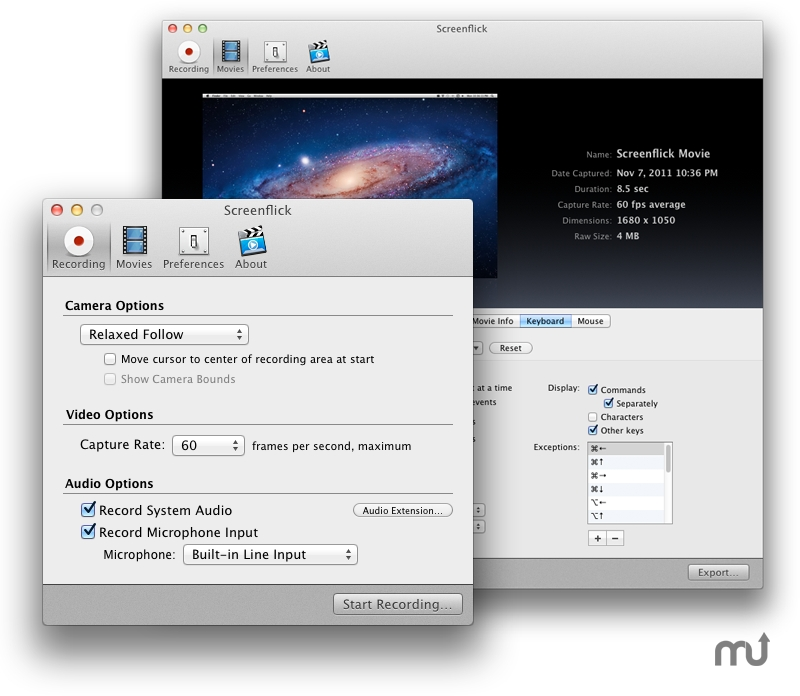
Screenflick is a program for Mac OS X that features high performance screen capturing for smooth, fluid motion up to 60 fps. Screenflick can record any portion of the screen, simultaneously recording audio from internal or external microphones and the system audio.
An excellent utility for software screencasters and software trainers, Screenflick offers the ability to display keyboard commands, and highlights mouse clicks to better communicate which actions are being performed during screen recording.
Unlike other solutions, Screenflick allows you to record a movie once and compress it as many times as you want at different resolutions, qualities, and with or without audio, offering you the maximum amount of flexibility when choosing which presentation options to offer to movie viewers.
WHAT'S NEW
Version 1.6.2:
Screenflick can now record "captured" displays. Keynote, slideshows, and video games for example will "capture" the screen, which previously would prevent Screenflick from recording.
To fit the screen selection to the boundaries of a window, Option-Click on the window when the screen selection view is displayed.
The screen selection window now remembers its window position.
Fixed a bug which sometimes would cause movies to not contain sound when multiple movies were exported simultaneously.
Worked around a QuickTime bug related to file names.
Fixed a stupidly obvious GUI bug outlining the text fields in the screen selection window.
REQUIREMENTS
Mac OS X 10.4 or later, QuickTime 7.2 or later.

You need Screenflick...
![]()
Screenflick is a program for Mac OS X that features high performance screen capturing for smooth, fluid motion up to 60 fps. Screenflick can record any portion of the screen, simultaneously recording audio from internal or external microphones and the system audio.
An excellent utility for software screencasters and software trainers, Screenflick offers the ability to display keyboard commands, and highlights mouse clicks to better communicate which actions are being performed during screen recording.
Unlike other solutions, Screenflick allows you to record a movie once and compress it as many times as you want at different resolutions, qualities, and with or without audio, offering you the maximum amount of flexibility when choosing which presentation options to offer to movie viewers.
WHAT'S NEW
Version 1.6.2:
Screenflick can now record "captured" displays. Keynote, slideshows, and video games for example will "capture" the screen, which previously would prevent Screenflick from recording.
To fit the screen selection to the boundaries of a window, Option-Click on the window when the screen selection view is displayed.
The screen selection window now remembers its window position.
Fixed a bug which sometimes would cause movies to not contain sound when multiple movies were exported simultaneously.
Worked around a QuickTime bug related to file names.
Fixed a stupidly obvious GUI bug outlining the text fields in the screen selection window.
REQUIREMENTS
Mac OS X 10.4 or later, QuickTime 7.2 or later.