

Got a tip for us?
Let us know
Become a MacRumors Supporter for $50/year with no ads, ability to filter front page stories, and private forums.
Video: How to Use an iPad as a Screen for Your Nintendo Switch
- Thread starter MacRumors
- Start date
- Sort by reaction score
You are using an out of date browser. It may not display this or other websites correctly.
You should upgrade or use an alternative browser.
You should upgrade or use an alternative browser.


Once I finally found a link to download the CapturePro app via TestFlight, the setup was a piece of cake and within seconds, my PS 5 was showing up on my the screen of my 2018 iPad Pro 12.9” (not M-series). Alas, even just playing Diablo II Resurrected—hardly a demanding game by any means—I was getting unacceptable amounts of video tearing every time I tried to move my character. Does anybody know whether there would be less tearing if I were using an M1 or M2 iPad Pro?

ackmondual
macrumors 68020
Heh... and to think I still use a Palm Tungsten T3!Yep, I had my Handspring Visor connected to my Motorola Startec early 2001. The Handspring browser was a horrendous experience overall, but it worked if you were patient. Was also able to send and receive email.
Exactly! iPad for portable monitor. I have a device similar to NUC and as an IT pro, a monitor like this would be awesome for convenience getting to console into a device.I'll use this with NUCs that I work on as my iPad is always near me and this is easier than pulling out a portable monitor and having to put something else on my desk. I will also like to use it on the go when using my NES retro game box. I don't think any lag will be enough to matter on those old games.
Umm wait. You use "a video capture dongle". Doesn't that mean, just like for Apple, that the hardware doesn't support it?Samsung tablets have been doing it for ages. I use my Galaxy tab as a portable HDMI display with a video capture dongle. This is just Apple’s shortcoming.
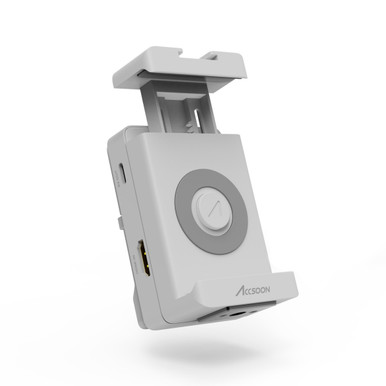
Or you can just get an Accsoon SeeMo which works on iphone and ipad with both usbc and lighting without having to resort to a beta OS or beta apps. It will just cost you.


bingeciren
macrumors 65816
Well, as far as I know, iPads don’t support video input, be it through USB-C or Lightning. What I mean by video capture dongle is a $40 little device with HDMI input and a USB output. Of course I run a simple App on the tablet to be able to see the video as well.Umm wait. You use "a video capture dongle". Doesn't that mean, just like for Apple, that the hardware doesn't support it?


OferJ
macrumors member
There's no way this would happen. Nintendo is doing quiet well financially and has no reason to court a buyout by a foreign company.Would be nice to acquire Nintendo OR release Nintendo games (not latest) only on Mac.
That’s a mighty fine dojo bro, I wouldn’t dare!I‘m with Eagle Fang Dojo so yeaah dude come get some

StyxMaker
Suspended
Or you wait until the EU & others force apple to allow sideloading, then just play all your favourite emulators directly on the iPad with no input lag!
To be honest I would love that tablet manufacturers be forced to enable a target display mode for their usb c devices. This is such a gigantic waste of screen space not to have it.
I really don’t like the idea of governments mandating technology. Once that starts it will be far easier to force backdoors on everything.

Cankoda
macrumors regular
Why make this comment? I can see no other reason than to be a mean arrogant bully…anyone going through this much effort to make this comment has a bullying problemwho would be this desperate? anyone going through this effort probably has video game addiction...
ackmondual
macrumors 68020
They're mandating standards. Things like everybody must be on USB-C. That leads to backdoors?I really don’t like the idea of governments mandating technology. Once that starts it will be far easier to force backdoors on everything.

ShawnTXDFW
macrumors 6502
So, how can one go about getting the beta version of this app through TestFlight since it says it’s ‘full’?They're mandating standards. Things like everybody must be on USB-C. That leads to backdoors?
Attachments

ShawnTXDFW
macrumors 6502
So, how can one go about getting the beta version of this app through TestFlight since it says it’s ‘full’? (And don’t worry about the Bears app on the pic.🤣)
The app is now available on the iOS App Store as Genki Studio.So, how can one go about getting the beta version of this app through TestFlight since it says it’s ‘full’?
ShawnTXDFW
macrumors 6502
Thank you so much! I really appreciate it!The app is now available on the iOS App Store as Genki Studio.
ShawnTXDFW
macrumors 6502
For some reason I don’t see it listed. Can you share a link by chance?The app is now available on the iOS App Store as Genki Studio.

Abazigal
Contributor
Try this one?For some reason I don’t see it listed. Can you share a link by chance?

Genki Studio App - App Store
Download Genki Studio by Human Things, Inc on the App Store. See screenshots, ratings and reviews, user tips and more games like Genki Studio.
 apps.apple.com
Cool thing is it also works with my visualiser. A bit funny plugging one into my iPad after years of using my iPad as a visualiser. 😀