
Got a tip for us?
Let us know
Become a MacRumors Supporter for $50/year with no ads, ability to filter front page stories, and private forums.
Viewing MRI CD on mac
- Thread starter stoneage
- Start date
- Sort by reaction score
You are using an out of date browser. It may not display this or other websites correctly.
You should upgrade or use an alternative browser.
You should upgrade or use an alternative browser.
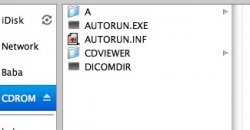

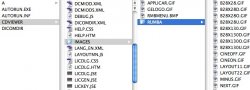
There's these, but the gif wouldn't open in preview so I don't know what to do.Have you looked in the folders for any sort of image files? It looks like it's some autorun and Windows executable that just pulls the images otherwise.
Attachments


Eidorian
macrumors Penryn
Have you tried a program...other then Preview?There's these, but the gif wouldn't open in preview so I don't know what to do.

TheAnswer
macrumors 68030

I found this free program designed to view MRIs and other medical images.
Usually the image will have the software on the CD to view it. I would presume it is for windows only. Put it in a windows computer. Don't bother trying to download other viewers as it probably needs its own software.
OsiriX works great. Thanks for the link.


Peace
Cancelled
I got a CD with my shoulder MRI from my doctor, but it won't open on my Mac. Is there a program to open or convert this so I can view it? Thanks for any help.
http://homepage.mac.com/rossetantoine/osirix/Index2.html
Osirix will work fine.I use it to look at my CT scans.
I use Osirix frequently to view MRI, CT and plain X-ray films.
I ALWAYS have to IMPORT the image files.
Is there a way to have these autoboot?
Also, I find that at times the resolution on some of the MRI slices is less than it should be. Is there a way to increase this?
Thanks
Steve
I ALWAYS have to IMPORT the image files.
Is there a way to have these autoboot?
Also, I find that at times the resolution on some of the MRI slices is less than it should be. Is there a way to increase this?
Thanks
Steve
OffersMonthly
macrumors newbie
Mri Cd
I have got my mri on a cd too, but it mentions it is encrypted and stuff but have given me a password..... can anyone help me open this on my mac
http://yfrog.com/5dpicture1itp

I have got my mri on a cd too, but it mentions it is encrypted and stuff but have given me a password..... can anyone help me open this on my mac
http://yfrog.com/5dpicture1itp

Thank You
I cannot help the last poster (hopefully it is OBE, by now), but I wanted to post that based on stoneage's note that OsiriX worked well to read his MRI CD I downloaded the free version for mine. It did, indeed, work immediately and well. It also automatically read and managed the CD for my old fashioned X-rays.
I am grateful to the person (I think it was "theanswer") who first suggested this application. I plan to let my doctor's office know about it so they can advise their Mac-using clients of it.
I should add Peace and drsarbe to the list of those to thank.
I cannot help the last poster (hopefully it is OBE, by now), but I wanted to post that based on stoneage's note that OsiriX worked well to read his MRI CD I downloaded the free version for mine. It did, indeed, work immediately and well. It also automatically read and managed the CD for my old fashioned X-rays.
I am grateful to the person (I think it was "theanswer") who first suggested this application. I plan to let my doctor's office know about it so they can advise their Mac-using clients of it.
I should add Peace and drsarbe to the list of those to thank.
Last edited:
Jumpthrough
macrumors newbie
As far as some sort of application to open these, I have no idea but I work at a University Hospital and we give patients copies of their radiology studies on cd's all day long. These images are DICOM, which means they need the DICOM viewer-this is on the CD already and works if you have a Windows based PC. Our instructions for the disc clearly state they are not viewable on Apple computers.🙄
I had a CAT scan and they gave me the disc which of course was windows only, so I found a friend at the public library who let me use one of their systems to view the CAT scan. It worked, but unfortunately looking at the scan didn't tell me anything. You need more than just viewing the scan to make sense out of it.
http://homepage.mac.com/rossetantoine/osirix/Index2.html
Osirix will work fine.I use it to look at my CT scans.
Great info. I have MS and always have to wait till i go to work to use a PC to look at my MRI to find out if there are any new brain lesions. 😀

sage2k
macrumors newbie
Heres a cross-platform MRI viewer:
http://www.mccauslandcenter.sc.edu/mricro/mricron/install.html
Its simpler and smaller in size than OsiriX.
http://www.mccauslandcenter.sc.edu/mricro/mricron/install.html
Its simpler and smaller in size than OsiriX.
bubaglobalj
macrumors newbie
phillipteeth
macrumors newbie
MRI CD Reader for Mac FREE
This worked perfectly:
http://www.osirix-viewer.com/ContributionOsiriX.html
This worked perfectly:
http://www.osirix-viewer.com/ContributionOsiriX.html
you can view your x-rays directly in your web browser using Jack Imaging. no downloads required!
1. go to http://jackimaging.com/demo
2. drag & drop the files from your CD to the box to load the files
3. after loaded, click "View"
here are a couple of additional links:
* Jack Imaging Overview: http://dox.nephosity.com/d/khfqwnjfjmxndfkb
* Jack Imaging how to guide: http://dox.nephosity.com/d/ccVKb
1. go to http://jackimaging.com/demo
2. drag & drop the files from your CD to the box to load the files
3. after loaded, click "View"
here are a couple of additional links:
* Jack Imaging Overview: http://dox.nephosity.com/d/khfqwnjfjmxndfkb
* Jack Imaging how to guide: http://dox.nephosity.com/d/ccVKb
This site worked perfectly.you can view your x-rays directly in your web browser using Jack Imaging. no downloads required!
1. go to http://jackimaging.com/demo
2. drag & drop the files from your CD to the box to load the files
3. after loaded, click "View"
here are a couple of additional links:
* Jack Imaging Overview: http://dox.nephosity.com/d/khfqwnjfjmxndfkb
* Jack Imaging how to guide: http://dox.nephosity.com/d/ccVKb

teradyl
macrumors newbie
Just want to say mjpan & kari6's answer is fantastic. You just drag and drop your files from the CD in Finder and it loads them up seamlessly, and no installing any program!!
Last edited:

chevyorange
macrumors member
OsiriX was awesome. I can see it in 3D, drill in, spin around. Its my dang knee, I sould be able to see it!

connietpa
macrumors newbie
OsiriX works great. Thanks for the link.
Well, it costs hundreds of dollars now. Any ideas to help me? THANKS.
Google "horos dicom viewer". It is free. If you need more help feel free to ask.