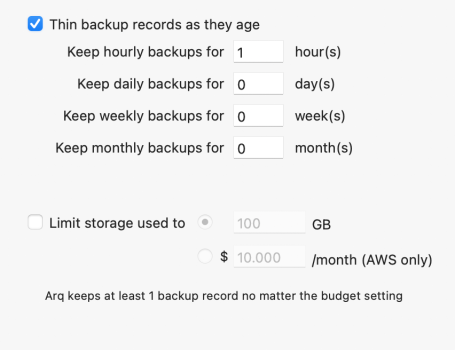
As a non-computer user of ARQ, I must be using thinning and storage limit wrong. Would appreciate your correction.
The Arq Help says:
"If you check “Thin backup records as they age”, Arq will keep fewer backup records as they get older.
For example, if you check “Thin backup records as they age” and choose to keep hourly backups for 24 hours, daily backups for 30 days, weekly backups for 52 weeks and monthly backups for 60 months, each time Arq backs up it will:
- keep one backup record per hour for the past 24 hours
- keep one backup record per day for 30 days after that (starting at 1 day after the current date)
- keep one backup record per week for 52 weeks after that (starting at 31 days after the current date)
- keep one backup record per month for 60 months after that (starting at 31 days + 52 weeks after the current date)"
I have never experimented with zeros and I suspect that it does not handle zeros as we might expect/hope. I also suspect that keeping hourly backups for less than 24 hours may not be helpful/meaningful . Your results suggest that a zero indicates that no thinning should take place rather than thin to zero!
You could ask Arq Support what is expected to happen with n,0,0,0.
The minimum might well be 24,1,1,1 - one backup for per hour for 24 hours, then daily backup for 1 day, then weekly backup for 1 week, and then monthly backups for 1 month. With that I believe you would get hourly backups for a day and then 3 more backups with the oldest backup 1month+1week+1day old. That would be my choice for testing.
My settings:
1. I do daily backups to cloud storage.
2. My retention settings vary a bit, but most of the backup sets use 24,30,26,60.
There was a time when Arq kept the oldest backup whatever the thinning numbers. Stefan, who has always been very conservative about what gets deleted, changed that following a discussion I (and likely others) had with him.
----
I don't have a storage limit set for any of my backups, but when interpreting what happens note that:
1) Help says "Arq keeps at least one backup record no matter what the budget setting".
2) The budget refers to storage used - not the size of the data being backup up. Apart from some overhead, doing 2 backups of 48GB data will only use 48GB plus size of changed data - not 96GB. Just like Time Machine, CCC, etc.
----
Final thought. Thinning due to time or size only takes place at the end of an error free backup.