Become a MacRumors Supporter for $50/year with no ads, ability to filter front page stories, and private forums.

maerz001

macrumors 68030
Original poster
I have a 16“ M1 pro 16GB. Unfortunately I constantly hit the orange zone in RAM pressure by basically just web browsing.

Yes i have safari (20+tabs), chrome (2 tabs for ad free youtube) and Tor(tabs for geolocation blocked streaming) running at the same time.

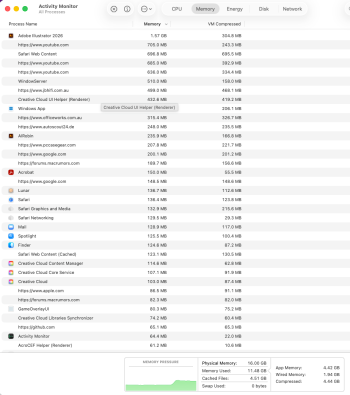
The issue i see in activity monitor is that a few websites in safari use huge amounts of RAM.
E.g. Autoscout 1GB just in one tab. financial website Parra 1GB.
And a few others sites using also GB or more.

Apart from this only mail and dropbox running

Is there a solution apart from closing tabs and browsers? Which I don’t find practical.


Screenshot 2026-03-28 at 09.51.40.png
 
What’s the OS version you’re running? Recommend getting up to the latest as there were memory leak issues for a few versions. Additionally, restart your PC to get rid of your swap usage because that’s pretty darn high.
 
  • Like
Reactions: Biro
Closing tabs is the only way..each tab takes hundreds of MB and my FB tab consumes 3GB from not closing it for a few days (Firefox) but luckily i have 128GB of RAM so no biggie here but that's just how much webpages consume these days.
 
  • Like
Reactions: pauliaK
Thanks for the replies.

I am on 26.3.

Performance is not bad. Just here and there a second when switching apps.

Just wanted to see if this is common.

Of course closing tabs or restart helps for a few hours. But than again going in orange RAM region when new tabs are loaded
 
I have 32GB of RAM and the system idles at 16GB used with similar usage as what you've described, so probably nothing much you can do.
 
I have a 16“ M1 pro 16GB. Unfortunately I constantly hit the orange zone in RAM pressure by basically just web browsing.

Yes i have safari (20+tabs), chrome (2 tabs for ad free youtube) and Tor(tabs for geolocation blocked streaming) running at the same time.

The issue i see in activity monitor is that a few websites in safari use huge amounts of RAM.
E.g. Autoscout 1GB just in one tab. financial website Parra 1GB.
And a few others sites using also GB or more.

Apart from this only mail and dropbox running

Is there a solution apart from closing tabs and browsers? Which I don’t find practical.


View attachment 2617661
Is the problem the orange memory pressure, or is performance slowing?

Maybe disable Apple Intelligence if you don’t use it.
 
as said the performance is not bad, but here and there a second lost when switching apps. so I see a bit off difference compared to "green memory pressure".

the only extensions are AdGuard extension in safari and AdBlock in chrome. Apple intelligence is off.

how are the new Neo users doing with 8GB?
 
btw. I only use chrome cos of no ads in youtube. I tried both the AdGuard and AdBlock in safari but it doesn't help. why is there no YT ads on chrome?
 
I’ve never really understood people who open loads of tabs… why do you need so many open?

I maybe have like 5 - 10 max and that’s just news articles and close them once ive read them
well like 10+ are daily used for work. i am in the rental business. so I have Airbnb, vrbo, and other rental websites, channel manger, billing, translator...
since 2factor authentication is no fun, I stay locked in.

an then for private use the other browsers as mentioned. of course I close tabs when I dont use them in a while. but since I use them daily I am often in the "orange zone"
 
What you are seeing seems typical to me when you run multiple browsers at the same time especially with extensions for adblocking which increase memory usage. You can try switching away from Safari and Chrome and use Brave instead. It comes with adblocking built-in and it's a very good one too.

Otherwise one trick is to reboot the entire Macbook every couple of days or at least once a week. If you never reboot it and only put it to sleep by closing the lid the memory usage will climb a bit over time and slow the Mac down just a bit. A reboot will restore the performance again.
 
  • Like
Reactions: maerz001
If you never reboot it and only put it to sleep by closing the lid the memory usage will climb a bit over time and slow the Mac down just a bit. A reboot will restore the performance again.
I leave my Macs running for weeks or months without rebooting, and there's no discernible slowdown. Mac memory management is sophisticated enough to de-allocate cached data if space is required. It's not just going to keep increasing forever.
 
  • Like
Reactions: Ste_S
I have M1 Air 16GB but on Sonoma, stopped using Safari for browsing since Monterey. I mean it wasn’t really slow but it felt weird. I have Firefox and recommend it 10/10. Auto-update system is non-intrusive unlike chrome, same extensions that block ads (I always get mine from getadblock), good browsing speed. Maybe try this one? However I cannot say that I had used mine in your scenario, my max is 10 tabs open when I search some product and then try to compare it with other products.

Also it could be that the websites are simply too heavy on memory due to lots of unnecessary JS code. Btw you could and should use these websites with Adblock and enable “block trackers” mode, it should give you faster speeds because it blocks those scrips from loading at all
 
  • Like
Reactions: maerz001
Register on MacRumors! This sidebar will go away, and you'll see fewer ads.