Become a MacRumors Supporter for $50/year with no ads, ability to filter front page stories, and private forums.

knifoon

macrumors newbie
Original poster
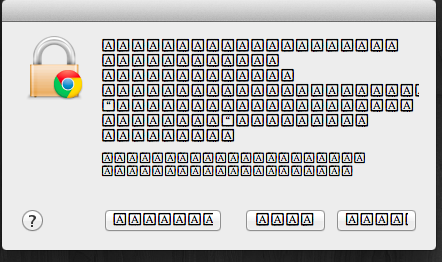
ScreenShot2012-02-15at12536PM.png

Im confused...
Any ideas?

It happens with some other popups too but this is the easiest one to get to.
 
It usually happens when the authenticate window pops, but this one is chrome trying to access my keychain

----------

Already tried restarting, repairing permissions and disk, Pram reset and whatnot.
 
It usually happens when the authenticate window pops, but this one is chrome trying to access my keychain

----------

Already tried restarting, repairing permissions and disk, Pram reset and whatnot.
Open Font Book in your /Applications folder and check to see if you have any corrupted fonts.
 
Open Font Book in your /Applications folder and check to see if you have any corrupted fonts.
Tried it earlier, there were some little alert icons, clicked them it then it did it thing. Restarted and it still does the same thing.
 
Works fine on my guest account.
>_>?
So that means...
idk.
Seems like progress though.

At least we know the problem is just with your user account and not system wide.

The only thing I can think of, in addition to GGJ's suggestions is a corrupted keychain plist file.
 
While in Font Book, did you happen to try Edit > Resolve Duplicates?

No duplicates :/

----------

At least we know the problem is just with your user account and not system wide.

The only thing I can think of, in addition to GGJ's suggestions is a corrupted keychain plist file.
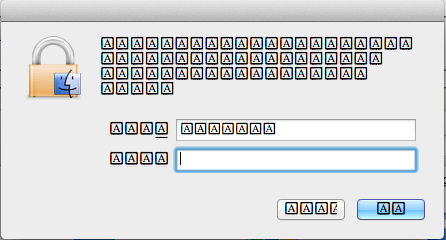
Same symbols show up when it asks me for a password sometimes. Would that still be a keychain issue?
ScreenShot2012-02-15at22155PM.png
 
Same symbols show up when it asks me for a password sometimes. Would that still be a keychain issue?
I really can't see it being a keychain issue. It appears to be an issue with fonts or the user interface. Perhaps a corrupt .plist, but I'm not sure which at this point.

I haven't read it all, but you may find some helpful ideas here: Font Management in OS X
 
Yeah, i think reformatting would be my best bet, but my time capsule's HDD isn't big enough... I was hoping to find some other way
 
I've fixed that problem before by manually re-installing the most recent combo update. Go to http://support.apple.com/downloads and search for 10.6.8 if you're on snow leopard and 10.7.3 if you're on lion. You want the combo update for client, not server. Download that, run the installer, and reboot.
 
Register on MacRumors! This sidebar will go away, and you'll see fewer ads.