Become a MacRumors Supporter for $50/year with no ads, ability to filter front page stories, and private forums.

Tiffany Cat and Mac

macrumors newbie
Original poster
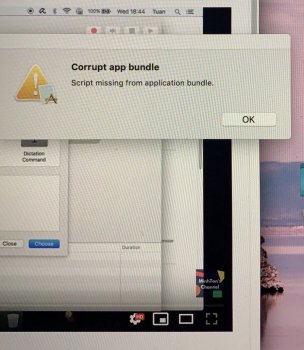
Hi guys! Ive got a bit of a problem here. What do I do to get this off my screen? Ive been looking at youtube videos all day but nothing helped. BTW I didn't do anything new to my mac, i just opened it and this keeps popping up every 5min.
🙂
 

Attachments

  • IMG_4045.JPG
    IMG_4045.JPG
    232.3 KB · Views: 176
I wonder if this will work open your applications folder drag the app that is giving you this issues to your trash bin
 
you could always try and reinstall macOS Mojave-Catalina over your existing version and see if that fixes the issue
 
If an individual app is corrupted then I don't see how an OS reinstall is going to help, tbh.
But it could be a Mac app that is corrupted or a 32 bit app left over when upgrading from Mojave to Catalina and that script got deleted and you could be right as well
 
Can you try a "safe boot"?
Reboot and hold down the shift key continuously until login.

If you can get that far, open "users & groups" in system preferences.
Then check the login items for your account.
What's in there...?

By the way, it sure helps if you tell people:
- WHICH Mac you have
- WHAT YEAR it was made
- WHAT VERSION OF THE OS is on it.
 
Register on MacRumors! This sidebar will go away, and you'll see fewer ads.