
Got a tip for us?
Let us know
Become a MacRumors Supporter for $50/year with no ads, ability to filter front page stories, and private forums.
What does "dredge" mean?
- Thread starter mac 2005
- Start date
- Sort by reaction score
You are using an out of date browser. It may not display this or other websites correctly.
You should upgrade or use an alternative browser.
You should upgrade or use an alternative browser.

mattscott306
macrumors 68040


iSaint
macrumors 603
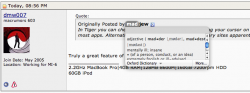
In Tiger you can check the definition of a word by putting your cursor on it and holding CONTROL-COMMAND-D. It should work in most apps. Alternatively, the internet has a few dictionary sites apparently. I wouldn't know because I can't read yet.
Next thing you know you'll want us to read the owner's manual!
In Tiger you can check the definition of a word by putting your cursor on it and holding CONTROL-COMMAND-D. It should work in most apps. Alternatively, the internet has a few dictionary sites apparently. I wouldn't know because I can't read yet.
Yeah that or y'know you could just highlight the word, right click (or ctrl-click) and press 'Look up in dictionary.' Your way is much too complicated 😛

eluk
macrumors 6502a
Yeah that or y'know you could just highlight the word, right click (or ctrl-click) and press 'Look up in dictionary.' Your way is much too complicated 😛
How can less clicks be more complicated😕

dredge as in dredge something up (from obscurity)....meaning bringing an inactive thread back to life after a period of time.
I think that's the problem. The person in the forum I was reading wasn't dredging; ergo, the word in the context in which it was presented didn't make sense.
How can less clicks be more complicated😕
Because it involves pressing (multiple) modifier keys. Right click + menu is simpler.

nbs2
macrumors 68030
I think that's the problem. The person in the forum I was reading wasn't dredging; ergo, the word in the context in which it was presented didn't make sense.
He was. It just didn't seem like it. The thread was last touched almost a week ago. So, it was filtering into oblivion when it was brought back. Not a dredge like some of the others that I've seen (two or three years), but dredged nonetheless.
He was. It just didn't seem like it. The thread was last touched almost a week ago. So, it was filtering into oblivion when it was brought back. Not a dredge like some of the others that I've seen (two or three years), but dredged nonetheless.
Didn't occur to me to check the dates. Now it makes sense!

mad jew
Moderator emeritus
Yeah that or y'know you could just highlight the word, right click (or ctrl-click) and press 'Look up in dictionary.' Your way is much too complicated 😛
Because it involves pressing (multiple) modifier keys. Right click + menu is simpler.
Perhaps, but it's quicker than opening an entirely different app. Each to their own... 🙂

dmw007
macrumors G4
In Tiger you can check the definition of a word by putting your cursor on it and holding CONTROL-COMMAND-D. It should work in most apps. Alternatively, the internet has a few dictionary sites apparently. I wouldn't know because I can't read yet.
Truly a great feature of Mac OS X 10.4. 🙂

iSaint
macrumors 603
In Tiger you can check the definition of a word by putting your cursor on it and holding CONTROL-COMMAND-D. It should work in most apps. Alternatively, the internet has a few dictionary sites apparently. I wouldn't know because I can't read yet.
Hmm, this doesn't work for me. Is it an on/off option I need to select somewhere? thanks...

MrSmith
macrumors 68040
No. But it only works in Cocoa apps(?) so it doesn't work in NeoOffice, for example.Hmm, this doesn't work for me. Is it an on/off option I need to select somewhere? thanks...
iSaint
macrumors 603
No. But it only works in Cocoa apps(?) so it doesn't work in NeoOffice, for example.
What about Firefox?