Im trying to watch Apples keynote in Chrome, but in the center of the keynote video box, the quicktime logo appears along with a question mark. Can anyone help me on this?
The site says it requires Safari 4 or later, so I am guessing something about the Quicktime plugin in Chrome does not work with the video. You are going to need to use Safari.
Thanx but how can it be possible that Chrome (which is a more advanced browser than Safari) cannot be able to manage quicktime videos? Can it be a matter of an equivalent plugin?
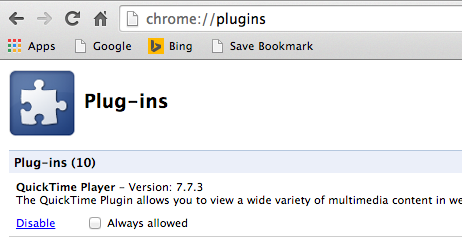
Chrome can use QT though... you can see here on my install of Chrome the QT plugin is available and enabled.
It could just be something Apple did on the site to make it Safari only. I don't really know.
Edit: I just went to the events site in Chrome and it works for me. Maybe you don't have the Chrome plugin installed, although a default OS X install includes it? I got a bar at the top asking if I wanted to allow the QT plugin to run on that site, and after I approved it the video worked.
Code:
chrome:plugins
Enter this in the address bar and see if it is listed there.
You should be able to see the QT plugin in this folder.
Thanx but how can it be possible that Chrome (which is a more advanced browser than Safari) cannot be able to manage quicktime videos? Can it be a matter of an equivalent plugin?
For the sole purpose of watching the keynote, are you that against using Safari? According to Apple's website you need Safari 4 or higher. To save yourself any extra hassle, just use Safari.