Become a MacRumors Supporter for $50/year with no ads, ability to filter front page stories, and private forums.

sahnert

macrumors 6502a
Original poster
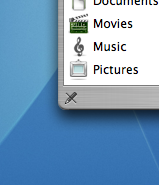
This image in the lower left corner of a finder window. It looks like a pencil with a line through it. What does it mean/do?
What's this?.png
 
I believe that shows up when you cannot modify the contents of a folder. Shows up when you are browsing the contents of a CD-R.
 
Thanks!
Apparently it means that the selected folder is write-protected
I'm running this account as a regular user (not admin - extra security) which is why every finder window except home folder has this.
Thanks guys!
 
rtdgoldfish said:
I believe that shows up when you cannot modify the contents of a folder. Shows up when you are browsing the contents of a CD-R.

Yep. That's it. If you enable the 'Snap to Grid' option in the finder by pressing command + J, you'll also get 4 little bricks in the same location.
 
It means you have permissions set for "No Access" for that folder. You can change it by selecting the folder - or it may be the enclosing folder - and hitting Cmd+I. Down at the bottom, there's a panel for setting "Ownerships and Permissions".
 
Hover the mouse over it and you'll see it says 'No Changes' . I presume that means read only. just to confirm.
 
Register on MacRumors! This sidebar will go away, and you'll see fewer ads.