
Got a tip for us?
Let us know
Become a MacRumors Supporter for $50/year with no ads, ability to filter front page stories, and private forums.
What features would you like to see in the Apple Passwords app?
- Thread starter forza69
- Start date
- Sort by reaction score
You are using an out of date browser. It may not display this or other websites correctly.
You should upgrade or use an alternative browser.
You should upgrade or use an alternative browser.


AnInanimateCarbonRod
macrumors regular
Fix passkeys always creating a new, separate entry even when an existing option exists.
Failing that, the ability to merge entries together. Right now, you have to copy all the data from one to another manually.
Failing that, the ability to merge entries together. Right now, you have to copy all the data from one to another manually.

The biggest for me is custom fields, so I can store more than just user name, password, 2FA code, and a note. Many times I have more fields of info I need to copy (answers to security questions, for example.) I'm in the process of transitioning from 1Password and this is the thing I miss the most.
The second would be better password generation. Sometimes I want a memorable password (four or more random words with numerals and special characters mixed in), sometimes I need to create a 4 or 6 digit numeric PIN, sometimes I want a very long random password. I have tools to allow all that, but it would be nice in the passwords app.
The second would be better password generation. Sometimes I want a memorable password (four or more random words with numerals and special characters mixed in), sometimes I need to create a 4 or 6 digit numeric PIN, sometimes I want a very long random password. I have tools to allow all that, but it would be nice in the passwords app.

HouseLannister
macrumors 68040

Knowlege Bomb
macrumors G4
Know what would be really great? Autofill working when I try to install an app. The fact that APPLE passwords can’t autofill when I’m getting something from the APPLE App Store and I have to cancel the install and go into passwords to copy and paste into a second try is pretty ridiculous.

WarmWinterHat
Suspended
An Archive folder and a separate independent password option for the passwords app itself. I don't like my screen lock password also working for passwords.

Apple_Robert
Contributor
Set the app to only open with Biometrics.An Archive folder and a separate independent password option for the passwords app itself. I don't like my screen lock password also working for passwords.
WarmWinterHat
Suspended
Set the app to only open with Biometrics.
I have it set that way, but it's a hassle sometimes at work when I'm wearing a full respirator, or splash googles and a mask.
There is iCloud for Windows. It works, with one exception: Passkeys do not sync.A Windows app and a decent Chrome plugin that rivals Bitwarden. Not going to use it until I can use it everywhere.
Set up iCloud Passwords on your Windows computer
Set up iCloud Passwords in iCloud for Windows so you can manage and autofill your passwords on your PC.
HouseLannister
macrumors 68040
madeirabhoy
macrumors 68000
id just like it to work.
when I say it, I mean the password bit of safari as much as the app itself.
just reset my password on an airline website. and not for the first time it didnt ask me to save the password, so when I chose an apple strong password, I had to reset it again a minute later and choose something not strong.
when I say it, I mean the password bit of safari as much as the app itself.
just reset my password on an airline website. and not for the first time it didnt ask me to save the password, so when I chose an apple strong password, I had to reset it again a minute later and choose something not strong.
WarmWinterHat
Suspended
There is iCloud for Windows. It works, with one exception: Passkeys do not sync.
Set up iCloud Passwords on your Windows computer
Set up iCloud Passwords in iCloud for Windows so you can manage and autofill your passwords on your PC.support.apple.com
It also requires use of the Microsoft store. I can't use that on my work computer.
"It just works" was a great sales pitch by Apple though 😆Not a great sales pitch. 🙂

Arran
macrumors 603
The biggest for me is custom fields, so I can store more than just user name, password, 2FA code, and a note. Many times I have more fields of info I need to copy (answers to security questions, for example.) I'm in the process of transitioning from 1Password and this is the thing I miss the most…
You can put a LOT of text in the notes field. I have at least one with multiple paragraphs.
Yes, that's what I had to do, but when I need one discrete piece of text, it's a lot easier to click to copy than to select the text that I need in the note and then do copy. Compare this to what you would do if you just need the current username or password - you click the field and it is put in the clipboard. 1Password works that way as well for custom fields, as does Bitwarden. That's what I'd like to see.You can put a LOT of text in the notes field. I have at least one with multiple paragraphs.
Know what would be really great? Autofill working when I try to install an app. The fact that APPLE passwords can’t autofill when I’m getting something from the APPLE App Store and I have to cancel the install and go into passwords to copy and paste into a second try is pretty ridiculous.
An account password (App Store) locked behind an app that uses the device password (Passwords) is pointless. If someone can unlock your device they can access your Apple Account.
The Password Autofill is for websites and their associated apps using HTML inputs and verified using the website domain names.
Apple uses biometrics for quick account service authorization in apps like iTunes, App Store, Find My, etc etc without the use of a password. Their website (Apple.com and iiCloud.com) use Passkey that require one of your trusted device and your biometrics without the use of a password. This way there isn't a password to type in or worry about getting stolen, hacked or phished. Other websites use Passkey as well (Google, Amazon, eBay).
You'll need to have iTunes & App Store turned on in FaceID/TouchID & Passcode settings. You'll also want to write down the password because I'm not sure if there is a "use nearby passkey" option when setting up a new device. But you can delete any passwords for Apple out of the Password app.

macfacts
macrumors 603
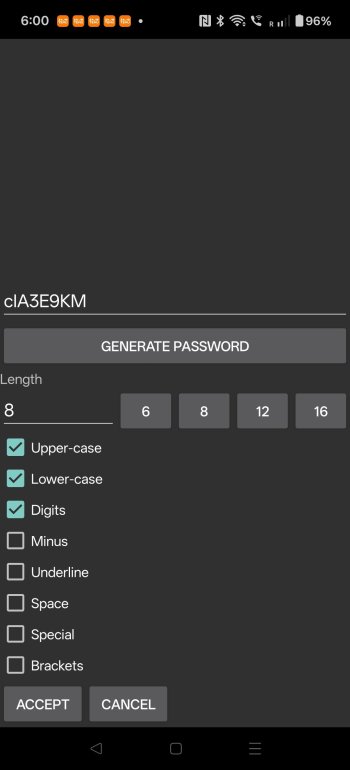
search iOS keepass, I use a keepass app on Android, keepassdroidPersonally I just want the option to make passwords however long I want them to be and to add in special characters. I don’t understand why we’re stuck with 18 characters of only letters and numbers.
Attachments
This doesn’t help as there is always a fallback to iOS lock code and/or macOS system passwordSet the app to only open with Biometrics.
not if you have 2FA enabled. If someone can unlock your device they can access your Apple Account.