J jbmwoodward macrumors newbie Original poster Jun 22, 2010 #1 I was sent a .mcd file for Vectorworks by a colleague and the file has come up as an exec file. What is this, is it corrupt and can it be revived?

I was sent a .mcd file for Vectorworks by a colleague and the file has come up as an exec file. What is this, is it corrupt and can it be revived?
J jbmwoodward macrumors newbie Original poster Jun 22, 2010 #3 I have Vectorworks 12.5 installed. I have seen this type of file for other programs before too, esp. backups and alike.
I have Vectorworks 12.5 installed. I have seen this type of file for other programs before too, esp. backups and alike.
angelwatt Moderator emeritus Jun 22, 2010 #4 OSX will generally show the file as a Unix exec when no program is associated with the file extension. It's not a sign of corruption in the file.
OSX will generally show the file as a Unix exec when no program is associated with the file extension. It's not a sign of corruption in the file.
GGJstudios macrumors Westmere Jun 22, 2010 #5 jbmwoodward said: I have Vectorworks 12.5 installed. I have seen this type of file for other programs before too, esp. backups and alike. Click to expand... Locate the file in Finder, right-click on it, Get Info Check what app is listed under Open with: If it's not Vectorworks, then select Vectorworks and then click "Change All"
jbmwoodward said: I have Vectorworks 12.5 installed. I have seen this type of file for other programs before too, esp. backups and alike. Click to expand... Locate the file in Finder, right-click on it, Get Info Check what app is listed under Open with: If it's not Vectorworks, then select Vectorworks and then click "Change All"
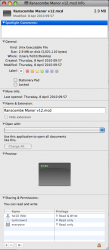
J jbmwoodward macrumors newbie Original poster Jun 23, 2010 #6 I have tried that but the Vectorworks icon is greyed out and it doesn't allow me to open it. It will only open in text edit which comes up as code I don't understand. I have attached an image of the 'get info' window. Attachments Picture 1.png 83.5 KB · Views: 635
I have tried that but the Vectorworks icon is greyed out and it doesn't allow me to open it. It will only open in text edit which comes up as code I don't understand. I have attached an image of the 'get info' window.
angelwatt Moderator emeritus Jun 23, 2010 #7 Did you try to use the Open With drop box to pick something?