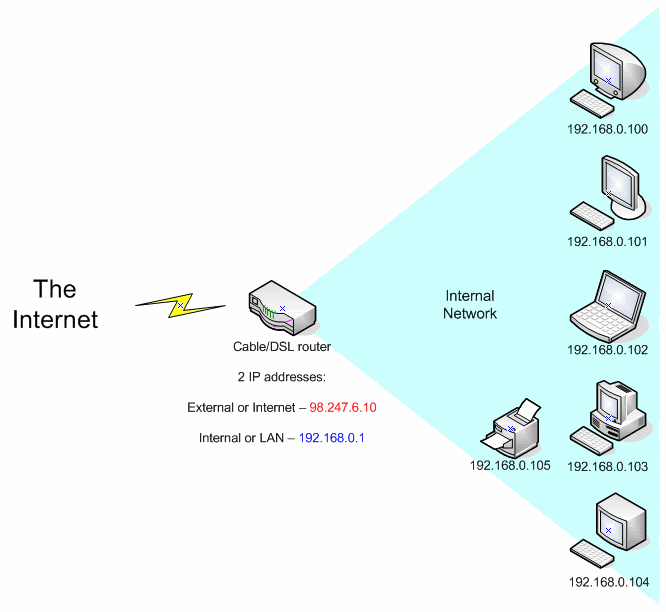
The first is your external ip address and the second is your internal ip address.
Your apartment or your office has an internal network where they assign a private ip to your computer. However when your computer talks to the world outside the internal network, the traffic is routed through an external ip address belonging to a gateway or router.
This way, they restrict the amount of unwarranted traffic (spammers, hackers, or you running various services like website/ftp etc).
This is why you have two ip addresses. The internal ip addresses always start with numbers like 192.168 or 10.200 etc.
To put it simple. Your router ( airport ) is a DHCP server that uses NAT. Network Address Translation. It allows the external IP ( The real one that is seen on the internet and is assigned to your modem by your ISP ) to translate it to a loop-back address ( the 10.*,192.* ). This allows you to see the internet from behind a DHCP server and translates the IP from an external one to an internal one. Or called a loop-back IP.
A loop-back address is for LAN ( local area networks ) only.
So when you go to the real internet a website ( normally ) sees the address of your Cable,DSL modem.
Is that confusing enough ? 🙂
I drew up a quick diagram:
![]()
As far as the rest of the internet is concerned, any computer coming from the internal network is seen as the external IP address of the Airport (which is the Cable/DSL router in the diagram)