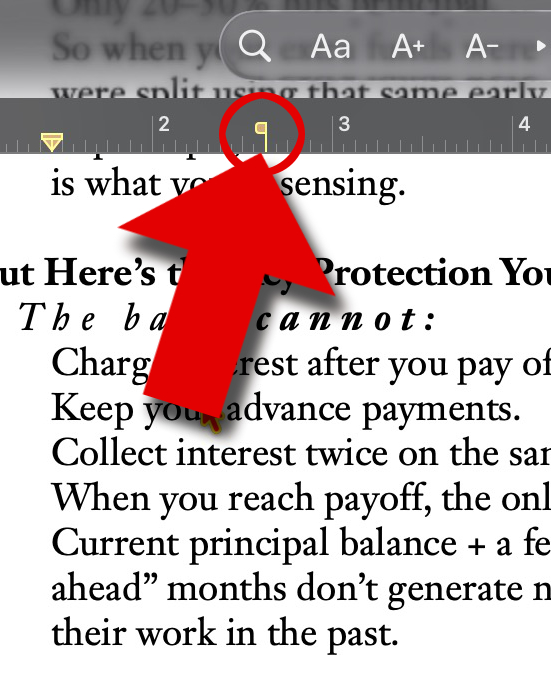
That's your indent marker. If you tab items it will jump to that horizontal position.
EDIT: Actually I might be wrong on that. InDesign has a similar looking icon for tabs. I assumed it was the same. Not sure what it is actually just having a look but can't find anything to turn on/off that would make something like that appear.
I updated my post above. Sorry I got it wrong. Im not sure what it is but it's annoyingly familiar lol. It's bugging me now. Save your document then slide the icon left and right see what moves. Should give you a clue to what it controls. Then report back here so I don't go insane haha.
Try Format > Text > Layout > Indents (in the sidebar)
I don't have latest Pages as I don't like LG so maybe they have changed the icon from a T shape to the reverse P. Like AlumaMac says I think its the paragraph indent which is what I was referring to in my first post but the different icon in my version threw me off.
I'm not sure about the name but it indicates where there is a "stop" or a tab. Think of it like a border where text won't pass it. They're typically found on the edges (margin), but you can place one anywhere.
“indicates where there is a "stop" or a tab.“ Then why have tab triangles at top? Or the left or right column stops? Does not make sense to me what or why?
I don’t use Pages, but in general that marker is directly related to the position of the cursor.
Without knowing where the cursor is on the page, it can mean a variety of things from indent and bullets to right-to-left text.
I haven’t tested this to see if it is correct, but from a phone conversation w support, the icon allows us to position any object on the page exactly as needed. To stop from positioning any text to the point, i unselect all text, then place the position icon. Hope this is correct.