
Become a MacRumors Supporter for $50/year with no ads, ability to filter front page stories, and private forums.

zm15

macrumors member
Original poster
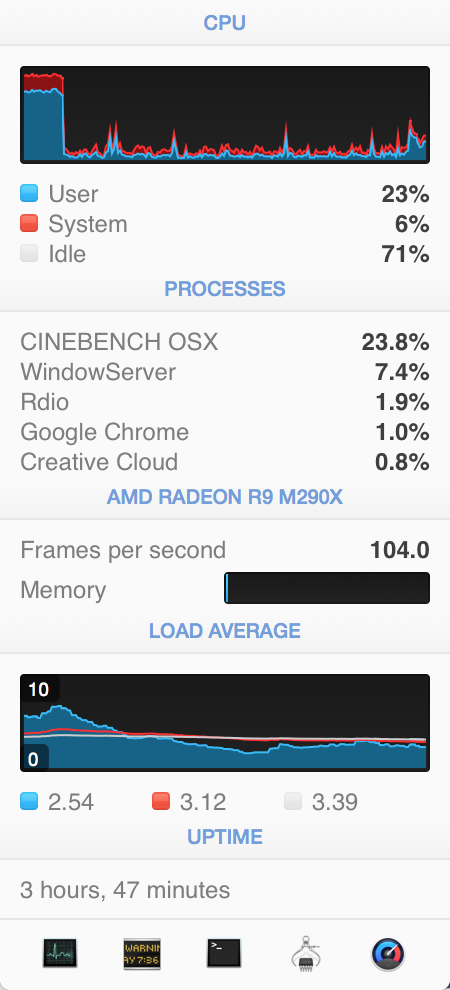
I noticed that the Graphics Card memory is hardly used at all, even during Cinebench 3D testing despite the FPS being high. What programs actually use the graphics card memory?

Trying to determine if the M295x is worth the money to upgrade in a new iMac. (I do mostly video editing with Premiere Pro and After Effects)

Currently running an iMac 5k with the M290x card.

Here's a screenshot running Cinebench 3d test - high FPS, no GPU memory being used...
4vmPi.png
 
Interesting. Here's my i7 M295X after a fresh reboot, just running Mail and iTunes in the background, and a couple of Safari tabs with no video running.
 

Attachments

  • Screen Shot 2015-07-02 at 2.55.23 PM.png
    Screen Shot 2015-07-02 at 2.55.23 PM.png
    163.1 KB · Views: 239
I have a m290x as well, and istatMenus doesn't seem to show much, if any VRAM usage. I think it's a bug with iStatMenus. It would be an enormous help if I could rely on this utility to help me configure graphics options, but I think that it's inaccurate for both m290x and m295x cards. The frames per second jumps around a lot, from 3.7 to 37 fps when I'm just running the basic Safari, Mail, Finder configuration.

On the other hand, I tried running the company of heroes benchmark (at 1024*768; ultra settings, windowed, so that I could pay attention to istat menus, and got 336 max, 161 avg, 68 min), which seemed to correlate with ista's fps indicator, at least somewhat.
 
I have a m290x as well, and istatMenus doesn't seem to show much, if any VRAM usage. I think it's a bug with iStatMenus. It would be an enormous help if I could rely on this utility to help me configure graphics options, but I think that it's inaccurate for both m290x and m295x cards. The frames per second jumps around a lot, from 3.7 to 37 fps when I'm just running the basic Safari, Mail, Finder configuration.

On the other hand, I tried running the company of heroes benchmark (at 1024*768; ultra settings, windowed, so that I could pay attention to istat menus, and got 336 max, 161 avg, 68 min), which seemed to correlate with ista's fps indicator, at least somewhat.

Thanks for sharing guys. It certainly raises more questions than answers. I wish there was a way other than GPU temp to measure the processor load. I'm not sure I'm convinced the 295x is worth the upgrade for performance, but perhaps resale value.
 
Interesting. Here's my i7 M295X after a fresh reboot, just running Mail and iTunes in the background, and a couple of Safari tabs with no video running.
Sorry for the off topic.
Is it possible to have a screenshot showing istat's temps under similar conditions?
 
Thanks for sharing guys. It certainly raises more questions than answers. I wish there was a way other than GPU temp to measure the processor load. I'm not sure I'm convinced the 295x is worth the upgrade for performance, but perhaps resale value.

Imho the 4 gb of the m295x are alone worth the upgrade especially if you 're using an additional external display.
iMac alone has a lot of pixels to process and the specs for software are always going higher.

I also think that these video editing programs are using during processing the video ram and if it's not enough, they crash especially with the current high video resolutions.
 
Last edited:
Supposedly you can use the OpenGL Monitor to figure this out. It's an optional bit of XCode.
the manual states:
Current Video Memory in Use

The total number of bytes of VRAM in use. This parameter is vendor specific and not available for all drivers. vramUsedBytes​
 
The thing about bare feats is that, they typically compare an i7/m295x with an i5/m290x, so there's no way to break it down.

And even if they compare video cards, it's typically (D300/4 core, D500/6 core, D700, 8 core), a least for the After Effects benchmarks. Maddening.
 
  • Like
Reactions: filmak
Register on MacRumors! This sidebar will go away, and you'll see fewer ads.