Plus the Max chip variant is much, much more competent than the base level chip.What I also failed to mention is that I sometimes work on my casual iOS app with the Mac. Unfortunately this means that I always need the latest OS in order to have Xcode work. I am leaning more towards the M4 now.
The other thing that made me think here is. When macOS 27 (or 28, 29, etc) drops support for the M1 chip, I wonder if it'll be all of the M1 chip altogether, or would they still support the Max/Ultra variant a bit longer. The Max/Ultra variant comes approximately 12-18 months after the regular variant, so I think it'll make sense to support them a bit longer.


Got a tip for us?
Let us know
Become a MacRumors Supporter for $50/year with no ads, ability to filter front page stories, and private forums.
What would you buy if you were me?
- Thread starter ayaka19
- Start date
- Sort by reaction score
You are using an out of date browser. It may not display this or other websites correctly.
You should upgrade or use an alternative browser.
You should upgrade or use an alternative browser.

Hey @ForkHandles, at one time, my hard drive was full, but this recent slowdown happened after I empied the drive. This is also why I was leaning towards 1TB SSD.There is something wrong with your machine. Is your hard drive full? This affects performance.
I have a similar config and it’s speedy as light.
I’d be sorely tempted, if you don’t like spending cash, to find out why your machine isn’t capable of doing everything it could do four years ago.
I also think that I have inflated my own needs since 4 years ago. I know it's silly, but I have like 60 tabs and 5 spreadsheet files open at once, where I didn't have this many 4 years ago. I got into home ownership, mortgage, etc and my needs has became increasingly more and more complex. I also think the websites on those tabs might have been more RAM hungry over the years.
Thanks for everyone who was suggesting me to check my CPU and RAM usage.
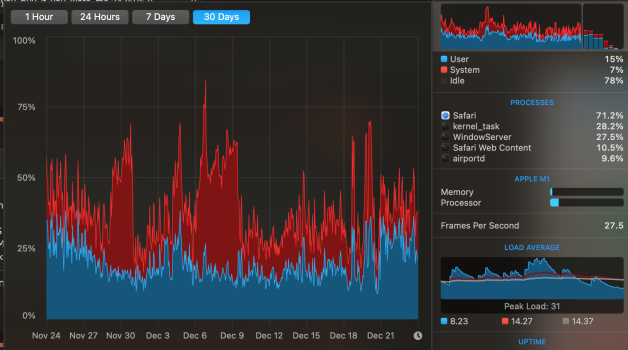
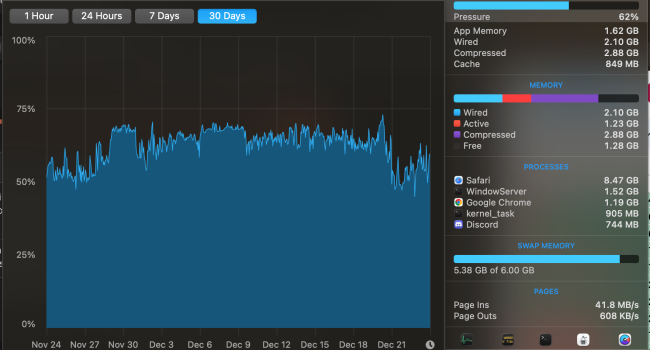
I have been running iStatMenus and they actually gave me a chart of my usage in past 30 days. I think the slowdowns I experience were mainly due to CPU actually.
I've attached my CPU and RAM 30 day usage history here.
I have been running iStatMenus and they actually gave me a chart of my usage in past 30 days. I think the slowdowns I experience were mainly due to CPU actually.
I've attached my CPU and RAM 30 day usage history here.
Attachments


I love iStat been running it forever.Thanks for everyone who was suggesting me to check my CPU and RAM usage.
I have been running iStatMenus and they actually gave me a chart of my usage in past 30 days. I think the slowdowns I experience were mainly due to CPU actually.
I've attached my CPU and RAM 30 day usage history here.
For my own uses, a mythical M1Pro with 24GB RAM would have been fine until recently. And even recently, it’s only yellow memory pressure (you can review your actual bottlenecks but I’m travelling without my Mac and my mind is a sieve…) so hardly likely to impact workflow.Thank you, this is quite insightful. What apps did you use in your old Mac Mininthat made it choke? I might have made it sound like I’m a super professional photographer in my original post, but really 90% of what I do are just cropping photos, adjusting colours, and creating albums for my family and friends. My camera is a 24MP camera and when I open those photos, I can tell it’ll have a bit more lag than the smaller iPhone photos. I use Photos app most of the time.
I can wait for M5 for sure, it isn’t a dire need at the moment. I do feel that I don’t want to sacrifice MacOS updates but as I mentioned above I have a feeling that Max/Ultra variant will have slightly longer macOS updates than the regular M1s.
I’ve now mapped out from this thread that I probably need at least a 24GB RAM, whatever machine I end up getting. With the GPU, I am still tossing between M4, M4 Pro, M1 Max, or M2 Max now.
To answer your question on my use: I use layers. A LOT. And often will have several photos open in Windows within the apps I use, principally Pixelmator and Photomator… I tend to manipulate curves and colour correct and until recently my principal camera was a Nikon D700, so 12MP! But I tend to edit RAW photos rather than jpegs. We’ll see how my workflow is impacted now that I have replaced the D700 with a combo D750 (24MP) and D850 (45MP).
I’ll include a chip breakdown I’ve been tracking to see when things get interesting for me to upgrade:

Best of luck. This certainly sounds like a bit of a smoking gun. I wonder if there is a tool like Disk Defrag on windows that could super clean the available Gb.Hey @ForkHandles, at one time, my hard drive was full, but this recent slowdown happened after I empied the drive. This is also why I was leaning towards 1TB SSD.
I also think that I have inflated my own needs since 4 years ago. I know it's silly, but I have like 60 tabs and 5 spreadsheet files open at once, where I didn't have this many 4 years ago. I got into home ownership, mortgage, etc and my needs has became increasingly more and more complex. I also think the websites on those tabs might have been more RAM hungry over the years.
Your usage still sounds tiny compared to the 3D rendering I do and Final Cut Pro movies I make on my computer.
That said mine is 1Tb so it’s easier to manage.

Current machine: Mac Mini M1, 8GB RAM, 512GB SSD.
I’m a really big cheap ass. The last few Mac’s I’ve bought are either heavily discounted, refurbished, or used.
.
.
.
Now as I am a cheap ass, I’m thinking there’s no way I’m getting a new machine. So with my price point (below $2,000 AUD), I think I can get either:
.
.
What machine would you get if you were me. I’m hoping this will last me at least 4 years.
.
Two things I have noticed about the really big, cheap asses in my family. One is that they complain the item doesn't do all they want. Second, they buy two or three times to replace that cheap item. I say all that with kindness.
Your 2000 AUD works out to about 1400 USD. There are a ton of refurbished M4 Mac Minis on the Apple refurbish site. Take a look at them. Here is one in your price range: M4 10/10, 16GB UM, 2TB SSD. 1800AUD.
You never want less than 1TB SSD in the Mac Mini or the Studio due to speed; a 512GB SSD on either is hobbled.
There are a few refurbished M4 Mac Studios that fall into your range. Frankly, if you have the money to splurge, I would go for a refurbished M4 Mac Studio and be set for the next 7 or so years.
Out of stock at my local Microcenter. I missed out on a bargain.If you have a Micro Center near you the have base M4 mini's for $399.00 right now (brand new).
Two things I have noticed about the really big, cheap asses in my family. One is that they complain the item doesn't do all they want. Second, they buy two or three times to replace that cheap item. I say all that with kindness.
Your 2000 AUD works out to about 1400 USD. There are a ton of refurbished M4 Mac Minis on the Apple refurbish site. Take a look at them. Here is one in your price range: M4 10/10, 16GB UM, 2TB SSD. 1800AUD.
You never want less than 1TB SSD in the Mac Mini or the Studio due to speed; a 512GB SSD on either is hobbled.
There are a few refurbished M4 Mac Studios that fall into your range. Frankly, if you have the money to splurge, I would go for a refurbished M4 Mac Studio and be set for the next 7 or so years.
You are absolutely right that 1TB SSD is the best for semi-professional and heavy users like us in this forum. I do think 256GB or 512GB are actually okay for a few people - including my spouse who uses the iPhones much much more than the computer.
I would say one thing about being a cheap ass though - I think in terms of computing it's really balancing what you need right now and what is available on the market. I don't cheap out on some things, for example my iPhone. I got the 15 Pro with a big SSD that I still use today, and planning to keep using for a few more years after I replace its battery. I would say my decision back in 2020 to get an M1 Mac Mini with 8GB of RAM was quite appropriate at the time. I think I saved quite a bit of money, and I did not foresee how much heavier my computing life has become. The money I had saved in 2020 was invested through S&P500 and Apple stocks, instead of getting the M1 Max or Pro chips that I didn't really need at the time.
For today, I do see the values of getting M4 Pro or Studio, but realistically, I think it is only useful very very little of the time, perhaps not enough to justify the extra $500-1000 I would have spent if I have just saved it. This thread had made it very clear to me that M4 is probably the way to go and to get bigger RAM than I need, perhaps with 24GB/32GB rather than 16GB.
I have now mapped out the Apple refurb store items in Australia, and I think I might ended up going with this one highlighted in yellow. Unless a similarly specced item comes up on eBay or Marketplace. But I do now realise that it's quite rare that people sell such a highly specced Mac Mini on eBay/Marketplace. This is actually ended up only about $300 AUD of savings but I think it's the best machine for me for my current situation.
Getting from the Refurb store will allow you to get the Apple Care + which I'd for sure get.You are absolutely right that 1TB SSD is the best for semi-professional and heavy users like us in this forum. I do think 256GB or 512GB are actually okay for a few people - including my spouse who uses the iPhones much much more than the computer.
I would say one thing about being a cheap ass though - I think in terms of computing it's really balancing what you need right now and what is available on the market. I don't cheap out on some things, for example my iPhone. I got the 15 Pro with a big SSD that I still use today, and planning to keep using for a few more years after I replace its battery. I would say my decision back in 2020 to get an M1 Mac Mini with 8GB of RAM was quite appropriate at the time. I think I saved quite a bit of money, and I did not foresee how much heavier my computing life has become. The money I had saved in 2020 was invested through S&P500 and Apple stocks, instead of getting the M1 Max or Pro chips that I didn't really need at the time.
For today, I do see the values of getting M4 Pro or Studio, but realistically, I think it is only useful very very little of the time, perhaps not enough to justify the extra $500-1000 I would have spent if I have just saved it. This thread had made it very clear to me that M4 is probably the way to go and to get bigger RAM than I need, perhaps with 24GB/32GB rather than 16GB.
I have now mapped out the Apple refurb store items in Australia, and I think I might ended up going with this one highlighted in yellow. Unless a similarly specced item comes up on eBay or Marketplace. But I do now realise that it's quite rare that people sell such a highly specced Mac Mini on eBay/Marketplace. This is actually ended up only about $300 AUD of savings but I think it's the best machine for me for my current situation.
View attachment 2590701
Never got Apple care since I bought my first Mac in 2006 haha. Only had one repair on my trackpad in the first year and a MacBook Air logic board failing repair for around $700. I think I came out ahead given how much I saved.Getting from the Refurb store will allow you to get the Apple Care + which I'd for sure get.
You're lucky, I can't tell you how much it's saved me having it.Never got Apple care since I bought my first Mac in 2006 haha. Only had one repair on my trackpad in the first year and a MacBook Air logic board failing repair for around $700. I think I came out ahead given how much I saved.

This is not true. The 512GB in an M4 outperforms the 1TB.You never want less than 1TB SSD in the Mac Mini or the Studio due to speed; a 512GB SSD on either is hobbled.
Sweet spot for the stingy OP is a base M4 mini with 24GB RAM and a 512GB SSD.
Or consider a pre-loved Studio M4.
Thank you, I do need the 1TB SSD preferably, as I sometimes have a lot of big apps I like to keep in the main SSD to make it faster.This is not true. The 512GB in an M4 outperforms the 1TB.
View attachment 2591290
Sweet spot for the stingy OP is a base M4 mini with 24GB RAM and a 512GB SSD.
Or consider a pre-loved Studio M4.
Ah well…Thank you, I do need the 1TB SSD preferably, as I sometimes have a lot of big apps I like to keep in the main SSD to make it faster.
Then we have the consideration that TB4 on the Mini M4 is limiting external NVMe drives to 3GB/sec.
Whereas TB5 on a Studio is doubling that figure, and you can see the internal speeds aren’t far behind.
So the Studio gives a huge leap in RAM width and throughput. The 16-core Max especially.
But a Studio with a 1TB drive will be way over your budget. A used one would be close though. But for non-video work, the Studio is a little bit overkill for you, and leaves no financial scope for up to date peripherals.
If you nail it down and say you are only thinking of a base M4 Mini, then 24GB and 1TB would be a nice little machine, and a decent TB4 external NVMe will be close in speed to the internal drive. Nice and balanced. This machine new is $1200 or so. This falls perfectly in your budget, and the extra RAM gives you a little overhead to play with. I can see it performing admirably for what you want, and for the few years you require - even more if you use an external drive a bit more in your routines
Consider a used unit, as there are some great, barely touched Minis about. This then frees up a little money to spend on an OWC 1M2 TB4 enclosure, with a 990 Pro, or WD 850 NVME.
Keep your 2TB storage (and have an old SSD around for Time Machine), but having a 1TB external NVMe on TB4 - this is very useful for workflow, and as a fast temp dump folder prior to archiving. You might even run some Apps from it.
Think about grabbing a used Razer TB4 hub. I like the Chroma. This will power all externals, give USB2 capability, and ensures the mini’s internal PSU isn’t stressed - which keeps temps down, the fan off, and helps longevity/reliability.
Last edited:
The refurbished base M4 Mini with 24GB RAM and 1TB SSD seems to be around $1,600 AUD from the screenshot I posted above. I'm not sure when the M5 will come out, but I'm thinking it might even drop in price when the M5 comes out. In the mean time I set up an alert in https://refurb-tracker.com/ and when it comes in stock I'd get it. I can hardly find a used on on eBay with these specs.Ah well…
Then we have the consideration that TB4 on the Mini M4 is limiting external NVMe drives to 3GB/sec.
Whereas TB5 on a Studio is doubling that figure, and you can see the internal speeds aren’t far behind.
So the Studio gives a huge leap in RAM width and throughput. The 16-core Max especially.
But a Studio with a 1TB drive will be way over your budget. A used one would be close though. But for non-video work, the Studio is a little bit overkill for you, and leaves no financial scope for up to date peripherals.
If you nail it down and say you are only thinking of a base M4 Mini, then 24GB and 1TB would be a nice little machine, and a decent TB4 external NVMe will be close in speed to the internal drive. Nice and balanced. This machine new is $1200 or so. This falls perfectly in your budget, and the extra RAM gives you a little overhead to play with. I can see it performing admirably for what you want, and for the few years you require - even more if you use an external drive a bit more in your routines
Consider a used unit, as there are some great, barely touched Minis about. This then frees up a little money to spend on an OWC 1M2 TB4 enclosure, with a 990 Pro, or WD 850 NVME.
Keep your 2TB storage (and have an old SSD around for Time Machine), but having a 1TB external NVMe on TB4 - this is very useful for workflow, and as a fast temp dump folder prior to archiving. You might even run some Apps from it.
Think about grabbing a used Razer TB4 hub. I like the Chroma. This will power all externals, give USB2 capability, and ensures the mini’s internal PSU isn’t stressed - which keeps temps down, the fan off, and helps longevity/reliability.
With the hub, I'm thinking that I can be using a Mac Mini Hub like Satechi which will give me access to NVME drive and SD Card reader which I'd really appreciate. Unfortunately it seems like most of these kinds of hubs are only running on USB 3.0 (10Gbps) instead of TB4. I'll keep looking for a good one, it's a problem for another day. I think there's plenty of these kinds of accessories which I really appreciate.
A common config is 24GB/512GB. Plenty of those around. Perhaps think about that, and buy a 2TB external NVMe in a good TB4 enclosure. Then change your workflow to suit. Bin all the bloat, and offload stuff you rarely use. Your budget is restricting your choices, but alternatively, bear in mind that only an extra $200 outlay for 4 years is only pennies every day - but you’d get what you want.The refurbished base M4 Mini with 24GB RAM and 1TB SSD seems to be around $1,600 AUD from the screenshot I posted above. I'm not sure when the M5 will come out, but I'm thinking it might even drop in price when the M5 comes out. In the mean time I set up an alert in https://refurb-tracker.com/ and when it comes in stock I'd get it. I can hardly find a used on on eBay with these specs.
With the hub, I'm thinking that I can be using a Mac Mini Hub like Satechi which will give me access to NVME drive and SD Card reader which I'd really appreciate. Unfortunately it seems like most of these kinds of hubs are only running on USB 3.0 (10Gbps) instead of TB4. I'll keep looking for a good one, it's a problem for another day. I think there's plenty of these kinds of accessories which I really appreciate.
I bought the base 256/16 Mini to experience the single-core performance, and still am very impressed.
But the second I need more RAM, then I always planned to get a better specced machine, and sell this one. But it has served to dip my toe firmly in the 2025 computing water..
The used market is worth considering. All these machines are just one year old, and many are unused, open-box deals, or someone just hated Mac OS. Mine was from Jan 2025, and used once - immaculate.
Forget Satechi rubbish. Don’t put your Mini on a hub. Keep it away from stuff. 4 silicone feet is all it needs.
Look at OWC and RAZER hubs only. The Razer has a really good PSU, which is important too.
I bought a RAZER Chroma TB4 hub, an OWC 1M2 enclosure, and a 990 Pro 1GB - all were barely used eBay items, for about £320 in the UK.
Think about that Mini’s PSU when you start piling on peripherals.
With OWC and Razer, you can be sure that you are getting a good quality TB4 cable. This is very important.
Satechi, uGreen or whatever - their cables will be dreadful.
Left to right - Mac Mini M4, OWC 1M2/990Pro, Razer Chroma TB4 hub, TB3enclosure with 970 Evo NVMe, USB3 enclosure with 850 Evo SSD.
The SSD is my 400MB/sec Time Machine 512GB drive.
TB3/970 Evo is a 1GB/sec dump and transfer 512GB drive.
OWC 1M2/990 Pro is my 3GB/sec ‘dynamic’ 1TB drive for loading/streaming audio samples and loading/saving projects. It’s faster than the Mini’s 256GB drive.
The internal drive has only system and Apps on it. All associated data and samples are on the external.
I never, ever save anything to the internal 256GB drive - which carries about 117GB - very healthy
Last edited:

I did this for my M4 Mac mini using an ACASIS dock and hub unit. In this particular one can be mounted two 8TB NVMe SSDs and the connect speed is 40Gbps, much faster than the 10Gbps of other/older models. I’ve only been able to afford a 4TB SSD so far but the setup is a screamer. Large (>5GB) files go from the M4 Mac mini’s RAM to the SSD shockingly fast vs. my attached 20TB of HDD, as would be expected but still impressive to watch.The refurbished base M4 Mini with 24GB RAM and 1TB SSD seems to be around $1,600 AUD from the screenshot I posted above. I'm not sure when the M5 will come out, but I'm thinking it might even drop in price when the M5 comes out. In the mean time I set up an alert in https://refurb-tracker.com/ and when it comes in stock I'd get it. I can hardly find a used on on eBay with these specs.
With the hub, I'm thinking that I can be using a Mac Mini Hub like Satechi which will give me access to NVME drive and SD Card reader which I'd really appreciate. Unfortunately it seems like most of these kinds of hubs are only running on USB 3.0 (10Gbps) instead of TB4. I'll keep looking for a good one, it's a problem for another day. I think there's plenty of these kinds of accessories which I really appreciate.
As an Amazon Associate, MacRumors earns a commission from qualifying purchases made through links in this post.
I did come across this, when looking at hubs and cooling devices. I then thought about it for a whole day, then spent a week reading articles, forums, etc - with all the spec figures in my head.I did this for my M4 Mac mini using an ACASIS dock and hub unit. In this particular one can be mounted two 8TB NVMe SSDs and the connect speed is 40Gbps, much faster than the 10Gbps of other/older models. I’ve only been able to afford a 4TB SSD so far but the setup is a screamer. Large (>5GB) files go from the M4 Mac mini’s RAM to the SSD shockingly fast vs. my attached 20TB of HDD, as would be expected but still impressive to watch.
This is called Due Diligence. Below are my observations…
The Acasis is shipped with a measly 30watt power adaptor. Barely enough to run 2 x NVME’s.
They even recommend a 65W or higher on their website. Extra expense, and very odd. I would imagine their PSU is a total ********. It won’t charge or power on USB2 either. Your pen-drives won’t even light up. Utterly Useless.
I would insist on 90W - which is why the Razer Chroma hub excels, with it’s superb PSU, and a TB4 cable which alone is worth $40.
I question the lack of common sense, in stacking a Mini M4 on top of something which is going to get seriously hot.
And 1949MB/sec is definitely not ‘shockingly’ fast. In fact it’s shockingly crap for a £150 unit.
Nor is 2869MB/sec in Raid 0.
Bear in mind that when two fitted NVME’s are performing, each will be doing so at below TB3 speeds, as they will share a single bus - probably 950MBb/sec each.
You might as well buy £10 TB3 NVMe enclosures, and plug them straight into the Mini.
Twin 52dB fans? Are they having a laugh? My bathroom extractor fan is 32dB!
This belongs in the bin with all the rest. 10 year-old tech, re-boxed to fit an M4 Mini, and mid-priced precisely to catch the unwary and those who impulse buy, whilst waiting for the M4 Mini to arrive.
Last edited:
As an Amazon Associate, MacRumors earns a commission from qualifying purchases made through links in this post.
Register on MacRumors! This sidebar will go away, and you'll see fewer ads.