
Become a MacRumors Supporter for $50/year with no ads, ability to filter front page stories, and private forums.

decksnap

macrumors 68040
Original poster
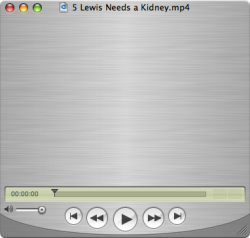
I haven't run my updates in some time... recently updated quicktime, and now I can't see the video on any movies. It just looks like this. I removed my Uno skin before running the update... applying and removing it seem to do nothing at this point. I also have Perian and Flip4Mac. Any thoughts on the culprit? Also, I forget how to reapply an update.
 

Attachments

  • Picture 25.png
    Picture 25.png
    65.7 KB · Views: 151
Have you tried removing Perian and Flip4Mac then reinstalling them? They might be out of date with your latest version of Quicktime.
 
try this

Open Quicktime 7
Click on Edit tab and go to preference,
then click on Quicktime Preference.
One that opens click on Advanced tab
You will see a selection for video or direct X.
Click on Safe mode (GDI only)
Then click on Apply, then OK.
Restart Quicktime and play a movie to test.
 
So far they are removed... haven't bothered reinstalling.

Anybody know the sequence to 'redo' a software update?
 
Open Quicktime 7
Click on Edit tab and go to preference,
then click on Quicktime Preference.
One that opens click on Advanced tab
You will see a selection for video or direct X.
Click on Safe mode (GDI only)
Then click on Apply, then OK.
Restart Quicktime and play a movie to test.

Are you on Windows or something? I'm running tiger.
 
the most recent version of flip4mac has some weird interactions with either the newest version of safari and/or quicktime.

the problem was mainly playing wmv videos in safari, but apparently quicktime was goofed as well.

i just downgraded my flip4mac, but haven't tested enough to know if this fixed it (or if it is even the same problem you were having)
 
Thanks guys- I just reinstalled straight from Apple.com and at the very least standard mp4 playback is fixed.
 
Register on MacRumors! This sidebar will go away, and you'll see fewer ads.