Become a MacRumors Supporter for $50/year with no ads, ability to filter front page stories, and private forums.

kimcheeboi65

macrumors member
Original poster
My main browser that I use is Firefox. I use Opera once in awhile and I've tried safari and camino, but they fail to satisfy my browser needs.

For firefox, it allows me to "force" open in tabs and allow me to switch in between my pressing commandkey + ` or commandkey + (the number). How come camino or safari cannot do those??

It really bothers me. If they actually do, can someone tell me hwo to set it up? or any other easy way to manipulate tabs in safari or camino?
 
To switch between tabs in Safari you use cmd+{ and cmd+} to go left and right, respectively.

I don't think you can 'force open' in tabs, but cmd+clicking works.
 
gauchogolfer said:
To switch between tabs in Safari you use cmd+{ and cmd+} to go left and right, respectively.

what do you mean cmd+[ and cmd+]???


-----edit-----

ohh nvm, you mean to go back or forward on the webpage.

I meant having more than one tabs open and be able to switch to another tab using a keyboard shortcut.
 
kimcheeboi65 said:
For firefox, it allows me to "force" open in tabs
The saft plugin (http://haoli.dnsalias.com/Saft/index.html) allows (among other things) to catch all "new windows and put them in tabs. It's just a pain in teh ass that it's no freeware 🙁.

The only reason i use Safari (apart from it's great support for web standards) is the fact that it knows how to use the "zoom" button.. Firefox just goes fullscreen and that's a serious waste of space on a 24".
 
in camino you switch between tabs by using: command-option right arrow, or left arrow

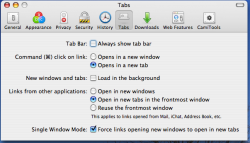
the last option in the tabs section of the preferences allows you to force new windows to open in tabs.
 

Attachments

  • Picture 1.png
    Picture 1.png
    74.5 KB · Views: 124
kimcheeboi65 said:
what do you mean cmd+[ and cmd+]???


-----edit-----

ohh nvm, you mean to go back or forward on the webpage.

I meant having more than one tabs open and be able to switch to another tab using a keyboard shortcut.

Nope, what I meant was to go left and right between tabs.
So, push command+{ (which is the same as command+shift+[ ) to go left and cmd+} to go right. Works fine.
 
I have a Kensington wireless kb with back, forward, and scrolling buttons on the left side, very convenient but it only works in Safari!
 
AmbitiousLemon said:
in camino you switch between tabs by using: command-option right arrow, or left arrow

This works in Safari too.

Edit: Oops, it's command+shift+arrow to switch between tabs in Safari.
 
AmbitiousLemon said:
in camino you switch between tabs by using: command-option right arrow, or left arrow

the last option in the tabs section of the preferences allows you to force new windows to open in tabs.


what version of camino are you using? I don't have the last option of "force" opening in tabs.

I'm using 1.0.2
 
kimcheeboi65 said:
what version of camino are you using? I don't have the last option of "force" opening in tabs.

I'm using 1.0.2

I'm using one of the recently nightly builds. Switched from the stable version when they added spell checking I believe.

http://www.caminobrowser.org/download/releases/nightly/

The only bug that remains in Camino that I find better handled in other browsers (safari) is keychain support. Safari seems to handle multiple logins for single domains better than Camino. Other than that I find Camino has them all beat.
 
Register on MacRumors! This sidebar will go away, and you'll see fewer ads.