Become a MacRumors Supporter for $50/year with no ads, ability to filter front page stories, and private forums.

iMacZealot

macrumors 68020
Original poster
What's wrong here?

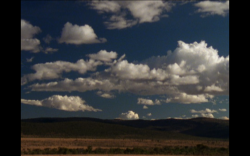
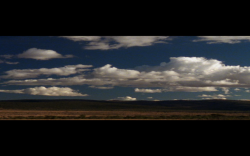
In the first pic, you see some SD footage paused in desktop cinema preview, but the second is it being played (and stretched).
 

Attachments

  • Picture 5.png
    Picture 5.png
    840.1 KB · Views: 125
  • Picture 4.png
    Picture 4.png
    627.2 KB · Views: 91
Oh, sorry, FCP 6.

It's not just that source, but every clip, every sequence that I convert to SD resolutions that it does this.
 
Oh, sorry, FCP 6.

It's not just that source, but every clip, every sequence that I convert to SD resolutions that it does this.

What are you converting from? HD? HDV? it looks like an "anamorphic" check box is checked somewhere. Maybe your SD sequence settings? It only does this in Cinema Desktop Preview, or also in the Canvas window?
 
What are you converting from? HD? HDV? it looks like an "anamorphic" check box is checked somewhere. Maybe your SD sequence settings? It only does this in Cinema Desktop Preview, or also in the Canvas window?

Only in desktop cinema preview.

By "conversion", I mean converting a new sequence. My default sequence settings are HDV 1080i60, but I'm working with some SD stuff currently, so when I open a new sequence and import an SD clip, the dialog stating that the clip does not fit the sequence settings will appear, and I'll have it convert it to match the clip from there.

My other HDV 1080i60 sequences don't do this.
 
Register on MacRumors! This sidebar will go away, and you'll see fewer ads.