
Got a tip for us?
Let us know
Become a MacRumors Supporter for $50/year with no ads, ability to filter front page stories, and private forums.
Other What’s your battery capacity?
- Thread starter chillip
- Start date
- Sort by reaction score
You are using an out of date browser. It may not display this or other websites correctly.
You should upgrade or use an alternative browser.
You should upgrade or use an alternative browser.

tonybarnaby
macrumors 68020
No need to wait til 20%. The easiest thing to remember is to always try to keep it above 20% and remember that frequent top offs are better than deep discharges and recharges.Launch day iPhone 8 Plus - 97% capacity.
I normally only charge my phone when it gets to 30% or less (I try and let it run to 20% before I charge it) and I use both wireless and wired chargers.

No need to wait til 20%. The easiest thing to remember is to always try to keep it above 20% and remember that frequent top offs are better than deep discharges and recharges.
There’s no evidence that keeping it above 20% and frequent top-offs are best...

paulschofield76
macrumors member
There’s no evidence that keeping it above 20% and frequent top-offs are best...
I got my iPhone X a week after launch day. This is how I charge my phone:
Every night I put it on the wireless charger. I always let it go up to 100%. I don’t think I’ve plugged it in more than a dozen times.
During the day I charge it wirelessly on a portable charger. I frequently top my phone up and rarely let it get below around 70%. To be honest my phone gets out on a wireless charger at every opportunity wherever I am.
Here’s my battery health as of now.
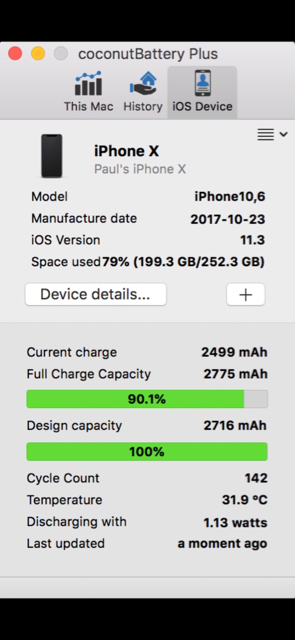
If you check this page from Battery University, there’s a couple of tables and graphs showing that depth of discharge does seem to effect overall battery life.
http://batteryuniversity.com/learn/article/how_to_prolong_lithium_based_batteries
Last edited:

tonybarnaby
macrumors 68020
Batteryuniversity.comThere’s no evidence that keeping it above 20% and frequent top-offs are best...
paulschofield76
macrumors member
My current charge
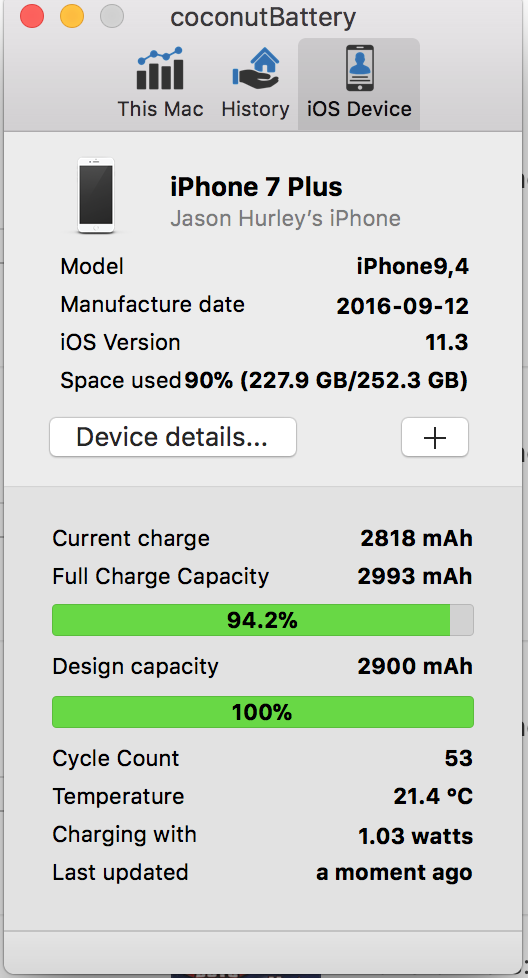
It looks like we’ve both got batteries bigger than they’re meant to be

vine-boating
Suspended
At this point, iOS 11.3 provides that information for iPhones (6 or newer). Aside from that, Coconut Battery, which is a Mac app, provides all kinds of battery details.What app are you guys using to find out this info?
vine-boating
Suspended
Is there a coconut battery app for the iPhone?At this point, iOS 11.3 provides that information for iPhones (6 or newer). Aside from that, Coconut Battery, which is a Mac app, provides all kinds of battery details.
Sorry this is my first iPhone....I've come from Android lol
There isn't really, at least not at this point (aside from what the phone itself reports with what was added in iOS 11.3).Is there a coconut battery app for the iPhone?
Sorry this is my first iPhone....I've come from Android lol
vine-boating
Suspended
Oh where is that under? Battery?There isn't really, at least not at this point (aside from what the phone itself reports with what was added in iOS 11.3).
Is there anything I should keep turned off to save battery life? Like background apps or anything?
Correct, under Battery settings.Oh where is that under? Battery?
Is there anything I should keep turned off to save battery life? Like background apps or anything?
Best overall tips are from Apple https://www.apple.com/batteries/maximizing-performance/
There are all kinds of other ones, like those from https://lifehacker.com/how-to-maximize-your-iphone-battery-life-with-ios-11-1819259970, for example, but plenty of them come at the cost of some features/functionality being potentially sacrificed, so it often depends on what you use on your device, how you use it, and what you can do without.
vine-boating
Suspended
Thank-youCorrect, under Battery settings.
Best overall tips are from Apple https://www.apple.com/batteries/maximizing-performance/
There are all kinds of other ones, like those from https://lifehacker.com/how-to-maximize-your-iphone-battery-life-with-ios-11-1819259970, for example, but plenty of them come at the cost of some features/functionality being potentially sacrificed, so it often depends on what you use on your device, how you use it, and what you can do without.
vine-boating
Suspended

TNThomas
macrumors 6502a
I use 1Blocker (the free one), and it works great!A bit off topic but can anyone recommend a ad blocking app to use with Safari?
https://forums.macrumors.com/threads/what’s-the-adblocker-of-choice-for-ios-11.2095625/A bit off topic but can anyone recommend a ad blocking app to use with Safari?
vine-boating
Suspended
Thanks I o[ted for ad guard.I use 1Blocker (the free one), and it works great!
[doublepost=1524317019][/doublepost]
You know push email on 'mail' and 'gmail' that is constantly search for emails....how do you turn that feature off or switch it to manually...that new emails only update when you actually go on the app?Correct, under Battery settings.
Best overall tips are from Apple https://www.apple.com/batteries/maximizing-performance/
There are all kinds of other ones, like those from https://lifehacker.com/how-to-maximize-your-iphone-battery-life-with-ios-11-1819259970, for example, but plenty of them come at the cost of some features/functionality being potentially sacrificed, so it often depends on what you use on your device, how you use it, and what you can do without.
Push isn't constantly searching for mails, it just sits there an listens for notifications of new mail coming in. That said, you can go into settings and change that to something else (like "manual"): Settings > Accounts & Passeords > Fetch New DataThanks I o[ted for ad guard.
[doublepost=1524317019][/doublepost]
You know push email on 'mail' and 'gmail' that is constantly search for emails....how do you turn that feature off or switch it to manually...that new emails only update when you actually go on the app?
vine-boating
Suspended
what settings do you recommend to have it on to save battery?Push isn't constantly searching for mails, it just sits there an listens for notifications of new mail coming in. That said, you can go into settings and change that to something else (like "manual"): Settings > Accounts & Passeords > Fetch New Data
Is push better or should I get it to manual? Does that mean if its on manual you just have to go on the app for it to update rather than being notified when you have not visited the app?
That's what manual is basically. It really depends on your use as to what's better for you overall. Manual is generally better for battery.what settings do you recommend to have it on to save battery?
Is push better or should I get it to manual? Does that mean if its on manual you just have to go on the app for it to update rather than being notified when you have not visited the app?
Last edited:
vine-boating
Suspended
Okay thanks!That's what manual is basically. It really depends on your use as to what's better for you overall. Manual is generally for battery.
I think I have got it lol
iPhone 6 Plus
Read it & weep
(iOS 9.3.5 - with native coconutBattery)
Battery has only been charged to 100% maybe 8 times since new (when using this app) Never discharged (ever) below 40%.
The battery will outlast the phone for sure.
Lightning port will probably wear out before battery - ha!
View attachment 756988
So you plug it in around 40%? At what percentage do you take it off the charger?