
Got a tip for us?
Let us know
Become a MacRumors Supporter for $50/year with no ads, ability to filter front page stories, and private forums.
When will we see the update to use multiple Apple watches?
- Thread starter Eric5964
- Start date
- Sort by reaction score
You are using an out of date browser. It may not display this or other websites correctly.
You should upgrade or use an alternative browser.
You should upgrade or use an alternative browser.


MacCubed
macrumors 68000
It's coming in iOS 9.3 and Watch OS 2.2(I think that's the version) should be in the next few weeks!i bought a second AW...now have stainless and a sport. I was under the impression that the update to grab and go with multiple watches was coming? Anyone have any idea when we can expect that for general release?
Thank you
EricE
OH-!


Brookzy
macrumors 603
Looking forward to this update, and I'm intrigued how the update will roll out. Because to update watchOS, your Watch must be paired with a phone. So if you have two Watches, which you currently alternate say every month or so, will you have to go through the rigmarole of pairing a Watch, updating it, and then wiping it again, and then repairing it?

SilentDoom
macrumors member
Looking forward to this update, and I'm intrigued how the update will roll out. Because to update watchOS, your Watch must be paired with a phone. So if you have two Watches, which you currently alternate say every month or so, will you have to go through the rigmarole of pairing a Watch, updating it, and then wiping it again, and then repairing it?
I don't think so. Right now you just unpair and pair with the new one. I will assume you will update the one that's connected, then be able to pair with your other one and update. Good question though; we will see I guess!
Brookzy
macrumors 603
That would be the ideal situation, but would be a technical challenge: the iPhone would have to update the Watch to the latest version without the Watch being in a paired state. While the iPhone could cope with that, the Watch, running older software, would not normally communicate with the phone until paired.I don't think so. Right now you just unpair and pair with the new one. I will assume you will update the one that's connected, then be able to pair with your other one and update. Good question though; we will see I guess!

Mac 128
macrumors 603
That would be the ideal situation, but would be a technical challenge: the iPhone would have to update the Watch to the latest version without the Watch being in a paired state. While the iPhone could cope with that, the Watch, running older software, would not normally communicate with the phone until paired.
There are threads on here where this has been demonstrated using the beta developer installs. You pair multiple watches once and then easily switch between them, just like pairing multiple blue tooth devices to a single phone. Not sure what you're getting at with older software on the watch. You will have to update everything to the latest software.
Brookzy
macrumors 603
Indeed. But what I'm thinking is:You will have to update everything to the latest software.
You can't update a Watch without it being paired.
And you can't pair more than one Watch without the Watch already being updated.
Thus, if you have one iPhone and two Watches, as I do, you will have to:
- Update the currently-paired Watch
- Unpair it
- Pair your second watch
- Update your second watch
- Re-pair the original
Mac 128
macrumors 603
Indeed. But what I'm thinking is:
You can't update a Watch without it being paired.
And you can't pair more than one Watch without the Watch already being updated.
Thus, if you have one iPhone and two Watches, as I do, you will have to:
- Update the currently-paired Watch
- Unpair it
- Pair your second watch
- Update your second watch
- Re-pair the original
Oh I see. You may not need to unpair the first watch after you pair it. You may be able to pair the 2nd watch and update it without unpairing the first watch. You may not be able to switch between the two if you don't update the second watch, in other words, you'll always have to pair the second watch again after you switch to the first watch with the updated software -- you won't be able to just switch back without re-pairing the second watch since it won't have the updated software that understands what's happening.
Regardless, it's a one time thing, since the goal is to update all of your watches to use this feature.
Brookzy
macrumors 603
That sounds like a solution. As things are though, iOS 9.3 doesn't let you pair a second Watch unless both Watches are running watchOS 2.2 beta already.Oh I see. You may not need to unpair the first watch after you pair it. You may be able to pair the 2nd watch and update it without unpairing the first watch. You may not be able to switch between the two if you don't update the second watch, in other words, you'll always have to pair the second watch again after you switch to the first watch with the updated software -- you won't be able to just switch back without re-pairing the second watch since it won't have the updated software that understands what's happening.
Regardless, it's a one time thing, since the goal is to update all of your watches to use this feature.

BarracksSi
Suspended
There's a reason why the pairing process makes you view the new watch through the iPhone's camera.

hovscorpion12
macrumors 68040
Looking forward to this update, and I'm intrigued how the update will roll out. Because to update watchOS, your Watch must be paired with a phone. So if you have two Watches, which you currently alternate say every month or so, will you have to go through the rigmarole of pairing a Watch, updating it, and then wiping it again, and then repairing it?
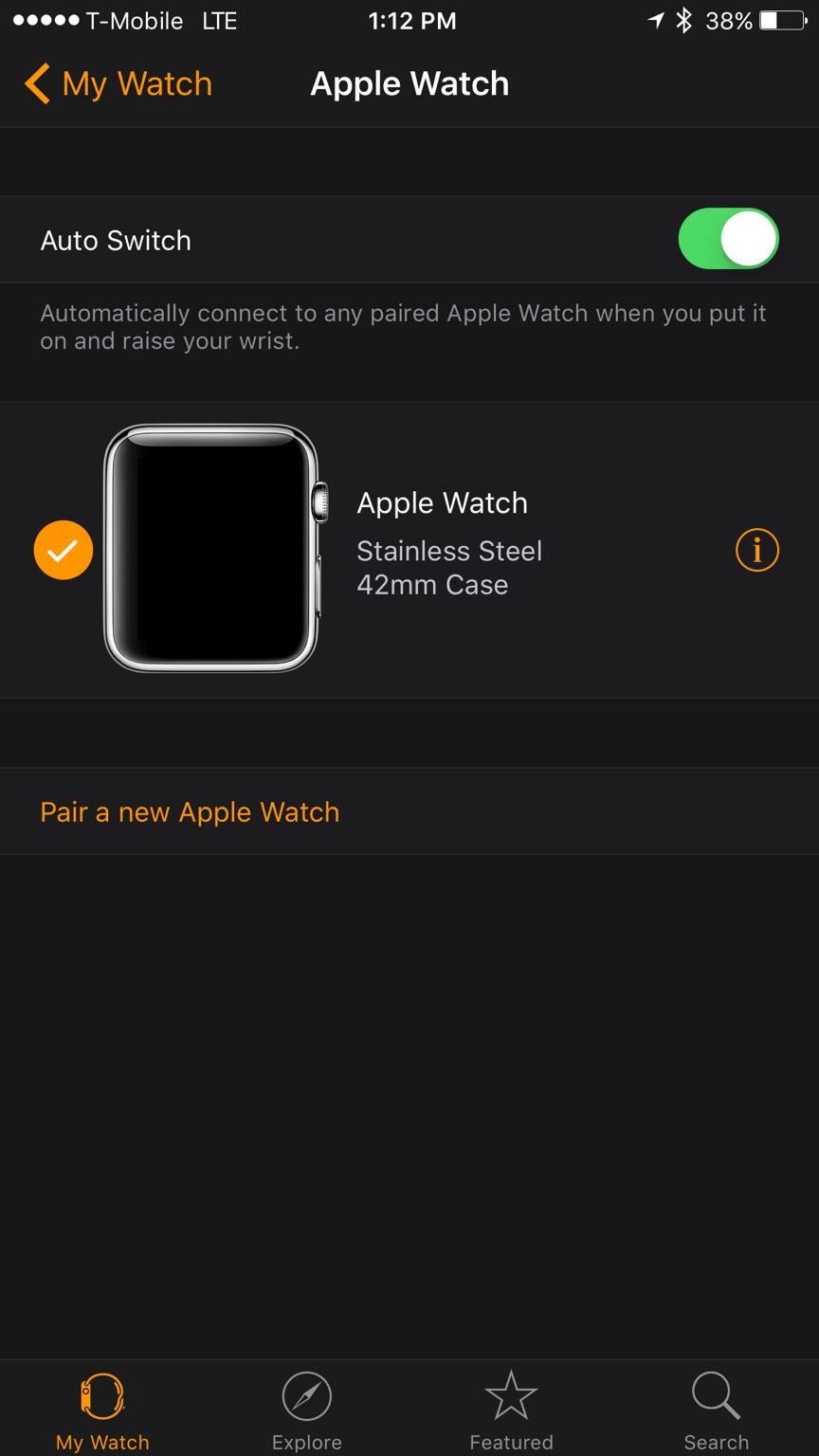
Not really. I have the 9.3 public beta. When iOS 9.3 & WatchOS 2.2 launches, update one watch to OS 2.2. Turn off that watch, then pair the second watch and update that watch to OS 2.2. There is an auto switch toggle (either on or off) that will understand which watch is now paired.
hovscorpion12
macrumors 68040
That would be the ideal situation, but would be a technical challenge: the iPhone would have to update the Watch to the latest version without the Watch being in a paired state. While the iPhone could cope with that, the Watch, running older software, would not normally communicate with the phone until paired.
I have the 9.3 beta with Watch OS 2.2.
Update first watch to OS 2.2. Turn it off. Pair second watch, update to 2.2. You now have two watches paired to an iPhone. Your iPhone will auto switch to whichever watch you turn on and connect.
hovscorpion12
macrumors 68040

Mac 128
macrumors 603
There's a reason why the pairing process makes you view the new watch through the iPhone's camera.
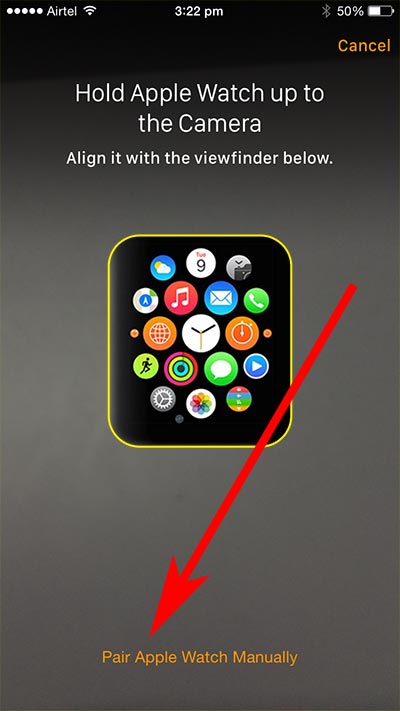
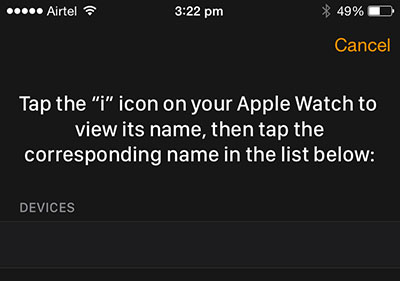
Except it doesn't. You can also pair the Watch manually without using the viewfinder on the camera. But curious to know why you think it does.
Brookzy
macrumors 603
Ah, so turning it off is enough? Good news! Thanks for sharing.I have the 9.3 beta with Watch OS 2.2.
Update first watch to OS 2.2. Turn it off. Pair second watch, update to 2.2. You now have two watches paired to an iPhone. Your iPhone will auto switch to whichever watch you turn on and connect.
Have you actually tried it with two Watches?
hovscorpion12
macrumors 68040
Ah, so turning it off is enough? Good news! Thanks for sharing. Have you actually tried it with two Watches?
Essentially when your watch disconnects. Initially Turn off, Airplane mode..etc are first steps in having two watches paired. Once both watches are paired and running OS 2.2 We have the option for auto-switch between. Both watches can be on. To switch, take off the watch you don't want to wear and put on the watch you do want to wear and it will connect. Similar to now, if you remove your watch it will ask you for your pass code. I don't have two watches, just the one running OS 2.2. I do plan on having a second watch (Sports model for exercise only) after 9.3/WatchOS 2.2 officially launches.
Last edited:
BarracksSi
Suspended
Each time I've done it, the iPhone app goes, "Place your Watch in the camera viewfinder."Except it doesn't. You can also pair the Watch manually without using the viewfinder on the camera. But curious to know why you think it does.
Mac 128
macrumors 603
Each time I've done it, the iPhone app goes, "Place your Watch in the camera viewfinder."
Much like Touch ID, it is a convenience not a requirement. Curious what purpose you thought it served.
https://support.apple.com/en-us/HT204505
BarracksSi
Suspended
I thought it helped ensure the iPhone would be paired with the specific watch on hand.Much like Touch ID, it is a convenience not a requirement. Curious what purpose you thought it served.
When the OP asked how multiple pairings would be done, I thought, "Well, duh…"