Hey,
I've had some sensor problems with my iMac and I have written a small python script to keep the fans from running at full speed. Of course I want to make sure that the fans aren't running too slow!
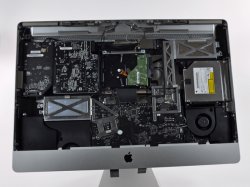
I have a 2009 27" iMac (bought it just when they came out). These iMacs have 3 fans: ODD fan, CPU fan and HDD fan.
I was wondering which one of these 3 affects the GPU? I have tried to google this question and I also tried to find where the GPU is located alas with no result. Hopefully someone can give me the correct answer.
Thank you.
I've had some sensor problems with my iMac and I have written a small python script to keep the fans from running at full speed. Of course I want to make sure that the fans aren't running too slow!
I have a 2009 27" iMac (bought it just when they came out). These iMacs have 3 fans: ODD fan, CPU fan and HDD fan.
I was wondering which one of these 3 affects the GPU? I have tried to google this question and I also tried to find where the GPU is located alas with no result. Hopefully someone can give me the correct answer.
Thank you.
 hope I helped!