Become a MacRumors Supporter for $50/year with no ads, ability to filter front page stories, and private forums.

aespana

macrumors 6502
Original poster
Hello guys! I was wondering what or which Google's app and services do you use.

Just wanted to discuss about what services and apps from google do you use. In my case, I have a mix:

  1. Browser: I use Firefox, on Android and desktop. I like the simplicity of Chrome and the integration with the system but man, you need a DNS to block ads and that always make the Pixel go crazy with the Wifi. I don't know why but if I use a DNS like NextDNS or Adguard, I got random disconnections of Wifi. This happen on my actual Pixel 9a and before with the 5. Firefox still support Ublock Origin so, a point for Firefox.
    I use Chrome for my work.
  2. Mail: I use Posteo as my main mail service. I keep Gmail because I just have too many services linked to my Gmail account (some bank accounts for example). I use Thunderbird as email app. Gmail app works flawlessly with gmail but not with Posteo, it keeps re sending notifications of already erased emails.. it is a weird behavior.
  3. Google Photos: It works perfect. I know, I know, the privacy thing and all that topic but it just works and sometimes, you only needs that. Also, it is integrated to the Camera app so, if you take a photo, you can go to the gallery directly. I don't like that because if you disable Google Photos, you can't go to another gallery app after taking a photo..
  4. Google Calendar, Maps, Waze: I'm not a super user of the calendar but again, it just works the app and the service. Maps for restaurants or places and Waze for Navigation. There are not other options viable for me.
  5. Youtube: should I say more?
  6. Youtube Music: I paid for Youtube Premium so Music is included. Good service yeah, and I don't need to pay for another music service.
  7. Wallet: Yes, Google wallet works fine, thats all.
  8. I don't use Gemini on my personal device, only for my work to review some emails before sending them but thats all
So, what do you use from Google guys?
 
I use Vivaldi over Chrome because it does the bottom tab bar better. But I use every other Google app/service. Thinking of moving off the Pixel Weather app after the last winter storm, but haven't had time to research them all.

As far as YouTube Premium goes:

 
  • Like
Reactions: MarkX and aespana
### Personal
YouTube means I have a Google account, and my Gmail account is quite old and I still use it because I can't be bothered to move all the accounts and services tied to it to a different address. Having said that, a lot of the emails that are sent to Gmail get forwarded to my Proton inbox. I dropped Google calendar for iCloud. Early last year I used takeout to import my Google photos library to Immich.

I used to use Google Drive for sharing files with people, but I recently stopped paying for the 200GB plan and let my Google storage drop back to baseline. I can share things with Proton Drive or with magic-wormhole for my more techy friends.

### Work
My office primarily uses Microsoft services, but that does mean we use Edge by default. I use Chrome as a backup browser. We actually just recently dropped support for Firefox on our work network.

****

Thinking of moving off the Pixel Weather app after the last winter storm, but haven't had time to research them all.
I researched weather apps on the iOS-side a few years ago and , man, it's a mess. A bunch of the weather apps that were available at the time were subscription-based. I did use Weathergraph for a long time but after two years the precipitation notifications progressively became less and less accurate. I thought there may have been problems with the source I was using so I tried to look up more detailed comparisons between sources like Foreca, OpenMeteo, and Pirate Weather and came up dry. Maybe Android is better in this case?
 
  • Like
Reactions: aespana
The only thing I don't use is chrome and Google password manager.
Same here. I still don’t understand how Google can create such a good desktop browser but such a hot garbage mobile browser. I use Samsung Internet for my browser on Android and 1Password for password management since I need good cross platform support with family sharing.

I use Gmail but via the Spark email app.
 
Same here. I still don’t understand how Google can create such a good desktop browser but such a hot garbage mobile browser. I use Samsung Internet for my browser on Android and 1Password for password management since I need good cross platform support with family sharing.

I use Gmail but via the Spark email app.
I'm using brave browser because I didn't think Samsung Internet worked with other password managers like bitwarden which is what I'm using. I might have to try it because I really like Samsung Internet.
 
Basically everything since I'm a Pixel person. The only exceptions are Spotify instead of YT Music and Niagara instead of the Pixel Launcher.
 
Authenticator, Contacts (sync with macOS Contacts), Docs, Files, Gmail (Bluemail Android app), Keep, Maps, (some) Photos and Wallet.
 
On my iphone I use Google Calendar, Meet, News, Gmail, Maps, Photos, Chrome, and Search. I use more Google apps on my iphone than I do Apple apps thus making it really easy to switch back and forth between the two platforms.
 
On my iphone I use Google Calendar, Meet, News, Gmail, Maps, Photos, Chrome, and Search. I use more Google apps on my iphone than I do Apple apps thus making it really easy to switch back and forth between the two platforms.
Yeah, I think Google is better to do that. I currently use Firefox and Bitwarden but I'm getting a PC with Chorme OS Flex so I'm thinking on moving to Chrome and its password manager (that works perfect on Android).
 
  • Like
Reactions: ab2c4
Phone app, Messages, Keep, Maps, Chrome, Calendar, Translate, Google Assistant. I find both Mail apps a toss up because they're both good.
 
  • Like
Reactions: aespana
Google:
Calendar, Camera, Contacts, Home, Keep, Maps, Messages, Translate, Wallet and Weather.

Alternative:
Bitwarden, Cx File Explorer, Firefox + uBlock, Fossify Gallery, Outlook, Poweramp and YouTube (Morphe patched).
 
Last edited:
I use Floorp on my computer, but Firefox as my browser on my Iphone. The only google services I use extensively are Gmail, and Google Docs, as well as Google Translate, other than Youtube.
 
  • Like
Reactions: aespana
I use Floorp on my computer, but Firefox as my browser on my Iphone. The only google services I use extensively are Gmail, and Google Docs, as well as Google Translate, other than Youtube.
Do you have a way to block adds on Firefox for iPhone? I like how it works but man, impossible without an ad blocker.
 
Do any of you disable Google services on Android and use third party alternatives?
I tried with Calendars and Contacts sync. I use Posteo email service that also has calendar and contacts sync but you need to use something like Davx 5 since it doesn't have native integration (as the iPhone for example). I don't like to use that so I stayed with native sync.

I don't use Google app, neither Gemini so I just disabled them. Also, Chrome is disabled since I use Firefox. Also, since I use Posted, I disabled gMail app and use thunderbird alongside with my Gmail email

I'm with a minimal use of Google Drive but don't know where to move my literally only file I have in the system (my personal budget, I use it there because Google sheets that I can use anywhere). Do you know a trust service to move? I don't care about the amount of storage. Sadly Posteo doesn't has a cloud service for storage.

One can say anything related to Google but man, their services works wonderful
 
Do you have a way to block adds on Firefox for iPhone? I like how it works but man, impossible without an ad blocker.
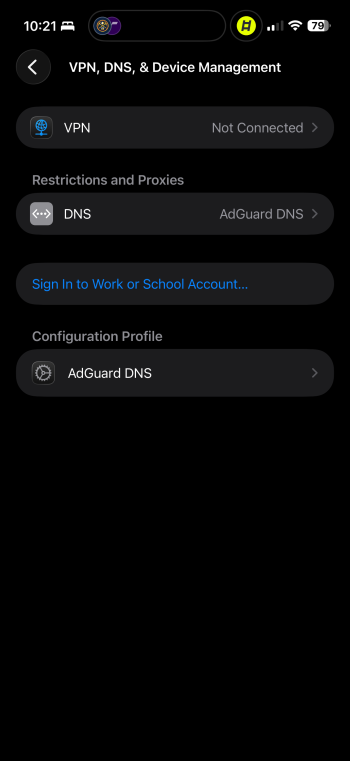
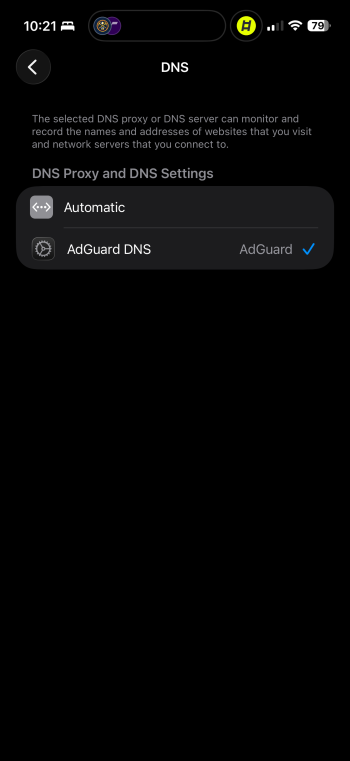
Use the instructions here to configure AdGuard DNS manually.

Go to the Option 2 section, hit the arrow to expand options and select iOS, select the 1st box for Default Server and download the configuration profile.

Once you install the profile, you have device wide content blocking. Your Profile settings should look like this. You can switch over to Automatic setting if you need to disable the content blocking.

IMG_0632.png
IMG_0633.png
 
  • Like
Reactions: Heat_Fan89
Use the instructions here to configure AdGuard DNS manually.

Go to the Option 2 section, hit the arrow to expand options and select iOS, select the 1st box for Default Server and download the configuration profile.

Once you install the profile, you have device wide content blocking. Your Profile settings should look like this. You can switch over to Automatic setting if you need to disable the content blocking.

View attachment 2609283
View attachment 2609282
I forgot to mention I am a pixel user and not iOS.
 
Google search, of course (I have it easily accessible in PopClip)
Google Drive 2TB plan
Youtube
Gmail
Google Contacts (reflecting mac adressbook, because it often loses avatars)
Blogger (to have a simple 'home page' and sharing Google Drive files, as I don't use Facebook etc. Very nice.)
Google Translate (Easily accessible in PopClip)
Google Earth sometimes
That's about it.
 
Last edited:
Sorry my confusion.
Blocking this stuff on android is a nightmare unlike when I was on iOS which was fairly straightforward.
You can essentially do the same thing on Android. I point my Pixel 10 Pro Fold at a public AdGuard DNS as well and it has the same effect. Don’t have my Pixel in front of me at the moment but will share later if I remember. 😉
 
Register on MacRumors! This sidebar will go away, and you'll see fewer ads.