Become a MacRumors Supporter for $50/year with no ads, ability to filter front page stories, and private forums.

knew2mack

macrumors regular
Original poster
Hi everyone

Ok I am new to computers as a whole. I read somewhere that in is vital to make sure to 'quit' everything instead of just clicking on 'x'....then I read that it's best to keep 'activity monitor' as certain levels.

I do NOT understand most of what I have read. Could someone please tell me if it's ok to quit every process in activities monitor? What are the ones that are vital to my machine running properly, quickly and at a relatively cool temperature??

I am just afraid that if I 'quit' the wrong thing, my computer will stop running and performing as it should.

Please please help me figure this out. Would it be better if I took a screenshot?

I appreciate any & all of the help you can provide me with

Dawn
 
I don't think you need to quit everything. I leave Mail, Safari, and iTunes running all the time. I do quit other apps that I'm not using.

Just click on the App name next to the apple in the upper left hand corner of the screen. Then click quit at the bottom of the menu. Alliteratively, press cmd + Q.
 
To quit an application (program / software) in Mac OS X, either use CMD+Q as keyboard shortcut or go to the Menu Bar and select the name of the program (Safari for example) and choose QUIT.

Quit.jpg


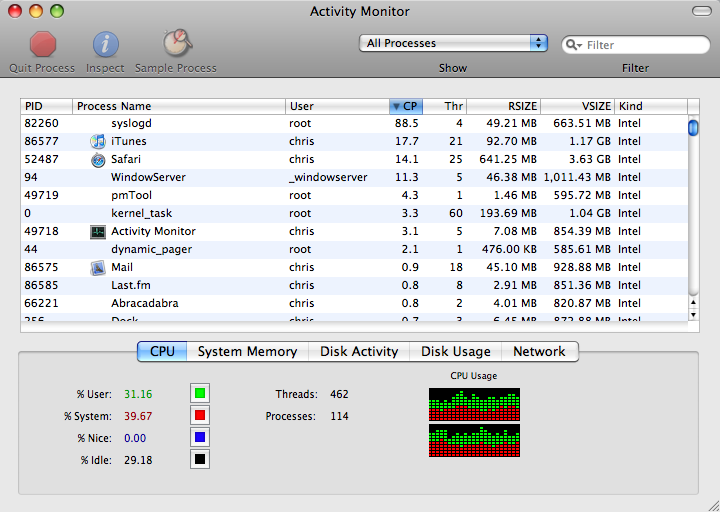
That is enough. You don't need to quit running processes in Activity Monitor, only if they stop responding.

activity_monitor_1.png


Also have a look at the following links, as the information presented there might be helpful in your future endeavours into Mac OS X and could clear up initial confusion and may even prevent harm to your system or your files.

4560602131_3d5b4f34c2_o.jpg


4561230638_3ced5b19a3_o.jpg

4561230714_d6e9a40397_o.jpg

 
The Dock notifier should be enough to now when an application is or is not running. I don't see why you'd need to go as far as to use Activity Monitor for the majority of applications and instances.
 
I might have posted the answer first, but you win with all the pictures. 😛

I might have though about the answer first thought 😛 , as when I made my first post, I shortly thought about adding add, but while looking for an image for Activity Monitor, I forgot it.

At least it was mentioned.

Btw, do you sometimes experience occurrences of even FORCE QUIT not reacting anymore and Activity Monitor or Terminal are the two options left? It happened from time to time in Mac OS X 10.5, but I think Apple took this feature out in 10.6. Hmm, Activity Monitor feels more lonely now.
 
That is enough. You don't need to quit running processes in Activity Monitor, only if they stop responding.

OP, there's no need to quit anything, unless you're having a lot of page outs and your computer is running slow. The only reason you might need to quit a process in activity monitor (besides if it stops running) is if the %CPU is >20 or so constantly (definitely if it is above 50%). Activity monitor is your friend. Finder is one process that can go wonky at times.
 
You mean like 96% CPU use? For me it helps just to close all windows via CMD+OPTION+W, and Finder is back to normal.

I would've gone into more detail, but when Finder does that, you usually have to delete the plist file or change the show icon preview and calculate all sizes under show view options (didn't want to confuse the OP).
 
Btw, do you sometimes experience occurrences of even FORCE QUIT not reacting anymore and Activity Monitor or Terminal are the two options left? It happened from time to time in Mac OS X 10.5, but I think Apple took this feature out in 10.6. Hmm, Activity Monitor feels more lonely now.
I experienced this a few times when I managed about 50 Macs in college. Things went wrong a lot with that many machines and so many different (read "technically challenged") users.
 
Btw, do you sometimes experience occurrences of even FORCE QUIT not reacting anymore and Activity Monitor or Terminal are the two options left? It happened from time to time in Mac OS X 10.5, but I think Apple took this feature out in 10.6. Hmm, Activity Monitor feels more lonely now.
There's a reason behind Force Quit dying as well. I havea vague memory that it involves switching over to or from Finder.
 
Register on MacRumors! This sidebar will go away, and you'll see fewer ads.