
Become a MacRumors Supporter for $50/year with no ads, ability to filter front page stories, and private forums.

kramer67

macrumors newbie
Original poster
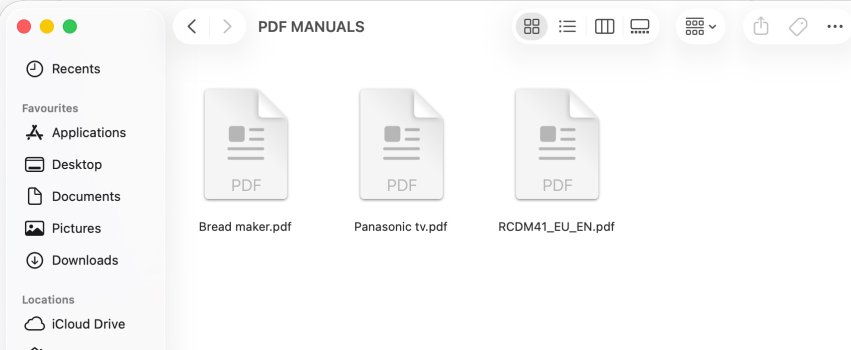
My Mac is showing generic white file icons (mostly PDF) instead showing the app they are associated with.

I believe this may be an issue with earlier versions of Tahoe, however I have updated to 26.5 but this 'problem' still persists.

I have trawled quite a few forums and tried all the suggestions but haven't had any success so far.

Has anyone managed to solve this or is it a case of waiting for a fix with the next update.
 

Attachments

  • Screenshot 2026-05-15 at 18.38.jpeg
    Screenshot 2026-05-15 at 18.38.jpeg
    85.7 KB · Views: 22
  • Like
Reactions: Starfia
Finder should query Launch Services for the application responsible for opening the file and then use that application's icon for the file.

Do you have many file types exhibiting this behavior?
 
Hi, kramer67 –

Fun question. Here's what comes off the top of my head:

I know that macOS sometimes chooses app-related icons which include imagery from the associated app's icon. (I'm guessing you meant "instead of showing the app they are associated with," and expected to see that kind of icon. Please correct me if I'm wrong.)

The system also sometimes generates richer icons for some common file types, such as plain text files, movie files, and indeed PDFs, which reflect their actual contents.

I'm using Tahoe 26.5 on my own Mac. I've checked my own folder of product manual PDFs. Some of the files momentarily show that generic white icon, but they're rapidly replaced with icons that show their contents (such as the front page of the document as displayed when open), superimposed by a dog-eared corner.

So, at the least, it seems clear the generic white icons don't represent a macOS 26.5 bug that affects all users.

I believe the rich icons are generated by "Quick Look generators" – part of the same architecture that provides previews for Quick Look. In Tahoe, those are found at "System > Library > QuickLook". So I'm wondering whether it's possible that Quick Look isn't properly being invoked, or the generator is somehow missing, et cetera.
 
Finder should query Launch Services for the application responsible for opening the file and then use that application's icon for the file.

Do you have many file types exhibiting this behavior?
Mainly PDF's and some old MS office docs from my windows PC, but my Libreoffice files all look fine.
 
Hi, kramer67 –

Fun question. Here's what comes off the top of my head:

I know that macOS sometimes chooses app-related icons which include imagery from the associated app's icon. (I'm guessing you meant "instead of showing the app they are associated with," and expected to see that kind of icon. Please correct me if I'm wrong.)

The system also sometimes generates richer icons for some common file types, such as plain text files, movie files, and indeed PDFs, which reflect their actual contents.

I'm using Tahoe 26.5 on my own Mac. I've checked my own folder of product manual PDFs. Some of the files momentarily show that generic white icon, but they're rapidly replaced with icons that show their contents (such as the front page of the document as displayed when open), superimposed by a dog-eared corner.

So, at the least, it seems clear the generic white icons don't represent a macOS 26.5 bug that affects all users.

I believe the rich icons are generated by "Quick Look generators" – part of the same architecture that provides previews for Quick Look. In Tahoe, those are found at "System > Library > QuickLook". So I'm wondering whether it's possible that Quick Look isn't properly being invoked, or the generator is somehow missing, et cetera.
I just did a quick search and one suggestion was to open the Activity Monitor, search for "quicklook," and force quit quicklookuiservice. I did this then restarted the Mac and opened a folder containing some PDF's. Interestingly the preview app displayed briefly then defaulted to the white icons again.
 
Finder's view options has a setting to show document previews. Quicklook might be involved if you have that turned on. If you have that off then Quicklook should not be involved; the icon of the associated application should be used. If Launch Services has nothing registered for the file (or the registration is in need of repair), then some system default icon will be shown.

One suggestion I saw was to choose one of those PDF files, right click -> Get Info. And then in the "Open with:" section, choose Preview (or whatever you use for the kind of document), and click on the "Change All..." button. I've read that will redo the registration with Launch Services.

If the problem is more pervasive, then a reset of Launch Services is in order.

"lsregister -kill -r -domain local -domain system -domain user"

lsregister is probably a file that's not on your path. It's here:

/System/Library/Frameworks/CoreServices.framework/Versions/A/Frameworks/LaunchServices.framework/Versions/A/Support/lsregister.

You might need "sudo" in front of that.
 
Register on MacRumors! This sidebar will go away, and you'll see fewer ads.