
Got a tip for us?
Let us know
Become a MacRumors Supporter for $50/year with no ads, ability to filter front page stories, and private forums.
Who else is still using a 2017 iMac?
- Thread starter Feek
- Start date
- Sort by reaction score
You are using an out of date browser. It may not display this or other websites correctly.
You should upgrade or use an alternative browser.
You should upgrade or use an alternative browser.
If you look carefully at Luke Miani’s YT video you’ll see his conversion is only running at 8 bits YUV.
5K iMac panels can do better than that , and display RGB 10bit - see the second to last @kalsta link, or the MacRumors thread I posted.
5K iMac panels can do better than that , and display RGB 10bit - see the second to last @kalsta link, or the MacRumors thread I posted.
Last edited:

Does anyone have experience using EGPU together with Mac on Intel? Can EGPU work in games on the internal display? Are there any restrictions in the choice of OS?
I was afraid to install i7 7700k in 21.5 2017 because of overheating and I was wrong.
Games do not often use multithreading, the processor frequency is more important. I think that there would be more benefit from 7700k working at a higher frequency with one or two cores.
I did not succeed. And the i7 7700 processor is weak and Radeon Pro 560 with 4 GB of memory is not enough (PCI-e x 8). The last chance to use EGPU, at least Vega 56. This card should be supported, I think.
But if it can only work on an external monitor, there will be no point in this.
I was afraid to install i7 7700k in 21.5 2017 because of overheating and I was wrong.
Games do not often use multithreading, the processor frequency is more important. I think that there would be more benefit from 7700k working at a higher frequency with one or two cores.
I did not succeed. And the i7 7700 processor is weak and Radeon Pro 560 with 4 GB of memory is not enough (PCI-e x 8). The last chance to use EGPU, at least Vega 56. This card should be supported, I think.
But if it can only work on an external monitor, there will be no point in this.
My 2017 5K is used everyday. I would like to upgrade but have run into one of the disadvantages of the all in one system. I love the 27" 5K display. My wife has a 24" m1 iMac which runs very well but I like having the larger display. If I could somehow use this display for a newer Mini or Studio I would but I hate to fork out for another display when this one is so good.
Exactly!
👀
I've been on the market for a 5k display and ended up "settling" for an iMac 27" 2017 16GB 512GB SSD instead of just hooking up my MacBook Pro M3 Pro to a monitor. I'll keep using my MBP for more demanding tasks and use the iMac for basic day to day work stuff (mostly boring admin) and my home use (YouTube, light vid editing, overall web browsing, etc).
Paid $500 for it, and it is a much better overall deal compared to any 5k monitor around. Samsung and Dell 5k monitors are going for decently more. It is in fantastic condition too. No complaints at all about purchasing an iMac 2017 in 2024.
When it stops supporting any form of updates, I'll try to convert it into a Mac Mini monitor as shown above 🫣
Paid $500 for it, and it is a much better overall deal compared to any 5k monitor around. Samsung and Dell 5k monitors are going for decently more. It is in fantastic condition too. No complaints at all about purchasing an iMac 2017 in 2024.
When it stops supporting any form of updates, I'll try to convert it into a Mac Mini monitor as shown above 🫣
Dc2006ster
macrumors 6502
Interesting but way beyond my skills.Paid $500 for it, and it is a much better overall deal compared to any 5k monitor around. Samsung and Dell 5k monitors are going for decently more. It is in fantastic condition too. No complaints at all about purchasing an iMac 2017 in 2024.
When it stops supporting any form of updates, I'll try to convert it into a Mac Mini monitor as shown above 🫣
i think we have the same, or very similar, model. OS updates stopped at Ventura but I do get the occasional, e.g. yesterday, Safari or security updates.
Yes, an eGPU can accelerate games rendered on the internal display, but there is something like an additional 25% performance penalty to render on the internal display vs a directly external monitor due to thunderbolt overhead. Just plan on buying a card that is a step or two beefier/faster that what you think you need/want.Does anyone have experience using EGPU together with Mac on Intel? Can EGPU work in games on the internal display? Are there any restrictions in the choice of OS?
I was afraid to install i7 7700k in 21.5 2017 because of overheating and I was wrong.
Games do not often use multithreading, the processor frequency is more important. I think that there would be more benefit from 7700k working at a higher frequency with one or two cores.
I did not succeed. And the i7 7700 processor is weak and Radeon Pro 560 with 4 GB of memory is not enough (PCI-e x 8). The last chance to use EGPU, at least Vega 56. This card should be supported, I think.
But if it can only work on an external monitor, there will be no point in this.
Supported cards with regard to MacOS:
MacOS 10.15.1 or newer: Vega 56, Vega 64, Radeon VII, RX 5700, RX 5700 XT
MacOS 11.4 or newer: RX 6800, RX 6800 XT, RX 6900 XT
MacOS 12.1 or newer: RX 6600, RX 6600 XT
(The RX 6600 isn't on Apple's eGPU support list, but it is the same chip family/generation/driver as the 6600 XT and has been reported as working by other eGPU Mac users)
Edit:
Assuming you plan to use OpenCore. 2024 is probably the wrong time to invest in an eGPU for a mac that will be stuck on Ventura. Honorable mention for getting a new console instead.
Last edited:
The way I look at it, at that point if I screw it up, it'll have been a basically 10 year old device without much resale value, so might be worth the effort to keep the amazing 5K display.Interesting but way beyond my skills.
i think we have the same, or very similar, model. OS updates stopped at Ventura but I do get the occasional, e.g. yesterday, Safari or security updates.

CaptTee
macrumors member
I have a 2007 Mini I use as a media server for my AppleTV and a 2007 27" iMac I use for backups (it has backups of my media files and I also use it when my new Mini is busy with an update or something).Just wondering who else is using their 2017 27" iMac?
I bought mine back in August 2017 and specced it to the best available at the time, the 4.2GHz quad core i7 with the 8Gb Radeon Pro 580 and a 1Tb SSD.
I retired it from my radio shack last year when I got a Mac Studio and moved it to my office where it's been running perfectly since then and because I need Windows 10 for a minor task (don't ask), I've just rebuilt it so I can set up a dedicated partition. It's never had an OS rebuild since it was initially installed, I always just upgrade the OS when the new version comes out.
The latest version this will run is Ventura.
View attachment 2329875
Obviously, it's nowhere near Apple Silicon speeds but for what I need, in the office, it's absolutely perfect.
The SSD isn't bad, speed wise.
View attachment 2329879
And despite it being a good few years old, there's plenty of life left in this SSD.
View attachment 2329883
View attachment 2329884
It'll be a sad day when I have to retire this old beast 🙂
Intrigued to know how many people are still using a 2017 iMac and whether you have any immediate plans to change.
Lost my 1984 Mac in a divorce in 1986. Wish I still had it for nostalgia. It would probably still work.
Currently, my wife has the 2014 27" iMac on High Sierra and I have the 2017 27" iMac on Monterey. We use them everyday just fine. I also have Parallels to run WinXP and Win10 applications. I'm not sure WinXP would be possible with an "M" mac.
When they die, I'll look into a 27" "M" iMac. Oh, that's right. The "geniuses" at Apple don't make the iMac anymore.
Currently, my wife has the 2014 27" iMac on High Sierra and I have the 2017 27" iMac on Monterey. We use them everyday just fine. I also have Parallels to run WinXP and Win10 applications. I'm not sure WinXP would be possible with an "M" mac.
When they die, I'll look into a 27" "M" iMac. Oh, that's right. The "geniuses" at Apple don't make the iMac anymore.
jacksactual
macrumors newbie
Was using my 2017 iMac until about a week ago. Traded it in to Apple. Got a Studio Display and connected it to MBA 15. I will miss that iMac 🙁
There are no problems with updating Mac OS and I use OCLP (thanks to the developers). Patches are only needed for Wi-Fi. Since it is connected with a cable, patches can be omitted. It works easier in Sonoma than in Sequoia. I think I need to go back to Sonoma. I am like a capricious child now - I want something, but I myself do not understand what I want. Everything is actually not bad. I can play old games on it. But not all kinds. New games are released only for Apple Silicon. The video card shows good results in tests. The processor is not pleasing. I will still try 7700k. If the power supply and the VRM of the processor on the system board can handle it. I will not do anything else with it. I do not see the maximum load on this processor and do not understand what is happening and what is the reason.Assuming you plan to use OpenCore. 2024 is probably the wrong time to invest in an eGPU for a mac that will be stuck on Ventura. Honorable mention for getting a new console instead.
Sorry for complaining here. The topic is positive, I am the only one who is not happy with something.

Did they actually give you anything for it? I'm surprised it still has trade in value.Traded it in to Apple

Geoff777
macrumors 6502
My 2017 27" iMac is sat next to the Studio and Studio Display I bought earlier this year and I'm using both at the same time with Universal Control, which is pretty cool (though would probably work better with Apple mouse & keyboard rather than the Logitech MX units I'm using).
It's showing age, sometimes screen goes black for a second or so, the ports at the back sometimes don't work until I do a restart but otherwise it's still good.
I can't bring myself to sell it as I am rather attached to it, like an old friend!
It's showing age, sometimes screen goes black for a second or so, the ports at the back sometimes don't work until I do a restart but otherwise it's still good.
I can't bring myself to sell it as I am rather attached to it, like an old friend!
My 2017 27" iMac is sat next to the Studio and Studio Display I bought earlier this year and I'm using both at the same time with Universal Control, which is pretty cool (though would probably work better with Apple mouse & keyboard rather than the Logitech MX units I'm using).
It's showing age, sometimes screen goes black for a second or so, the ports at the back sometimes don't work until I do a restart but otherwise it's still good.
I can't bring myself to sell it as I am rather attached to it, like an old friend!
I love it. I have the same setup though I'm using Synergy instead of Universal Control. I'm using a CoolerMaster mechanical keyboard and Logitech mouse.

Andy5Kimac
macrumors member
I still have my 2017 5k iMac with maxed out ram, 1TB NVME SSD, added a 2TB SATA SSD as secondary internal drive, and Radeon Pro 580. Also added a RX 6900XT EGPU set up to it. It’s a rendering beast. It cut my render/export times by more than half. Tested a 14 min 4k 60 video edit shot from my Canon R6ii. Did color grading, stabilization, sharpening, 3D transitions and titles, multiple layers to the footage and it exported in 7.5 minutes. Playback & scrubbing through the timeline was smooth without dropping frames, without pre rendering and without using proxies with the 6900XT. I also did the BruceX 5k benchmark my 2017 iMac stock internals did it in 12.33 seconds. With the RX 6900XT it did it in 6.23 seconds. Also game on it. This was my previous set up.
I replaced my 2017 iMac with a top spec 2020 5k iMac, but I still have my 2017 and it is still very capable today.
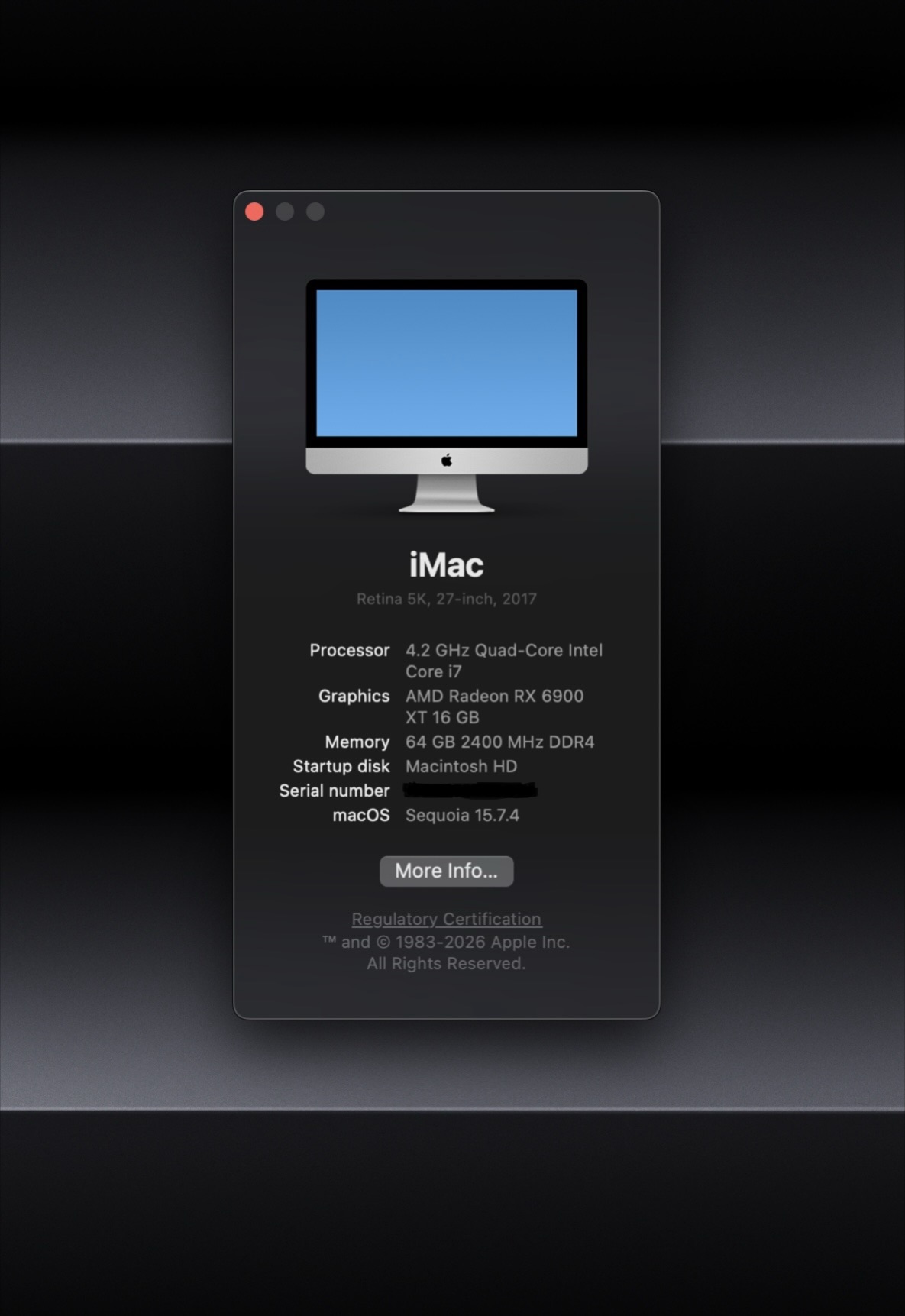
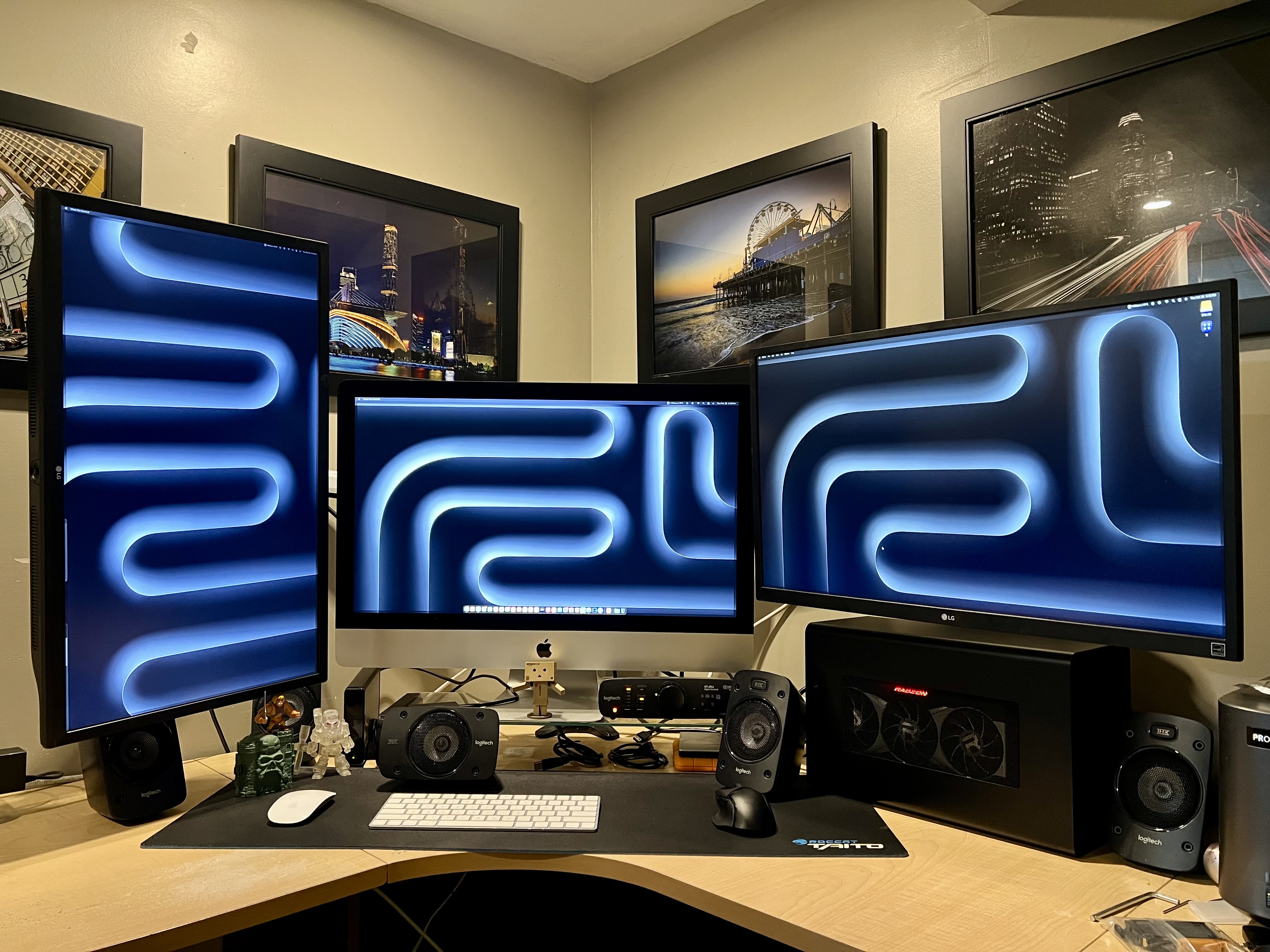
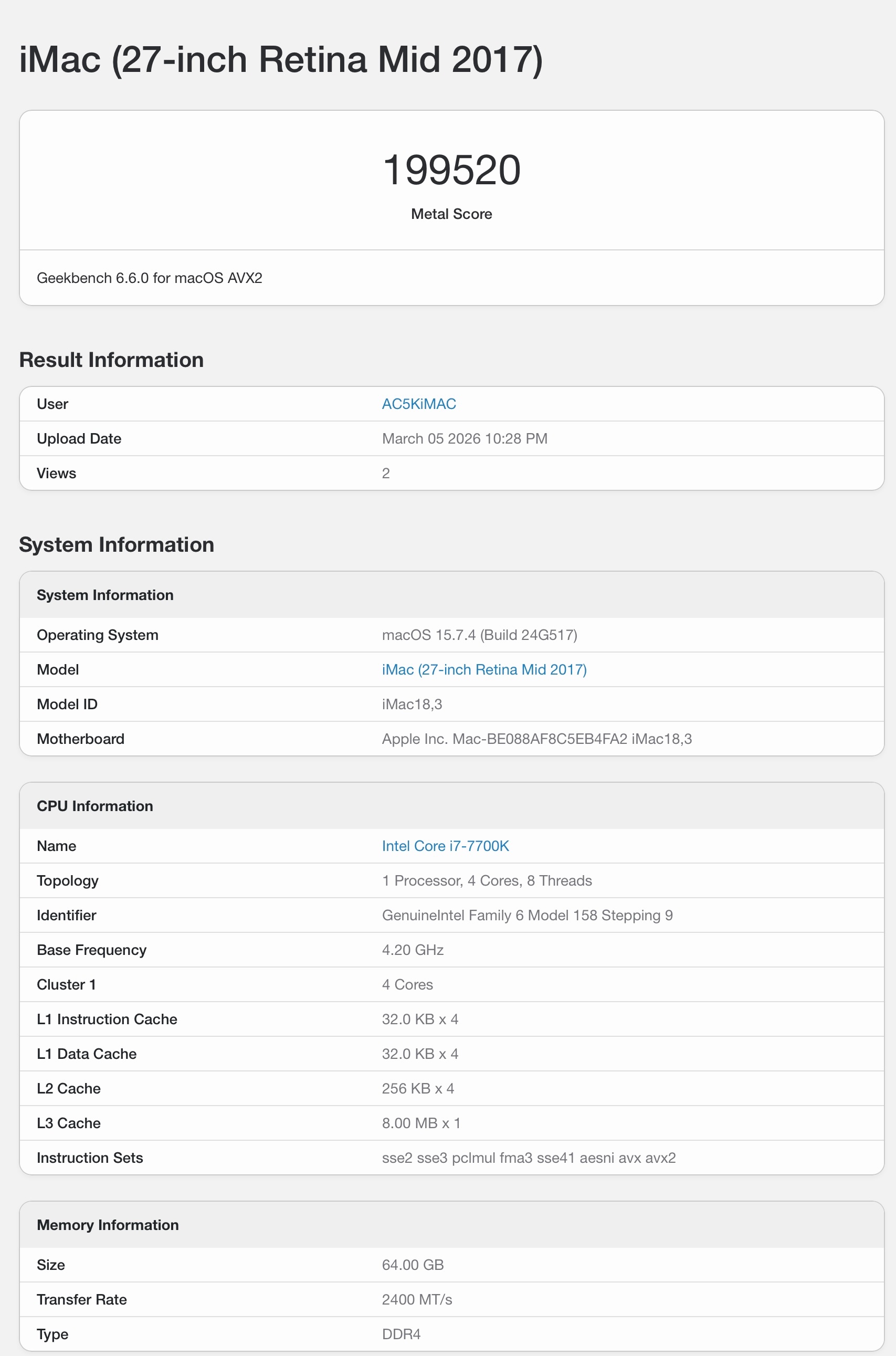
I replaced my 2017 iMac with a top spec 2020 5k iMac, but I still have my 2017 and it is still very capable today.
Last edited:

benzqn
macrumors newbie
I bought a Mac Studio m4 max. My 2017 5k max with 32gb is now a linux workstation. I just love the screen and linux runs perfectly.
Dc2006ster
macrumors 6502
“I just love the screen” . I think all of us 2017 iMac 5k owners have the same feeling and is why, despite the benefits of better overall performance and OS updates, I have not upgraded.
“I just love the screen” . I think all of us 2017 iMac 5k owners have the same feeling and is why, despite the benefits of better overall performance and OS updates, I have not upgraded.
I keep a lookout locally for 2020 iMac 27s and even iMac Pros and there has been very little inventory on Craigslist and Facebook keeps blocking attempts for me to create an account. OWC has them sometimes but the prices are insane.
Dc2006ster
macrumors 6502
I’m not surprised. People are hanging on to them. Despite mine getting a bit sluggish and not being able to handle the latest versions of my favourite apps, I am loathe to get rid of it. So far it still meets my nonprofessional, hobbyist needs albeit with the occasional frustrating slow down.I keep a lookout locally for 2020 iMac 27s and even iMac Pros and there has been very little inventory on Craigslist and Facebook keeps blocking attempts for me to create an account. OWC has them sometimes but the prices are insane.
Like many, I really love my 1TB SSD iMac 2017 27" 5K. But, I only have 24GB memory and just looked into buying more. Holy smoke, forget that with AI vacuuming up memory and driving up prices.
But recently I bought TurboTax 2025 and when I ran the installer I got this message:
"You can’t use this version of the application “TurboTax 2025.app” with this version of macOS.", i.e. Ventura.
What the ....? TurboTax only has to add, subtract, multiply and divide. So to do my taxes, much less update a lot of my photo editor apps, I need to spend $$$ on a new M Mac and monitor. Or do I? Enter OpenCore Legacy Patcher (OCLP).
OLPC is a free app that spoofs the 2017 iMac at boot to make Apple think it's a newer machine that can run Sequoia. By the way, Sequoia as it turns out runs just fine, if not better than Ventura, on the 2017 iMac.
So research time with YouTube to find out how to actually implement OCLP Sequoia. Two options, you can totally replace your Ventura with Sequoia, or install Sequoia on an external disk and run a dual boot system, both Ventura and Sequoia.
I opted for the second approach as I had an unused Samsung T7 SSD to plug into one of the iMac Thunderbolt ports. That gives a USB 3.2 Gen. 2 connection that runs at a measured 850 MB/sec read/write. By contrast, the Apple internal NvMD 1TB SSD runs at 2,100 MB/sec read/write. My other external regular USB disks ran at slow 120 MB/sec read/write.
So I built an OpenCore external Sequoia O/S on the T7 drive to see if it works. To my surprise, it actually works very well. I was able to install Sequoia only apps, e.g. TurboTax 2025, without messing up my existing Ventura internal drive.
An interesting benefit is you can run applications from the system drive Ventura Applications folder by using the Finder in Sequoia. No need to re-install all your applications.
Bottom line - you can extend the life of the 2017 iMac through Sequoia's lifespan with OCLP. But forget Tahoe at this time, not supported. Ideally, I would have gotten a fast NvMD SSD, but those prices!
Side Note:
---------
The Samsung Magician app allowed me to update the firmware of the T7. It can also test your internal iMac SSD as follows:
From S.M.A.R.T data, the internal iMac 2017 NvMD SSD had been powered for 3,219 hours, cycled 932 times and had processed 81/142 TB write/read data in 8 years. It measured that drive at 2,100 MB/sec R/W which is still decent speed.
But recently I bought TurboTax 2025 and when I ran the installer I got this message:
"You can’t use this version of the application “TurboTax 2025.app” with this version of macOS.", i.e. Ventura.
What the ....? TurboTax only has to add, subtract, multiply and divide. So to do my taxes, much less update a lot of my photo editor apps, I need to spend $$$ on a new M Mac and monitor. Or do I? Enter OpenCore Legacy Patcher (OCLP).
OLPC is a free app that spoofs the 2017 iMac at boot to make Apple think it's a newer machine that can run Sequoia. By the way, Sequoia as it turns out runs just fine, if not better than Ventura, on the 2017 iMac.
So research time with YouTube to find out how to actually implement OCLP Sequoia. Two options, you can totally replace your Ventura with Sequoia, or install Sequoia on an external disk and run a dual boot system, both Ventura and Sequoia.
I opted for the second approach as I had an unused Samsung T7 SSD to plug into one of the iMac Thunderbolt ports. That gives a USB 3.2 Gen. 2 connection that runs at a measured 850 MB/sec read/write. By contrast, the Apple internal NvMD 1TB SSD runs at 2,100 MB/sec read/write. My other external regular USB disks ran at slow 120 MB/sec read/write.
So I built an OpenCore external Sequoia O/S on the T7 drive to see if it works. To my surprise, it actually works very well. I was able to install Sequoia only apps, e.g. TurboTax 2025, without messing up my existing Ventura internal drive.
An interesting benefit is you can run applications from the system drive Ventura Applications folder by using the Finder in Sequoia. No need to re-install all your applications.
Bottom line - you can extend the life of the 2017 iMac through Sequoia's lifespan with OCLP. But forget Tahoe at this time, not supported. Ideally, I would have gotten a fast NvMD SSD, but those prices!
Side Note:
---------
The Samsung Magician app allowed me to update the firmware of the T7. It can also test your internal iMac SSD as follows:
From S.M.A.R.T data, the internal iMac 2017 NvMD SSD had been powered for 3,219 hours, cycled 932 times and had processed 81/142 TB write/read data in 8 years. It measured that drive at 2,100 MB/sec R/W which is still decent speed.
Like many, I really love my 1TB SSD iMac 2017 27" 5K. But, I only have 24GB memory and just looked into buying more. Holy smoke, forget that with AI vacuuming up memory and driving up prices.
But recently I bought TurboTax 2025 and when I ran the installer I got this message:
"You can’t use this version of the application “TurboTax 2025.app” with this version of macOS.", i.e. Ventura.
What the ....? TurboTax only has to add, subtract, multiply and divide. So to do my taxes, much less update a lot of my photo editor apps, I need to spend $$$ on a new M Mac and monitor. Or do I? Enter OpenCore Legacy Patcher (OCLP).
OLPC is a free app that spoofs the 2017 iMac at boot to make Apple think it's a newer machine that can run Sequoia. By the way, Sequoia as it turns out runs just fine, if not better than Ventura, on the 2017 iMac.
So research time with YouTube to find out how to actually implement OCLP Sequoia. Two options, you can totally replace your Ventura with Sequoia, or install Sequoia on an external disk and run a dual boot system, both Ventura and Sequoia.
I opted for the second approach as I had an unused Samsung T7 SSD to plug into one of the iMac Thunderbolt ports. That gives a USB 3.2 Gen. 2 connection that runs at a measured 850 MB/sec read/write. By contrast, the Apple internal NvMD 1TB SSD runs at 2,100 MB/sec read/write. My other external regular USB disks ran at slow 120 MB/sec read/write.
So I built an OpenCore external Sequoia O/S on the T7 drive to see if it works. To my surprise, it actually works very well. I was able to install Sequoia only apps, e.g. TurboTax 2025, without messing up my existing Ventura internal drive.
An interesting benefit is you can run applications from the system drive Ventura Applications folder by using the Finder in Sequoia. No need to re-install all your applications.
Bottom line - you can extend the life of the 2017 iMac through Sequoia's lifespan with OCLP. But forget Tahoe at this time, not supported. Ideally, I would have gotten a fast NvMD SSD, but those prices!
Side Note:
---------
The Samsung Magician app allowed me to update the firmware of the T7. It can also test your internal iMac SSD as follows:
From S.M.A.R.T data, the internal iMac 2017 NvMD SSD had been powered for 3,219 hours, cycled 932 times and had processed 81/142 TB write/read data in 8 years. It measured that drive at 2,100 MB/sec R/W which is still decent speed.
TurboTax only supports the last two versions of macOS.
It also runs like crap on Apple Silicon as it's not a native port. It runs better on my 2017 iMac Pro than on my M1 Max Studio.