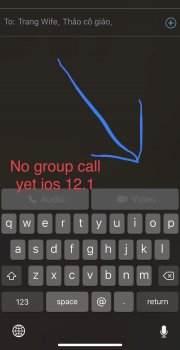
titrau Suspended Original poster Oct 30, 2018 #3 that add 2 contacts still non hight light - my ios 12.1 iphone X this is lie >>>
Banglazed macrumors 603 Oct 30, 2018 #4 You need to start one first and then add another person or if you have a group message conversation already then you can do a group FaceTime video
You need to start one first and then add another person or if you have a group message conversation already then you can do a group FaceTime video
titrau Suspended Original poster Oct 30, 2018 #5 Anytime i add second person it disappear video green button >>> that mean new firmware doesnt has group video call like they said on update detail •••••
Anytime i add second person it disappear video green button >>> that mean new firmware doesnt has group video call like they said on update detail •••••
C C DM macrumors Sandy Bridge Oct 30, 2018 #6 https://www.macrumors.com/how-to/use-group-facetime-in-ios-12/ https://www.macrumors.com/2018/10/30/group-facetime-video-newer-devices-only/ Everyone involved is on iOS 12.1 or macOS Mojave 10.14.1, using devices that support Group FaceTime? Last edited: Oct 30, 2018
https://www.macrumors.com/how-to/use-group-facetime-in-ios-12/ https://www.macrumors.com/2018/10/30/group-facetime-video-newer-devices-only/ Everyone involved is on iOS 12.1 or macOS Mojave 10.14.1, using devices that support Group FaceTime?
KeepCalmPeople macrumors 65816 Oct 30, 2018 #7 I suggest you read any of the multiple online tutorials for this, then if you still see a problem, contact Apple support.
I suggest you read any of the multiple online tutorials for this, then if you still see a problem, contact Apple support.