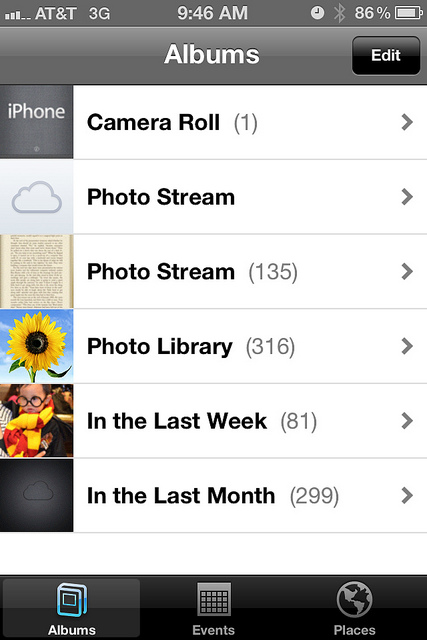
X xraytech macrumors 68030 Original poster Nov 9, 2011 #1 Last night I restored my iP4 and started from scratch. This morning I noticed this... Any thoughts?
T thinkadam macrumors regular Nov 9, 2011 #2 Same here.. can't remove the blank one...anyone know how to get rid of this? thanks
Mutinygraphiks macrumors regular Nov 9, 2011 #3 you cant delete that one, its your wifi backup, the other is your computer sync back up.
saving107 macrumors 603 Nov 9, 2011 #4 thinkadam said: Same here.. can't remove the blank one...anyone know how to get rid of this? thanks Click to expand... The only way I was able to get rid of it is by doing a restore, Settings> General> Reset> Erase All Content and Settings (make sure to back-up before doing this step, then just restore from a back-up and it should be gone).
thinkadam said: Same here.. can't remove the blank one...anyone know how to get rid of this? thanks Click to expand... The only way I was able to get rid of it is by doing a restore, Settings> General> Reset> Erase All Content and Settings (make sure to back-up before doing this step, then just restore from a back-up and it should be gone).
X xraytech macrumors 68030 Original poster Nov 10, 2011 #5 saving107 said: The only way I was able to get rid of it is by doing a restore, Settings> General> Reset> Erase All Content and Settings (make sure to back-up before doing this step, then just restore from a back-up and it should be gone). Click to expand... That's what I ended up doing. But I restored from back and that blank Photostream was back. So I restored from scratch. Now it's gone.
saving107 said: The only way I was able to get rid of it is by doing a restore, Settings> General> Reset> Erase All Content and Settings (make sure to back-up before doing this step, then just restore from a back-up and it should be gone). Click to expand... That's what I ended up doing. But I restored from back and that blank Photostream was back. So I restored from scratch. Now it's gone.
T thinkadam macrumors regular Nov 10, 2011 #6 I did a full restore as a new phone (for other issues) but its still there. Guess it docent bother me as long as its not doing any damage
I did a full restore as a new phone (for other issues) but its still there. Guess it docent bother me as long as its not doing any damage
X xraytech macrumors 68030 Original poster Nov 10, 2011 #7 Figured it out... I think =\ When I tried to restore and came to the sequence of Set-up screens I entered an old Apple ID and when I was up and restored, I switched Apple IDs. So I guess the older Apple ID is linked to that empty iCloud Photostream.
Figured it out... I think =\ When I tried to restore and came to the sequence of Set-up screens I entered an old Apple ID and when I was up and restored, I switched Apple IDs. So I guess the older Apple ID is linked to that empty iCloud Photostream.