Using the "optimised" setting, and then tapping on a photo, a little wheel appears, which presumably is a higher resolution version downloading to the phone.
But if I tap "edit", a popup saying "downloading" appears. My only guess is that the previous step's download was a higher res version for viewing, and the editing step's version is the highest res version.
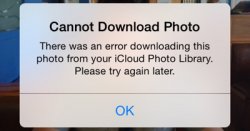
However, about 80% (or more) of the time, an error message appears (see attached) when downloading to edit (over wifi). The funny thing is that when I return to the image, it has been downloaded and I can edit as desired. So I'm wondering why the error message constantly appears. A bug, maybe?
Any thoughts?
But if I tap "edit", a popup saying "downloading" appears. My only guess is that the previous step's download was a higher res version for viewing, and the editing step's version is the highest res version.
However, about 80% (or more) of the time, an error message appears (see attached) when downloading to edit (over wifi). The funny thing is that when I return to the image, it has been downloaded and I can edit as desired. So I'm wondering why the error message constantly appears. A bug, maybe?
Any thoughts?