
Got a tip for us?
Let us know
Become a MacRumors Supporter for $50/year with no ads, ability to filter front page stories, and private forums.
Why is free ram bad ram?
- Thread starter lucifiel
- Start date
- Sort by reaction score
You are using an out of date browser. It may not display this or other websites correctly.
You should upgrade or use an alternative browser.
You should upgrade or use an alternative browser.


GGJstudios
macrumors Westmere
GGJstudios
macrumors Westmere
Windows has historically had a problem releasing RAM after an app closes. Over time, performance suffers due to insufficient RAM and excessive paging. Rebooting Windows frees up the RAM, giving you a performance boost. Mac OS X does a much better job of managing RAM than Windows, so you can run for weeks or months without rebooting.But then why do I notice a performance boost when I free the ram in XP? Or is that a placebo effect?

DoFoT9
macrumors P6
OSX and Windows handle memory COMPLETELY different. do not get caught up by comparing the two, you simply cannot.But then why do I notice a performance boost when I free the ram in XP? Or is that a placebo effect?
as does OSX. there is a "bug" at the moment.Windows has historically had a problem releasing RAM after an app closes.
quite a naive statement, dont you think?Over time, performance suffers due to insufficient RAM and excessive paging. Rebooting Windows frees up the RAM, giving you a performance boost. Mac OS X does a much better job of managing RAM than Windows, so you can run for weeks or months without rebooting.
GGJstudios
macrumors Westmere
Thank you for the prompt and informative answers...
back to work instead of procrastination learning about things that will ultimately have no bearing on my work...
Exactly. With Mac OS X, you can forget about many of the things you had to think about with Windows. Your Mac will manage itself just fine, leaving you free to do other things.

maflynn
macrumors Broadwell
OSX has some very good memory management, but that's not to say that some apps, including part of the OS don't have memory leaks, i.e., grabbing memory but not releasing it. Safari is the good example of such a phenomenon.
I can't speak of windows 7's memory management, but I use win xp for work and I need to reboot my workstation a couple of times during the week, because ram is all taken up and the system grinds to a halt. I have used win7 but not enough to say this is resolved or not.
For OSX while there are bugs, I can go months without rebooting.
I can't speak of windows 7's memory management, but I use win xp for work and I need to reboot my workstation a couple of times during the week, because ram is all taken up and the system grinds to a halt. I have used win7 but not enough to say this is resolved or not.
For OSX while there are bugs, I can go months without rebooting.
DoFoT9
macrumors P6
For OSX while there are bugs, I can go months without rebooting.
once again, im not sure i agree with that saying. there are those that approve of OSXs MMU whilst there are those that do not like it and prefer how Windows handles it.
the main ideology being that OSXs basic outlook is to use all free available memory for the benefit of the end user. windows takes the opposite outlook - use less memory and give the best optimisation for running multiple applications. this is the aim - not necessarily the outcome 😉
now for OSX, its unwillingness to want to give up inactive memory really does annoy me - especially given the "bug" (as it were) to want to save it, even though it is infact.... inactive! it really does annoy me. once this happens - its the end of the road for me, page outs galore!
under windows its a slightly different story, and Win7 has slightly better MMU over xp - nothing to be happy about.
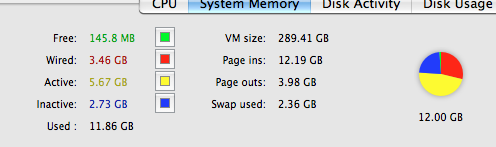
i guess i do have a love hate relationship with OSX. nearly 3GB of inactive memory there, if i open up an application i will have a significantly higher swap file used - instead of using that spare 3GB inactive.
also - the debate between uptimes of OSX vs Win is a bit old. i know of Win machines that have years of uptime, especially in the server market. talk to anybody who has experience with OSX AND WIN servers - they will say that Win servers will be more reliable in that regard.
the best i can manage from any of my machines is about 60 days uptime, that picture up there ^^ is 15days in - quite a lot of RAM activity already. i doubt i will see this get to 60 days to be honest, OSX simply cant cope. something will die.
maflynn
macrumors Broadwell
I maintain window servers for my job - about 25 web/app/file servers and we have to reboot them at least once a month. In fact given that MS releases critical patches nearly every month, I find it astounding that a windows server has gone years without a reboot. That means it has not had any security updates for years 😱also - the debate between uptimes of OSX vs Win is a bit old. i know of Win machines that have years of uptime, especially in the server market.
With the exception of VMware which seems to have an odd way of handling memory, the only time I need to reboot is when Apple releases an update that requires it. I've not witnessed any performance degradation when going between long periods between reboots on my OSX box. As I mentioned my PC at work is unusable if I go a week without rebooting.the best i can manage from any of my machines is about 60 days uptime, that picture up there ^^ is 15days in - quite a lot of RAM activity already. i doubt i will see this get to 60 days to be honest, OSX simply cant cope. something will die.
I do not really get worked up on how OSX handles memory, whether its inactive, wired, or free. I let the system do what its supposed to do and its been rock solid
DoFoT9
macrumors P6
fair enough for both points - the experience from my end was with Domain Controllers and the like (which also double as file servers in some cases). different uses have different experiences i guessI maintain window servers for my job - about 25 web/app/file servers and we have to reboot them at least once a month. In fact given that MS releases critical patches nearly every month, I find it astounding that a windows server has gone years without a reboot. That means it has not had any security updates for years 😱
we both agree there - OSX handles it very well. there is confusion as to why the inactive memory is not freed up - because at the lower levels it is meant to! on the OS layer it just doesnt seem to happen. not to worry.With the exception of VMware which seems to have an odd way of handling memory, the only time I need to reboot is when Apple releases an update that requires it. I've not witnessed any performance degradation when going between long periods between reboots on my OSX box. As I mentioned my PC at work is unusable if I go a week without rebooting.
I do not really get worked up on how OSX handles memory, whether its inactive, wired, or free. I let the system do what its supposed to do and its been rock solid
there was a bug going around in OSX back in 10.6.2 when i was running 4GB RAM + a few 1GB RAM VMs (was having 20+GB page outs) whenever i opened a new tab in safari or even went to expose after leaving the computer alone for a few hours it would literally take 5 mins to open up a tab, as a large portion of RAM had been transferred into swap - then it had to grab it all back. upgrading to 12GB has fixed that but i still have the odd few minute delays whilst waiting for some pages to swap back.
better then windows though!

r0k
macrumors 68040
DoFoT9, I too must call BS on the claim any version of windows is on par with OS X or Linux for stability and memory management. In my experience, this is simply not true.
I ran windows servers and Linux servers over the years. My windows servers had to be rebooted at least weekly and my Linux servers only ever rebooted for a power failure. Case in point, uptime for one of my Linux servers right now is passing 25 months (since the most recent power failure) (yes I know I should patch my kernel, but I've been busy). I have never owned a windows box that can make it for a tenth that much time without some form of calamity. I admit that if you run windows only as a domain controller, no iis, no applications, it can be a lot more stable. The difference is I can run whatever I like (within reason - no malware - no buggy apache servers) on my OS X and Linux boxes and they are still rock solid.
On Windows, when the network stack becomes fouled, you have to make a trip to the black screen (reboot). On Linux, you can start and stop services without rebooting the OS, except for a kernel patch.
As for my experience on the desktop, I use XP at work and it is pure hell. Our IT people have so much cruftware between me and getting anything done that I sometimes bring my iPad to work so I can get stuff done while my XP box performs unnatural acts with itself in the corner. At home, I sometimes have to reboot OS X, mostly for software update. But if I skip half a dozen software updates, and walk up to one of our machines that has been running for 6 months, it is just fine. I've even had Macintosh HD fill up and couldn't tell it was full until I went to save a file! Try letting your C: drive fill up on a Windows box. No. Strike that. Don't. 😱
I ran windows servers and Linux servers over the years. My windows servers had to be rebooted at least weekly and my Linux servers only ever rebooted for a power failure. Case in point, uptime for one of my Linux servers right now is passing 25 months (since the most recent power failure) (yes I know I should patch my kernel, but I've been busy). I have never owned a windows box that can make it for a tenth that much time without some form of calamity. I admit that if you run windows only as a domain controller, no iis, no applications, it can be a lot more stable. The difference is I can run whatever I like (within reason - no malware - no buggy apache servers) on my OS X and Linux boxes and they are still rock solid.
On Windows, when the network stack becomes fouled, you have to make a trip to the black screen (reboot). On Linux, you can start and stop services without rebooting the OS, except for a kernel patch.
As for my experience on the desktop, I use XP at work and it is pure hell. Our IT people have so much cruftware between me and getting anything done that I sometimes bring my iPad to work so I can get stuff done while my XP box performs unnatural acts with itself in the corner. At home, I sometimes have to reboot OS X, mostly for software update. But if I skip half a dozen software updates, and walk up to one of our machines that has been running for 6 months, it is just fine. I've even had Macintosh HD fill up and couldn't tell it was full until I went to save a file! Try letting your C: drive fill up on a Windows box. No. Strike that. Don't. 😱
DoFoT9
macrumors P6
well i guess that all depends on what you are doing on those machines. when running the machines at full tilt WRT RAM i have ran into loads of problems - app crashes, etc. since upgrading RAM i no longer have those issues - currently have 15 days. ill see what i get to!The difference is I can run whatever I like (within reason - no malware - no buggy apache servers) on my OS X and Linux boxes and they are still rock solid.
i similarly use XP at work. i most certainly know your pain! 1GB RAM, Celeron CPUs - running 20 apps at once? it just DOES NOT work.As for my experience on the desktop, I use XP at work and it is pure hell.
oh man i LOLd so hard. my mate recommends an inter-networking romp to upgrade to Win7 😉 somehow i dont think that will help..Our IT people have so much cruftware between me and getting anything done that I sometimes bring my iPad to work so I can get stuff done while my XP box performs unnatural acts with itself in the corner.
been there - done that. NOT pretty, then again, it wasnt pretty on my mac either - rendered it useless with my high-demand uses.Try letting your C: drive fill up on a Windows box. No. Strike that. Don't. 😱