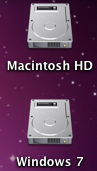
L logicpro7 macrumors 6502a Original poster Jun 16, 2011 #1 Hey guys, How can i stop the Windows partition from mounting on my desktop when in OS X? Attachments Screen shot 2011-06-17 at 00.12.36.png 29.2 KB · Views: 247
simsaladimbamba Guest Jun 16, 2011 #2 You could disable the showing of HDDs on your Desktop via Finder > Preferences >> General, but that would also hide the Macintosh HD icon. But the Windows 7 partition would still be mounted, just not shown.
You could disable the showing of HDDs on your Desktop via Finder > Preferences >> General, but that would also hide the Macintosh HD icon. But the Windows 7 partition would still be mounted, just not shown.
L logicpro7 macrumors 6502a Original poster Jun 16, 2011 #3 Thanks for the tip... I have just hidden both HD's 🙂