
Become a MacRumors Supporter for $50/year with no ads, ability to filter front page stories, and private forums.

Jitaka

macrumors newbie
Original poster
Hi All:

Should a macbook user be concerned about wi-fi security?

I ask because I'm so accustomed to running a thousand or so security programs on my PC based laptop (zonealarm, peer guardian, avast anti virus, and the list goes on). What programs (applications) do you guys and gals use (if any) to give you a sound piece of mind while surfing the wireless internets?
 
Hi All:

Should a macbook user be concerned about wi-fi security?

I ask because I'm so accustomed to running a thousand or so security programs on my PC based laptop (zonealarm, peer guardian, avast anti virus, and the list goes on). What programs (applications) do you guys and gals use (if any) to give you a sound piece of mind while surfing the wireless internets?

Yes .
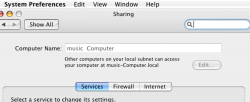
lock down your WiFi with encryption , what ever is the highest that your router supports, also turn on the built in firewall ( you will see this in the sharing part of system preferences ) you could do more but this depends on your situation I suppose .
 
Um, an encrypted wireless connection (128bit WEP/WPA2). If you mean for a public place, most of what your talking about keeps you safe when sharing files, or downloading and running stuff on the PC.

If you are worried about being hacked, anyone who knows what their doing with UNIX or BSD and being on a LAN with you is going to get in and there is really no stopping it. In fact its the same way with a PC. Software firewalls etc will never stop those who are more then a kid trying to show off his 1337 ski1z to impress his friends.

So you can go out and get Norton for Mac if you like, but the truth is that most flaws that people use to get into the OS get fixed by apple pretty soon after their discovered.

Cheers
Cameron
 
Thanks Guys!

I inquired about needed security because I attend a large University and I use their wi-fi a lot. Out of the 50,000 plus kids who're enrolled, I'm sure there is a small percentage of interloping individuals willing to abuse the system. Yes, I'm sure the University has some type of....security....but one can never be too careful!
 
Yes .
lock down your WiFi with encryption , what ever is the highest that your router supports, also turn on the built in firewall ( you will see this in the sharing part of system preferences ) you could do more but this depends on your situation I suppose .

Actually, it's under security in system preferences.
 
Thanks Guys!

I inquired about needed security because I attend a large University and I use their wi-fi a lot. Out of the 50,000 plus kids who're enrolled, I'm sure there is a small percentage of interloping individuals willing to abuse the system. Yes, I'm sure the University has some type of....security....but one can never be too careful!

Be careful, if the wireless is open access, there's a good chance there's no security on it at all... in which case you should only send out sensitive information over a secure (https) connection.
 
Be careful, if the wireless is open access, there's a good chance there's no security on it at all... in which case you should only send out sensitive information over a secure (https) connection.
Could you elaborate please ?


Actually, it's under security in system preferences.
?
 

Attachments

  • Picture 4.png
    Picture 4.png
    31 KB · Views: 81
... also turn on the built in firewall ( you will see this in the sharing part of system preferences ) you could do more but this depends on your situation I suppose .
Actually, it's under security in system preferences.
The firewall in Mac OS X Leopard is already turned on and cannot be turned off. You can configure the firewall to some extent by going to:
System Preferences > Personal > Security > Firewall​
You can configure what resources to share on a local network by going to:
System Preferences > Internet & Network > Sharing​
Of course, if you're connecting to a wi-fi network that you don't control, such as your university's, you don't have the option of choosing WEP or WPA/WPA2, since that is determined by the network administrators. You have to use whatever they set up.
 
What version of OSX are we talking about here guys ?


The firewall in Mac OS X Leopard is already turned on and cannot be turned off. You can configure the firewall to some extent by going to:
System Preferences > Personal > Security > Firewall​
You can configure what resources to share on a local network by going to:
System Preferences > Internet & Network > Sharing​
Of course, if you're connecting to a wi-fi network that you don't control, such as your university's, you don't have the option of choosing WEP or WPA/WPA2, since that is determined by the network administrators. You have to use whatever they set up.

Mine can be off or on as I wish.
System Preferences > Sharing > Firewall (OSX 10.4.11)
 
Since you are with a university, check to see if they have VPN that you could use. My university does, and I use it whenever I'm on their (or any, really) open wireless network, since they are pretty much wide open.

My university also offers office for free, so it may be worth finding the department that deals in the mass licensing of software for your campus.
 
Yes, wireless networks are extremely vulnerable to security threats.

If I were you, I would enable ACL lists with Mac Address filtering and even go as far as using WAP for passcode protection.
 
Register on MacRumors! This sidebar will go away, and you'll see fewer ads.