cycocelica macrumors 68000 Original poster Jan 1, 2006 #1 WMP opens on start up, why is this and how do i stop it? Its already an annoying program and this just makes it worse.
WMP opens on start up, why is this and how do i stop it? Its already an annoying program and this just makes it worse.
C croshtique macrumors 6502 Jan 1, 2006 #2 System Preferences > Accounts > Login Items Not sure why WMP would launch itself at startup but this is where you can throttle it at birth, so to speak.
System Preferences > Accounts > Login Items Not sure why WMP would launch itself at startup but this is where you can throttle it at birth, so to speak.
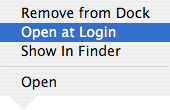
bousozoku Moderator emeritus Jan 1, 2006 #3 croshtique said: System Preferences > Accounts > Login Items Not sure why WMP would launch itself at startup but this is where you can throttle it at birth, so to speak. Click to expand... Perhaps, the option in my included screenshot? Attachments OpenAtLogin.png 8.5 KB · Views: 167
croshtique said: System Preferences > Accounts > Login Items Not sure why WMP would launch itself at startup but this is where you can throttle it at birth, so to speak. Click to expand... Perhaps, the option in my included screenshot?
cycocelica macrumors 68000 Original poster Jan 1, 2006 #4 I dont see that option on any drop down menu. But I took care of it in System Prefernces, dont know how it got there in the first place.
I dont see that option on any drop down menu. But I took care of it in System Prefernces, dont know how it got there in the first place.