Become a MacRumors Supporter for $50/year with no ads, ability to filter front page stories, and private forums.

Ruggy

macrumors 65816
Original poster
Sometimes, you make a mistake and realise you have got it wrong, not said something useful, misread or misunderstood. Even before you've posted it.
You can't delete it so you have to either let it go, post an empty comment or edit it and make an apology
It would be good to be able to delete a post.
You can't even cancel one you've decided not to post, you have to leave it and I suppose it eventually gets deleted but you can come back a long time later and it's still there waiting to be posted.
 
1) If you created a post in the reply box but, didn’t submit, you can highlight the entire post and then hit the delete button. That has worked for me.

2) In regards to the editing of a post, there is a time limit whereby a member can go back and edit the post. I don’t know what the exact minutes limit is but, I do know that a paid Contributor has extended ability go back and edit a post past the normal non-member time. A post can also be deleted. The staff don’t really like for a Contributor to do that as it can mess up the flow of the thread, cause confusion at times, and possibly trigger something with the database in regards to the user account etc.
 
Sometimes, you make a mistake and realise you have got it wrong, not said something useful, misread or misunderstood. Even before you've posted it.
You can't delete it so you have to either let it go, post an empty comment or edit it and make an apology
It would be good to be able to delete a post.
You can't even cancel one you've decided not to post, you have to leave it and I suppose it eventually gets deleted but you can come back a long time later and it's still there waiting to be posted.
The best way is to report your own post to the mods and ask them the delete it for you.

You can also become a paying contributor of the site and one of the perks is the option to delete your own posts.
 
You can't even cancel one you've decided not to post, you have to leave it and I suppose it eventually gets deleted but you can come back a long time later and it's still there waiting to be posted.
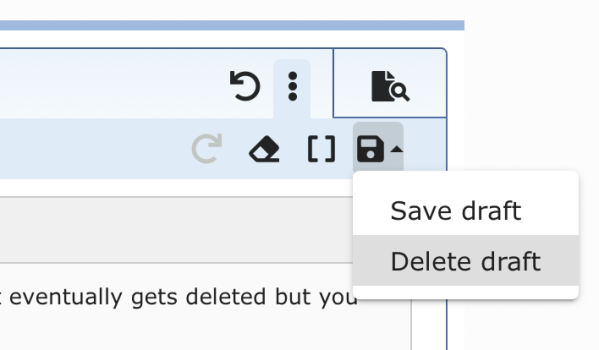
See my screenshot... click Delete draft over to the right side and the draft will go away.

Screenshot 2026-02-18 at 6.18.41 AM.png
 
Sometimes, you make a mistake and realise you have got it wrong, not said something useful, misread or misunderstood. Even before you've posted it.
You can't delete it so you have to either let it go, post an empty comment or edit it and make an apology
It would be good to be able to delete a post.
You can't even cancel one you've decided not to post, you have to leave it and I suppose it eventually gets deleted but you can come back a long time later and it's still there waiting to be posted.
You can, just become a contributor, i.e., Pay MR 50 dollars a year and you can delete your own posts.

If you don't want to do that, just do what others do, edit the post, remove the content and repost what you want.
 
  • Like
Reactions: BigMcGuire
See my screenshot... click Delete draft over to the right side and the draft will go away.

View attachment 2606089

Does he even mean drafts that were saved on purpose? Most of the time it's just the cookies saving the text for a while and it can't be deleted that way. I just mark everything and press delete or backspace.

I wonder what happened to all my purposely saved drafts that I never sent. Is there some kind of overview in my account settings? I don't find anything like that.
 
Does he even mean drafts that were saved on purpose? Most of the time it's just the cookies saving the text for a while and it can't be deleted that way. I just mark everything and press delete or backspace.

You don't have to manually save for that draft save, it just does it on its own automatically.

I wonder what happened to all my purposely saved drafts that I never sent. Is there some kind of overview in my account settings? I don't find anything like that.

I don't see any way to see all your drafts. You have to manually go back to the individual threads to see them.
 
You don't have to manually save for that draft save, it just does it on its own automatically.


I don't see any way to see all your drafts. You have to manually go back to the individual threads to see them.

It seems I misunderstood the draft concept. I always deleted the text after saving a draft and thought I am able to reload it again later but never tried until now and there is no option. I often did this when I wasn't sure about posting a text and wanted to post something else in the meantime in the same thread.

Clicking on delete draft isn't doing anything in here. The text is still there even if I reload the website. It also seems all drafts are gone anyway when I delete all website data in my browser and re-login what I do at least once or twice per week.
 
2) In regards to the editing of a post, there is a time limit whereby a member can go back and edit the post. I don’t know what the exact minutes limit is but, I do know that a paid Contributor has extended ability go back and edit a post past the normal non-member time. A post can also be deleted. The staff don’t really like for a Contributor to do that as it can mess up the flow of the thread, cause confusion at times, and possibly trigger something with the database in regards to the user account etc.

Wild guess: 15 (?)
 
Register on MacRumors! This sidebar will go away, and you'll see fewer ads.