Become a MacRumors Supporter for $50/year with no ads, ability to filter front page stories, and private forums.

cool11

macrumors 68000
Original poster
I want to be able to write data to my ntfs usb flash disk(stick).
I have installed ntfs-3g, and also macfuse software.
Despite these application, I am still unable to write files.
I cannot 'paste' files.

What I am doing wrong?
 
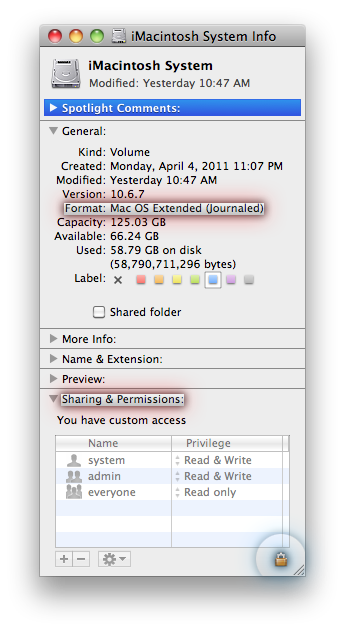
Have you checked Finder > select external HDD >> GET INFO >>> Format and Sharing & Permissions yet?
MR_SS_2011_04_GET-INFO_format_permissions.png
Do you have permissions to write to it?
 
I want to be able to write data to my ntfs usb flash disk(stick).
I have installed ntfs-3g, and also macfuse software.
Despite these application, I am still unable to write files.
I cannot 'paste' files.

What I am doing wrong?
What kind of error message, if any, are you getting? Have you looked at permissions?


NTFS (Windows NT File System)
  • Read/Write NTFS from native Windows.
  • Read only NTFS from native Mac OS X
    [*]To Read/Write/Format NTFS from Mac OS X: Install NTFS-3G for Mac OS X (free)
  • Some have reported problems using Tuxera (approx 33USD).
  • Native NTFS support can be enabled in Snow Leopard, but is not advisable, due to instability.
  • AirPort Extreme (802.11n) and Time Capsule do not support NTFS
  • Maximum file size: 16 TB
  • Maximum volume size: 256TB
 
I did many restarts.
Refresh list do not seem to update anything. My flash disk do not appear there at all.
 
I tried formatting with win xp sp3, and win7 also.
And osx disk utility of course.

ExtFat, does it help using it?
I think I 've never heard about the existence of such format.
All I wanna do is being able to transfer with my usb flash disk, files of several gigabytes. I 've problem with fat32.
I decided to go to ntfs, but how can I properly write files from inside osx finder?
 
exFAT is supported by Mac OS X 10.6.7 and Windows XP SP3 and higher and allows big files.
FAT32 (File Allocation Table)
  • Read/Write FAT32 from both native Windows and native Mac OS X.
  • Maximum file size: 4GB.
  • Maximum volume size: 2TB
NTFS (Windows NT File System)
  • Read/Write NTFS from native Windows.
  • Read only NTFS from native Mac OS X
    [*]To Read/Write/Format NTFS from Mac OS X: Install NTFS-3G for Mac OS X (free)
  • Some have reported problems using Tuxera (approx 33USD).
  • Native NTFS support can be enabled in Snow Leopard, but is not advisable, due to instability.
  • AirPort Extreme (802.11n) and Time Capsule do not support NTFS
  • Maximum file size: 16 TB
  • Maximum volume size: 256TB
HFS+ (Hierarchical File System, a.k.a. Mac OS Extended)
  • Read/Write HFS+ from native Mac OS X
  • Required for Time Machine or Carbon Copy Cloner backups of Mac internal hard drive.
  • To Read/Write HFS+ from Windows, Install MacDrive
  • To Read HFS+ (but not Write) from Windows, Install HFSExplorer
  • Maximum file size: 8EiB
  • Maximum volume size: 8EiB
exFAT (FAT64)
  • Supported in Mac OS X only in 10.6.5 or later.
  • Not all Windows versions support exFAT. See disadvantages.
  • exFAT (Extended File Allocation Table)
  • AirPort Extreme (802.11n) and Time Capsule do not support exFAT
  • Maximum file size: 16 EiB
  • Maximum volume size: 64 ZiB
 
I want to be able to write data to my ntfs usb flash disk(stick).
I have installed ntfs-3g, and also macfuse software.
Despite these application, I am still unable to write files.
I cannot 'paste' files.

What I am doing wrong?
Your problem is obvious. You need to uninstall your separate installation of MacFUSE. NTFS-3G has MacFUSE built-in. If you also have a standalone installation of the driver, then you have two drivers fighting over a single peripheral.
 
Register on MacRumors! This sidebar will go away, and you'll see fewer ads.