Become a MacRumors Supporter for $50/year with no ads, ability to filter front page stories, and private forums.

lammy1961

macrumors member
Original poster
Surely this can't be right ?
It takes 3minutes 59 seconds from when I switch my iMac on to the desktop appearing.....How long should it take ?
How can I reduce this ?

Thanks.
 
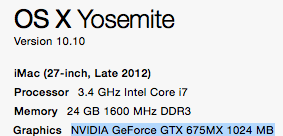
You failed to mentioned your system, your memory, your hard drive/SSD so we can advise you further.

Hdd will take much longer

SSD's should be faster

Doing a clean install not an update may help without all the previous garbage you have on it. Or it could be a bad download.
 
Yes it's a HDD
yosemite.png
 
Boot times will vary from system to system due to configuration.
Your system is pretty well spec'ed and 1 to 2 minutes sounds about right for a HDD. My 2014 rMBP takes about 10 seconds from power button to desktop.

How long did it take before the update? Have you tried clearing the caches in the Library folders?

Also have you noticed that it now looks like it's taking a longer time to boot due to that progress bar they've added now? haha. 😀
 
Last edited:
Yes it's a HDD
Image

That seems excessive. How full is your HDD?

I have a stock 5400 (500 GB with 35 GB used) HDD on a late 2011 MBP (8 GB RAM) and it takes about 71 seconds from the chime to seeing the home screen. Outside of standard Yosemite processes running at startup, I have Little Snitch and Outlook 2011 running at startup.
 
My two systems, one is a Hdd drive and not full and it takes over a minute to boot up with Yosemite and my other system is an SSD, not full and it boots up within 9 to 10 seconds.
 
Register on MacRumors! This sidebar will go away, and you'll see fewer ads.