
Got a tip for us?
Let us know
Become a MacRumors Supporter for $50/year with no ads, ability to filter front page stories, and private forums.
Geektool Your Geektool scripts
- Thread starter monke
- Start date
- Sort by reaction score
You are using an out of date browser. It may not display this or other websites correctly.
You should upgrade or use an alternative browser.
You should upgrade or use an alternative browser.
- Status
- Not open for further replies.

MacDawg
Moderator emeritus
Hey all, I looked for this earlier and it didn't get answered, but is there a way to move a group of scripts at a time? I just got done with the HTC "All-in-one" and I'd like to move it all at once if possible. Thanks!
I am not aware of a way
Woof, Woof - Dawg


jck1634
macrumors 6502
Hey all, I looked for this earlier and it didn't get answered, but is there a way to move a group of scripts at a time? I just got done with the HTC "All-in-one" and I'd like to move it all at once if possible. Thanks!
Yeah that really sucks that you can't do that.
Any chance you can post your geektool? I really wanna see what people have done with them. 🙂

MacDawg
Moderator emeritus
Mine's a very, very generic one, but it's all thanks to the nice people on this forum. 🙂 I'd still really like to move it all diagonally left...
Looks good!
But yeah, I think you will have to move it all individually 🙁
Woof, Woof - Dawg
jck1634
macrumors 6502
Mine's a very, very generic one, but it's all thanks to the nice people on this forum. 🙂 I'd still really like to move it all diagonally left...
That looks great! Don't forget you can change the alignment of geeklets!
so i'm doing the weather, and i've done it before where i had both the temperature and current conditions as separate shells so i could edit both individually to get the graphic style i wanted.
then the weather site we all used went down, and i went to using the weather and temp in one shell until something else came up. now yahoo weather can give me what i had before, but i can't find the script for the weather conditions. i have the temp already, just need the conditions now!
this is the code i'm using for the temp.
thanks!
then the weather site we all used went down, and i went to using the weather and temp in one shell until something else came up. now yahoo weather can give me what i had before, but i can't find the script for the weather conditions. i have the temp already, just need the conditions now!
this is the code i'm using for the temp.
Code:
curl --silent "http://xml.weather.yahoo.com/forecastrss?p=37212&u=f" | grep -E '(Current Conditions:|[A-Z]<BR)' | sed -e 's/Current Conditions://' -e 's/<br \/>//' -e 's/<b>//' -e 's/<\/b>//' -e 's/<BR \/>//' -e 's/[A-Z a-z]*, //' -e 's/\(.*\) [FC]/\1°/' | tail -n1thanks!
jck1634
macrumors 6502
Current Weather Conditions:
Code:
curl --silent "http://weather.yahooapis.com/forecastrss?p=YOURCITYCODE&u=c" | grep -E '(Current Conditions:|[A-Z]<BR)' | sed -e 's/Current Conditions://' -e 's/<br \/>//' -e 's/<b>//' -e 's/<\/b>//' -e 's/<BR \/>//' -e 's/<description>//' -e 's/<\/description>//' -e 's/, [0-9]* [A-Z]//' | tail -n1Current Weather Conditions:
Code:curl --silent "http://weather.yahooapis.com/forecastrss?p=YOURCITYCODE&u=c" | grep -E '(Current Conditions:|[A-Z]<BR)' | sed -e 's/Current Conditions://' -e 's/<br \/>//' -e 's/<b>//' -e 's/<\/b>//' -e 's/<BR \/>//' -e 's/<description>//' -e 's/<\/description>//' -e 's/, [0-9]* [A-Z]//' | tail -n1
thanks so much!
raltenbach
macrumors newbie
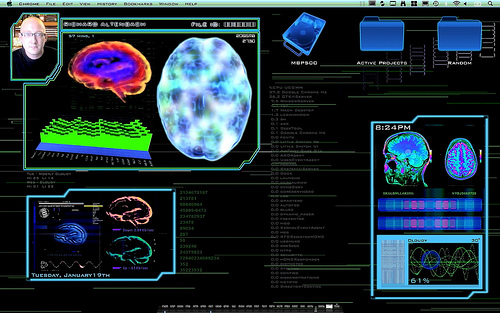
Thanks for the weather script. I made this desktop recording without the current conditions, now they are back on-screen like they should be!
http://www.youtube.com/watch?v=k1kSzpLojow
Here's a still shot:
http://www.youtube.com/watch?v=k1kSzpLojow
Here's a still shot:
NYC Notify Feed
Before I begin thank you to everyone on this thread and for all the great information.
ok I've tried everything here and a half dozen others.
NYC Notify is a service here in the NY area that alerts you to major events, outages, traffic, weather, etc, etc you get the idea.
first of all here is a link to the feed
feed:https://a858-nycnotify.nyc.gov/NotifyNYC/RSS/NotifyNYC.aspx
1. I'd like to limit it to only notification for the *current* day
2. I'd like to get it to layout something similar to this but not critical

Cheers and thank you!
PS here is a screenshot of my media center so far it's running on an old mini

Before I begin thank you to everyone on this thread and for all the great information.
ok I've tried everything here and a half dozen others.
NYC Notify is a service here in the NY area that alerts you to major events, outages, traffic, weather, etc, etc you get the idea.
first of all here is a link to the feed
feed:https://a858-nycnotify.nyc.gov/NotifyNYC/RSS/NotifyNYC.aspx
1. I'd like to limit it to only notification for the *current* day
2. I'd like to get it to layout something similar to this but not critical
Cheers and thank you!
PS here is a screenshot of my media center so far it's running on an old mini
can i put a forecast that only has tomorrow?
Most say "Today, Condition ,HIGH LOW
Tomorrow, Condition, HIGH LOW"
can i take out today some how?
or maybe even divide the information up even more?
Have one shell say "tomorrow's conditions"
Another script say "Tomorrow High"
and another for "tomorrow low"?
where none of them actually have what day tomorrow is, that will be a seperate shell.
So the three scripts would appear thusly: Partly Cloudy | H: 45* | L: 33*
Most say "Today, Condition ,HIGH LOW
Tomorrow, Condition, HIGH LOW"
can i take out today some how?
or maybe even divide the information up even more?
Have one shell say "tomorrow's conditions"
Another script say "Tomorrow High"
and another for "tomorrow low"?
where none of them actually have what day tomorrow is, that will be a seperate shell.
So the three scripts would appear thusly: Partly Cloudy | H: 45* | L: 33*
My forecast implementation
I wasn't thrilled with the forecast options so I rolled my own.
The simple solution that has a slight future proof advantage (IMHO) is I subscribed to weather forecasts via iCal
Add weather to your calendar per these instructions
http://www.macosxhints.com/article.php?story=20090327220804465
Then use iCalBuddy http://hasseg.org/icalBuddy/ to make it available via command line.
The Geektool / Nerdtool code I use is
usr/local/bin/icalBuddy -ic "YOUR_CALENDAR_NAME_OR_ID_HERE" -iep "datetime,title" -ps "| |" -nc -po "datetime,title" -df "%a" -nrd -b "" -ss"\t" eventsToday+3
replace YOUR_CALENDAR_NAME_OR_ID_HERE with the name you named your weather calendar or us the ID you can find it out using iCalBuddy.
This produces Today plus the next 3 days I then resize it in Geektool to just hide today. You could take it further and parse it out more any way you like.
This is how it looks

It could just as easy be other colors and instead of the days it can display relative dates like TODAY, TOMORROW instead... these are some of the advantages of how I've decided to do it.
So in your case the advantage is you could specifically target *tomorrow* via iCalbuddy since the weather is already being set to a specific day via your calendar.
Hope this helps
I wasn't thrilled with the forecast options so I rolled my own.
The simple solution that has a slight future proof advantage (IMHO) is I subscribed to weather forecasts via iCal
Add weather to your calendar per these instructions
http://www.macosxhints.com/article.php?story=20090327220804465
Then use iCalBuddy http://hasseg.org/icalBuddy/ to make it available via command line.
The Geektool / Nerdtool code I use is
usr/local/bin/icalBuddy -ic "YOUR_CALENDAR_NAME_OR_ID_HERE" -iep "datetime,title" -ps "| |" -nc -po "datetime,title" -df "%a" -nrd -b "" -ss"\t" eventsToday+3
replace YOUR_CALENDAR_NAME_OR_ID_HERE with the name you named your weather calendar or us the ID you can find it out using iCalBuddy.
This produces Today plus the next 3 days I then resize it in Geektool to just hide today. You could take it further and parse it out more any way you like.
This is how it looks
It could just as easy be other colors and instead of the days it can display relative dates like TODAY, TOMORROW instead... these are some of the advantages of how I've decided to do it.
So in your case the advantage is you could specifically target *tomorrow* via iCalbuddy since the weather is already being set to a specific day via your calendar.
Hope this helps
Attachments

My setup thus far updated
Feedback, suggestions critique welcome
This is running on a PPC MacMini I use as a basic media center driving a 42in plasma TV.
I'm using Nerdtool as it seemed to by slightly less demand on the system (correct me if you find this to be not true)
Using Remote Buddy for remote control via Keyspan wireless remote, iPhone as well as an ajax interface I can use from my laptops menubar.
FYI the birthdays and Events lists are also produced via iCalBuddy. The *Events* are pulled from a calendar tied to Google Calendar that me and my wife can access from our iPhone calendar app. When an event is added to this specific calendar it appears on all our iPhones as well as our laptops and the media center screen in just a few seconds. The *Birthdays* are a calendar that grabs them from Facebook.
Pics taken via remote desktop connection disregard the outer window frame 😉
Feedback, suggestions critique welcome
This is running on a PPC MacMini I use as a basic media center driving a 42in plasma TV.
I'm using Nerdtool as it seemed to by slightly less demand on the system (correct me if you find this to be not true)
Using Remote Buddy for remote control via Keyspan wireless remote, iPhone as well as an ajax interface I can use from my laptops menubar.
FYI the birthdays and Events lists are also produced via iCalBuddy. The *Events* are pulled from a calendar tied to Google Calendar that me and my wife can access from our iPhone calendar app. When an event is added to this specific calendar it appears on all our iPhones as well as our laptops and the media center screen in just a few seconds. The *Birthdays* are a calendar that grabs them from Facebook.
Pics taken via remote desktop connection disregard the outer window frame 😉
Attachments


Hope this helps
That is EXACTLY what i was talking about a few pages back, i will try it now, thanks!
hmmm i cant get it to work... the code is where i am failing, as i have weather in iCal... can you help me a little more?
This is the code as i have it in the shell.....
usr/local/bin/icalBuddy -ic "home" -iep "datetime,title" -ps "||" -nc -po "datetime,title" -df "%a" -nrd -b "" -ss"\t" eventsToday+3
i also tried USER
user/local/bin/icalBuddy -ic "home" -iep "datetime,title" -ps "||" -nc -po "datetime,title" -df "%a" -nrd -b "" -ss"\t" eventsToday+3
This is the code as i have it in the shell.....
usr/local/bin/icalBuddy -ic "home" -iep "datetime,title" -ps "||" -nc -po "datetime,title" -df "%a" -nrd -b "" -ss"\t" eventsToday+3
i also tried USER
user/local/bin/icalBuddy -ic "home" -iep "datetime,title" -ps "||" -nc -po "datetime,title" -df "%a" -nrd -b "" -ss"\t" eventsToday+3
hmmm i cant get it to work... the code is where i am failing, as i have weather in iCal... can you help me a little more?
I'll see what i can do 😉 after everything I figured out from this group I feel good paying it back.
ok so let's start from the top...
I'll assume you are sure you see weather in your calendar... but just in case and for others following along...
You can get the link by going to http://www.wunderground.com then search your zip code on the page that gets displayed to the right of the page you will see links for iCal and RSS click iCal this will prompt you to add a calendar in iCal name it something obvious and helpful like weather 😉
You should now see weather forecasts in iCal
Next up you will need to install iCalBuddy from http://hasseg.org/icalBuddy/
I'll dissect what iCalbuddy will be asking for from my example
Code:
usr/local/bin/icalBuddy -ic "YOUR CALENDAR NAME HERE" -iep "datetime,title" -ps "| |" -nc -po "datetime,title" -df "%a" -nrd -b "" eventsToday+3-ic tells iCalbuddy you want to use a specific calendar I opted to use the ID of the calendar you can also use the name of the calendar as well
-iep tells iCalbuddy the specific properties I want returned I only want the date and title (you could also include notes it has a longer forecast description)
-ps changes the separator between the date and the title
-nc removes the calendar title from the list item (i don't need to know it's in the weather calendar)
-po tells iCalbuddy the order to display the items in
-df is the date format (we only need the date and nothing more)
-nrd tells it to use numeric dates instead of relative dates such as today tomorrow
-b "" changes the bullet I left it blank to not use a bullet at all
eventsToday+3 tells it to return today plus the next 3 days
that's about all you should need to get it to return the data the only other thing I have done in a cofig file is set the colors to use so I turn on ansi color for the item.
Let me know if that's helps
I'm still figuring it out myself ;-) I don't know sed, and grep as well as many here so I am not sure how to pull just the next day our of the info returned however I am positive there IS a way to do that using sed or grep
once you've done this then you can start pulling all sorts of info from your calendars since there are other things you can subscribe to in iCal as well
Cheers
Edward
awesome!
well i dont know what i did differently, but it works now... how did you change the colors? I know you said ANSI but i don't know what the is / means... thanks again for all your help, that is exactly what i was looking for!
I just wish you could specify a relative day.... typing "eventsTomorrow+2" or something similar, but i know you cant
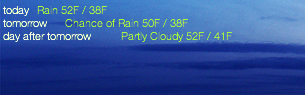
EDIT: i faked the coloring.... i just echoed "Today Tomorrow Day after Tomorrow" and covered the other ones up with the colors i wanted.... it looks like this right now, im happy with it i think, now if i could only get each day seperate!

well i dont know what i did differently, but it works now... how did you change the colors? I know you said ANSI but i don't know what the is / means... thanks again for all your help, that is exactly what i was looking for!
I just wish you could specify a relative day.... typing "eventsTomorrow+2" or something similar, but i know you cant
EDIT: i faked the coloring.... i just echoed "Today Tomorrow Day after Tomorrow" and covered the other ones up with the colors i wanted.... it looks like this right now, im happy with it i think, now if i could only get each day seperate!
awesome!
well i dont know what i did differently, but it works now... how did you change the colors? I know you said ANSI but i don't know what the is / means... thanks again for all your help, that is exactly what i was looking for!
kewl! glad it worked!
Enable ANSI color option in Geektool for that data item
in your home folder you need to make a plist file named ".icalBuddyConfig.plist" this will be used as a default for all data pulled from iCalbuddy.
this is what I have in my plist
Code:
<?xml version="1.0" encoding="UTF-8"?>
<!DOCTYPE plist PUBLIC "-//Apple//DTD PLIST 1.0//EN" "http://www.apple.com/DTDs/PropertyList-1.0.dtd">
<plist version="1.0">
<dict>
	<key>constantArguments</key>
	<dict>
		<key>formatOutput</key>
		<true/>
	</dict>
	<key>formatting</key>
	<dict>
		<key>datetimeValue</key>
		<string>yellow</string>
		<key>titleValue</key>
		<string>white</string>
	</dict>
</dict>
</plist>
you can change the colors to whatever colors you want to use
If you desire different coloring for a different data set pulled from iCalbuddy you can over-ride the default using -cf "PATH TO YOUR CUSTOM CONFIG"

partyBoy
macrumors 68000
How can i get that polaroid effect on my desktop with geektool,I think it looks kool.awesome!
Looks fantastic...
I agree about a command such as eventsTomorrow+x
I will be writing to the developer I'm sure it wouldn't be hard and might add it.
I'm also going to be asking if he could add an option to only set today and tomorrow as relative instead of everything changing to relative.
as for your wanting to get just tomorrows weather I'll see what I can figure out using sed.
it shouldn't be hard since the data returned is in a very logical delimited list.
back with an answer in a few 😀
I agree about a command such as eventsTomorrow+x
I will be writing to the developer I'm sure it wouldn't be hard and might add it.
I'm also going to be asking if he could add an option to only set today and tomorrow as relative instead of everything changing to relative.
as for your wanting to get just tomorrows weather I'll see what I can figure out using sed.
it shouldn't be hard since the data returned is in a very logical delimited list.
back with an answer in a few 😀
How can i get that polaroid effect on my desktop with geektool,I think it looks kool.
i just googled an image of a polaroid, cut out the inside, added my photo, added the tape, rotated the images randomly and changed the little ID number at the bottom, i can give you my Photoshop file where you can just drop your photos in if you'd like, PM me your email
- Status
- Not open for further replies.