Got a tip for us? Let us know
|
|
#1 | |
|
[Tutorial] Three Finger Drag on Non-supported Multitouch Macs
I have found the solution, and have posted it on posts seven and nine.
Quote:
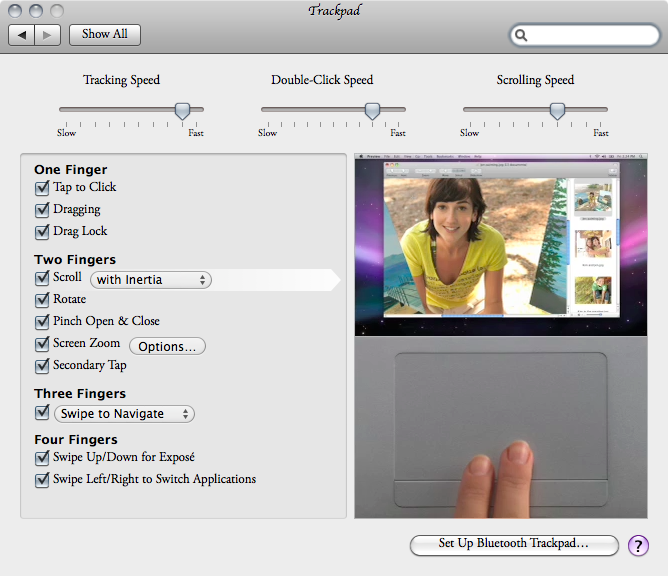
Also, if you use the Root account, the risk of messing up your computer is really low, and permission repair isn't necessary, at least when I did it. You can repair permissions if you want. For 10.6.4, you need the Multitouch update, you might also be able to do it without the update, but you would need to hack the kext, but that only gives inertial scrolling. I will try that later if I have time. As for 10.6.5, you need a new kext, I have uploaded one in a post below, but you can create one yourself. 10.6.6 uses the same kext, so if you used the combo updater, you will need to reapply the patch, but if you used the delta updater, you won't need to reapply the patch. Note: this is only for MacBookPro4,1 and MacBookAir1,1 and MacBookAir2,1. Look below for links to pre-made drivers. Also, I have uploaded a picture of the new Preference Pane. 10.6.4 kext on first page. 10.6.5 kext (works with 10.6.6 and 10.6.7). 10.6.8 kext on 2nd page. I have also included kext from 10.7.1 on the second page. 10.7.2 kext is also on the 2nd page. 10.7.3 kext on 2nd page. 10.7.4 kext on 3rd page. 10.8 kext by modified by drFUNK on 3rd page (works with 10.8.1 and 10.8.2). 10.8.3 kext on 4th page (works with 10.8.4). Have fun and Good Luck! Original question: Code:

OK, so with this new update, is there that option for the 3 finger drag for the early 2008 MBP? I mean how hard can it be for them to do it (isn't the late 2008 and early 2008 17" MBP the same except for a few specs like hdd???).
__________________
[Tutorial] Three Finger Drag on Non-supported Multitouch Macs (MAJOR UPDATES!!! (8/7/2013)) Front Row for Lion Now I know why the maps icon wants you to jump off of a bridge! Last edited by AnonMac50; Jul 7, 2013 at 04:41 PM. Reason: Compatibility info |
||
|
|
2
|
|
|
#2 |
|
One is unibody and one isn't...
__________________
Mac Pro | Thunderbolt Display | iPhone 6 | iPad Air 2 | Apple TV | AirPort Extreme
|
|
|
|
2
|
|
|
#4 |
|
My early 2008 non-unibody MacBook Pro can do every gesture that the unibody MacBook Pro can except for three finger drag...
__________________
*Super high tech stuff goes here* |
|
|
|
1
|
|
|
#5 | |
|
Quote:
Yep, the last one or two generations of multibody MacBook Pro's can do most of the "new" gestures. They were the computers that pioneered the new Unibodys.
__________________
15" 2.6GHz rMBP, 27" LED Cinema Display, iPhone 5S, iPod Classic |
||
|
|
1
|
|
|
#6 |
|
The 17" MBP unibody came in 2009, while the 15" came in 2008. The 17" has the same nonunibody (MacBookPro4,1) trackpad as the one before it (also MacBookPro4,1 which was released in 2008 February).
Also, I am messing with the plists to try to get the drag working. AnonMac
__________________
[Tutorial] Three Finger Drag on Non-supported Multitouch Macs (MAJOR UPDATES!!! (8/7/2013)) Front Row for Lion Now I know why the maps icon wants you to jump off of a bridge! |
|
|
|
1
|
|
|
#7 |
|
I did it! OK, I have uploaded the modified file you need to use. Install it to /System/Library/Extensions. Remember to repair permissions after installation (otherwise you will lose keyboard and trackpad functionality completely). THIS IS FOR 10.6.4 ONLY!!! USE THE OTHER ATTACHED FILES IF USING A DIFFERENT VERSION OF OS X!
__________________
[Tutorial] Three Finger Drag on Non-supported Multitouch Macs (MAJOR UPDATES!!! (8/7/2013)) Front Row for Lion Now I know why the maps icon wants you to jump off of a bridge! Last edited by AnonMac50; Jun 5, 2013 at 05:35 PM. |
|
|
|
0
|
|
|
#8 |
|
I never could get this to work. what files did you modify inside of the kext?
__________________
Early 2008 Macbook Pro 15.4"; 60 GB OWC SSD; 2.5 GHz; 4 GB RAM ☢ 32 GB iPod Touch 2G ☢ 32 GB iPhone4 |
|
|
|
0
|
|
|
#9 |
|
First, open the kext (Show Package Contents), then go to Contents, then open Info.plist (I usually open it in Property List Editor that comes with Xcode Tools (comes on the OS X Install discs). If it opens in Property List Editor, then do the following:
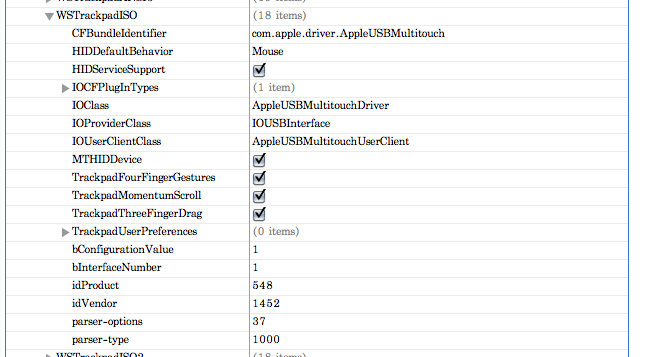
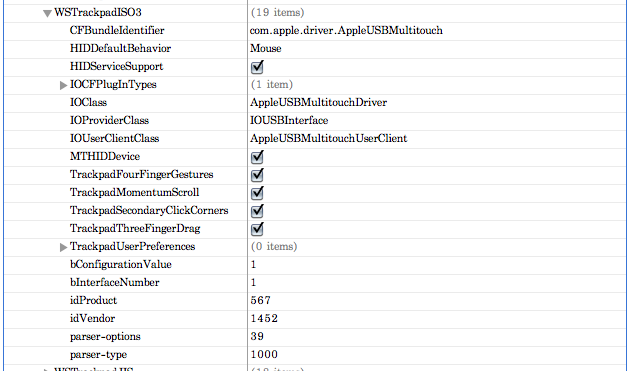
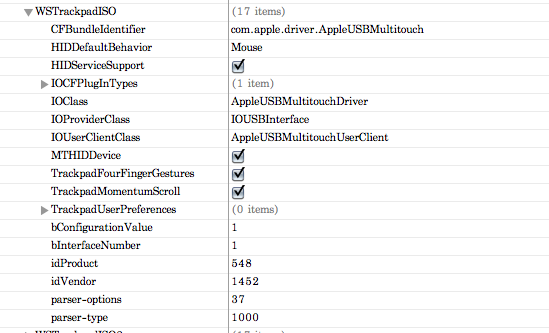
You MUST repair permissions, otherwise you'll lose keyboard and trackpad functionality completely. Screenshots bellow: The first one is of the IOKitPersonalities section. The second one is for WSTrackpadISO3 with all the options. The third one is of WSTrackpadISO before editing and the last one is of WSTrackpadISO after editing.
__________________
[Tutorial] Three Finger Drag on Non-supported Multitouch Macs (MAJOR UPDATES!!! (8/7/2013)) Front Row for Lion Now I know why the maps icon wants you to jump off of a bridge! |
|
|
|
0
|
|
|
#10 |
|
Hi,
I did exactly what is mentioned here and can't get it working. I tried it yesterday evening twice. First I downloaded the kext in this thread, replaced it with the Extension on my machine and didn't have a keyboard after relaunch. Of course I didn't forget to repair permissions. Next I tried to add the keys with an editor by myself. Repaired permissions, restart, no keyboard. I realized that there are no keys "TrackpadThreeFingerDrag" in my Info.plist. Neither in the WSTrackpad*3 section nor somewhere else. |
|
|
|
0
|
|
|
#11 | |
|
Quote:
AnonMac50
__________________
[Tutorial] Three Finger Drag on Non-supported Multitouch Macs (MAJOR UPDATES!!! (8/7/2013)) Front Row for Lion Now I know why the maps icon wants you to jump off of a bridge! |
||
|
|
0
|
|
|
#12 |
|
That's it! Thanks a ton!
|
|
|
|
0
|
|
|
#13 |
|
I'm glad you got it working.
__________________
[Tutorial] Three Finger Drag on Non-supported Multitouch Macs (MAJOR UPDATES!!! (8/7/2013)) Front Row for Lion Now I know why the maps icon wants you to jump off of a bridge! |
|
|
|
1
|
|
|
#14 |
|
Yes, the update. I totally read over that piece of information.
|
|
|
|
0
|
|
|
#15 |
|
Just tried this on my MacBook Air and lost all keyboard and trackpad functionality. I did repair permissions after replacing the file.
I guess I need to reinstall MacOS completely? Or is there a way to restore the back-up file? |
|
|
|
0
|
|
|
#16 | |
|
Quote:
You should be able to restore it. Simply delete the new file, and install the backup, and repair permissions.
__________________
[Tutorial] Three Finger Drag on Non-supported Multitouch Macs (MAJOR UPDATES!!! (8/7/2013)) Front Row for Lion Now I know why the maps icon wants you to jump off of a bridge! |
||
|
|
0
|
|
|
#17 |
|
I restored the file, and ran repair permissions, but there still is no trackpad or keyboard functionality.
|
|
|
|
0
|
|
|
#18 |
|
That is weird. Try reinstalling the multitouch update.
__________________
[Tutorial] Three Finger Drag on Non-supported Multitouch Macs (MAJOR UPDATES!!! (8/7/2013)) Front Row for Lion Now I know why the maps icon wants you to jump off of a bridge! |
|
|
|
0
|
|
|
#19 |
|
Problem solved, somehow I needed to run the repair permissions twice, ran one after restoring the file, ran again after reboot, rebooted again, and now it seems to work fine again.
|
|
|
|
0
|
|
|
#20 |
|
That's awesome!!!
PS. Out of curiosity, have you installed the multitouch update originally?
__________________
[Tutorial] Three Finger Drag on Non-supported Multitouch Macs (MAJOR UPDATES!!! (8/7/2013)) Front Row for Lion Now I know why the maps icon wants you to jump off of a bridge! |
|
|
|
0
|
|
|
#21 |
|
Guess What. With this new 10.6.5 update, you have to redo the Three Finger Drag trick.
EDIT: The new kext has WSTrackpad*4 and WSTrackpad*4a, as well as WSEvents*4 and WSEvents*4a. I'm guessing these are for either the new MacBook Airs, soon to come Macs, or both. EDIT 2: I have also uploaded the new kext for those who need it.
__________________
[Tutorial] Three Finger Drag on Non-supported Multitouch Macs (MAJOR UPDATES!!! (8/7/2013)) Front Row for Lion Now I know why the maps icon wants you to jump off of a bridge! Last edited by AnonMac50; Nov 11, 2010 at 02:30 AM. |
|
|
|
0
|
|
|
#22 |
|
Does anyone know how to make a video file that lets us view the 3 finger drag? The original is located at file:///System/Library/PreferencePan...ckpadCombo.mov Is there a way to modify that?
Thanks, AnonMac50
__________________
[Tutorial] Three Finger Drag on Non-supported Multitouch Macs (MAJOR UPDATES!!! (8/7/2013)) Front Row for Lion Now I know why the maps icon wants you to jump off of a bridge! |
|
|
|
0
|
|
|
#23 |
|
So ... does the .kext in post 7 still work in Lion?
Also.... I guess 4 finger drag i out of the question as its not a muli touch trackapad? (I have 2007 santa rosa MBP) |
|
|
|
1
|
|
|
#24 |
|
I wonder if this works on a white MacBook 2.1, mid 2007, the one officially capped at 2GB ram. Don't have the guts to try it out myself...
|
|
|
|
0
|
|
|
#25 | ||
|
I don't think so, but, you can make your own one from by following the steps.
Quote:
Quote:
AnonMac50
__________________
[Tutorial] Three Finger Drag on Non-supported Multitouch Macs (MAJOR UPDATES!!! (8/7/2013)) Front Row for Lion Now I know why the maps icon wants you to jump off of a bridge! |
|||
|
|
0
|
![]() |
|
«
Previous Thread
|
Next Thread
»
Similar Threads
|
||||
| thread | Thread Starter | Forum | Replies | Last Post |
| mod my early 2008 MBP or just upgrade to new Retina MBP? | macizzy | MacBook Pro | 10 | Mar 4, 2014 11:35 AM |
| Late 2007 MBP vs early 2008 MBP | adamj575 | MacBook Pro | 8 | Jan 5, 2013 04:25 PM |
| rMBP Bootcamp Three Finger Drag | macNewbie02 | MacBook Pro | 2 | Jul 23, 2012 08:31 PM |
| iMac Early 2008 and MBP 15 inch Early 2011 | Dekard | iMac | 1 | Jul 5, 2012 02:11 PM |
| How to enable three-finger drag with four fingers? | Fiona Kwok | Mac OS X 10.7 Lion | 2 | May 31, 2012 06:39 PM |
|
All times are GMT -5. The time now is 10:43 AM.


Linear Mode