Become a MacRumors Supporter for $50/year with no ads, ability to filter front page stories, and private forums.

turbineseaplane

Contributor
Original poster
Mar 19, 2008
24,864
71,928
This is just so unacceptable that Apple does this.

There is a VERY dark pattern on the Sequoia 15.7.3 update panel.

They make it look very clearly like you are updating (tonight or now) to 15.7.3, but when you click on the little "i" icon for more information about the update you are about to install (or agree to install tonight), they've actually selected the Tahoe upgrade.

I just find this to be abhorrent behavior on the part of Apple.

They are flat out lying to you on the main page and you only discover it if you dig in for more information.

This company has become rotten to the core.
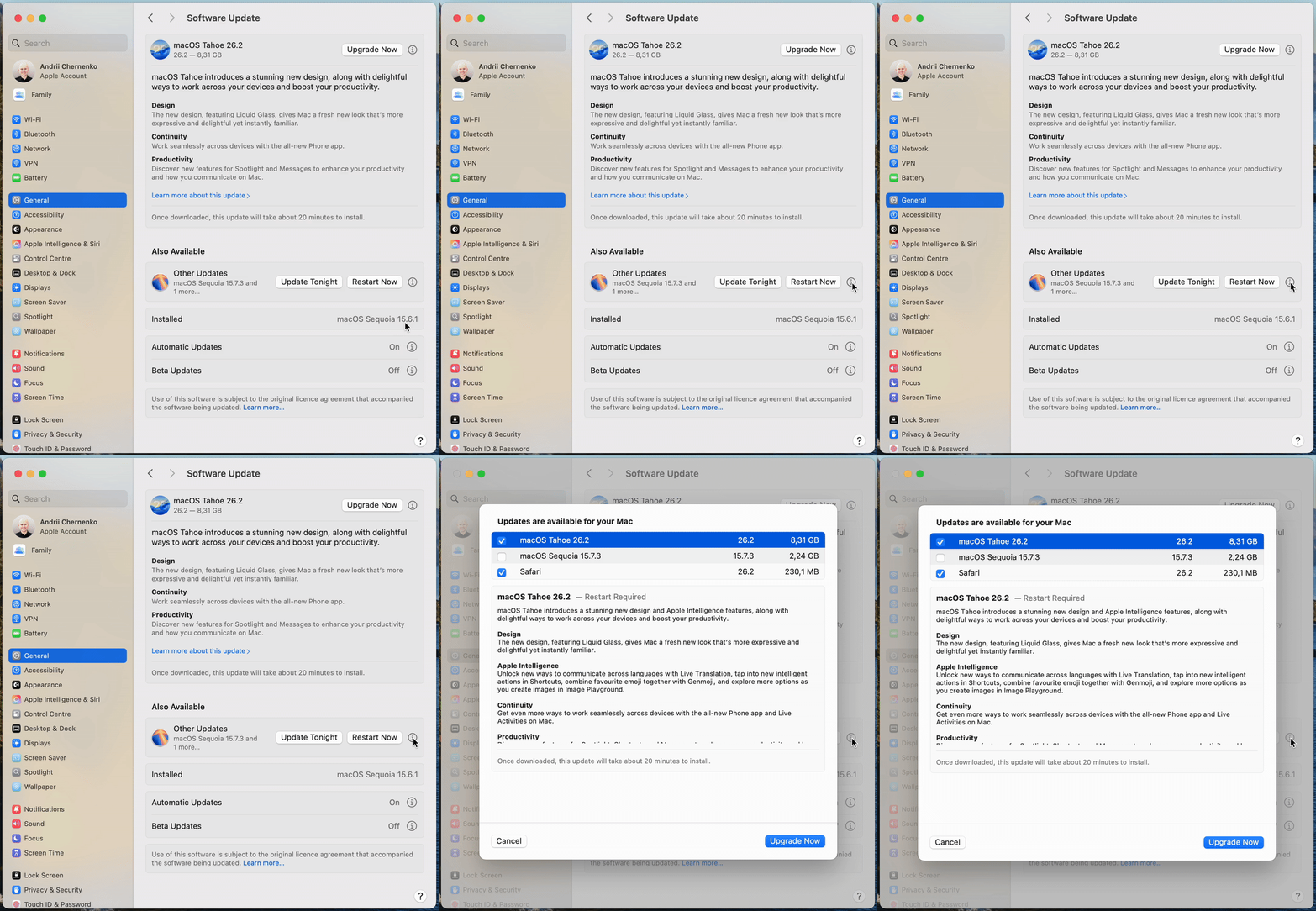
ezgif-53993516d382406a.gif


Original source on Mastodon
 
Last edited:
Good that I typically go to the view more details before installing updates. That's a nasty trick though. It seems almost nefarious.

Have seen a nasty pattern from Apple (and Microsoft even more so) of disrespecting user software preferences. Even things like forcing you to look at old "memories" (e.g. pics of your ex) in the Photos app rather than letting people choose the grid view to show only recent pics which had been the default for over a decade. Glad Apple walked that one back in iOS 26 and enabled the grid view again.
 
Last edited:
hasn't it been like this the last few updates, and not sure why it says 'other' instead of 'sequoia 15.7.3', but it pre-selects tahoe even if you click on ? next to safari. and what with the update doubling in size upon download, can't they just put up the actual number? where's EU when you need it most I don't know..
 
What I disliked about updating Sequoia from 15.6 to 15.7.3 today on my M4 Mini, is that the download jumped from 1.8GB to 4.8GB.
But during the download, which was running at a mind numbing 6MB/sec, Sequoia was uploading 15MB/sec constantly throughout. This means I uploaded over 14GB of data to Apple today!
My iCloud and AI are disabled, and I only ever used Safari for downloading music software - paying for it on my iPad, which is not linked to the M4 Mini.
Would someone like to tell me what is going on?
It feels like they just copied all my user folders?

Tahoe is but a figment of their imagination. I won’t ever be tempted. Nor will I patch/update my Steinberg Cubase 14 either. I have a working music system, and that’s where it stays.

Edit - I’m now very tempted to wipe and reload an old Time Machine of Sequoia 15.6 fresh, and never go online ever again after that.
I’m thankful I don’t have debit card details on this M4 Mini, and almost zero browsing history in Safari.
 
Last edited:
What I disliked about updating Sequoia from 15.6 to 15.7.3 today, is that the download jumped from 1.8GB to 4.8GB.
But during the download, which was running at a mind numbing 6MB/sec, Sequoia was uploading 15MB/sec constantly throughout. This means I uploaded over 14GB of data to Apple today!
Would someone like to tell me what is going on?

yeah, I don't think you uploaded anything, but re: expanding size, I can only hope, since I didn't think to actually check, that it overrides previous installs, otherwise it's giving bloatware.
 
I've a non Tahoe eligible machine, so the only update pushed is Xcode 26 (I develop some apps to do specialty computing so I have Xcode on this machine) which should not load anyway.
 
They make it look very clearly like you are updating (tonight or now) to 15.7.3, but when you click on the little "i" icon for more information about the update you are about to install
While I wholeheartedly agree with your anger about the constant pushing of Tahoe, I find it important to make it clear, that:

- if you simply press "update now" (or "update tonight") - without pressing the "i" - you will NOT get Tahoe, but the latest version of Seqioua (or the OS you are currently on).
- Apple ONLY pre-selects Tahoe when you click on the little "i".
- This mechanism has been around since September. This is NOT new to the latest updates form yesterday.

Tested for you on over 60 different Macs.

EDIT:
To clarify: I am talking about the "Update now"/"Update tonght" buttons on the BOTTOM of the Software Update window.
NOT the "UpGRADE now" button on the top.
 
Last edited:
- if you simply press "update now" (or "update tonight") - without pressing the "i" - you will NOT get Tahoe, but the latest version of Seqioua (or the OS you are currently on).
- Apple ONLY pre-selects Tahoe when you click on the little "i".

I appreciate you clarifying this, but this indefensible behavior by Apple (in Bold).

Clicking the "i" to go MAKE SURE you know what you're getting should NEVER in a million years automatically select Tahoe.

I think it's important to not in any way massage this to be sort of "ok" with some qualifiers or caveats here.
 
I've been wise to this type of behavior for a long time. Preying on the unaware. I've learned to simply ignore the persistent notifications, and suspect any "update". Sad, but true. They shouldn't need to trick me into "upgrading".
 
  • Like
Reactions: jchap
They are not outright lying to you

The lying comment is strong, I agree, and I hesitated on it.

Here's why I said that though.

Tahoe is up on it's own up top, as it should be, since it's an entirely new major version upgrade.

The "lying" part, which I admit I'm stretching a little, is that Tahoe is not mentioned prominently down under "also Available" and "other updates" -- nor should it be, since it's up top on it's own as is not just "an update", but a major OS upgrade, and something folks should generally just hit "sure, do it!" to without some thought.

Having ANYTHING about Tahoe buried down further under the little "i" for "other updates" just feels so frickin' dirty and sneaky to me.

If I'm a user running Sequoia .. there should be nothing related to Tahoe in this Pref Panel beyond up top where it pushes the major OS upgrade.

Screenshot 2025-12-13 at 17.26.31.png
 
This is just so unacceptable that Apple does this.

There is a VERY dark pattern on the Sequoia 15.7.3 update panel.

They make it look very clearly like you are updating (tonight or now) to 15.7.3, but when you click on the little "i" icon for more information about the update you are about to install (or agree to install tonight), they've actually selected the Tahoe upgrade.

I just find this to be abhorrent behavior on the part of Apple.

They are flat out lying to you on the main page and you only discover it if you dig in for more information.

This company has become rotten to the core.

ezgif-53993516d382406a.gif


Original source on Mastodon
Thought I was the only one! Glad I did a double take and noticed they sneaked Tahoe in that classic update checklist.
 
Thank you for this - would not have detected this otherwise! Am not upgrading to Tahoe until next year at least, when most bugs will hopefully be remedied 🤞. Very disappointed in Apple's behaviour - I switched from Windows last year, but have become rather disillusioned with Apple also since - especially in comparison to how they used to be.
 
Register on MacRumors! This sidebar will go away, and you'll see fewer ads.