
SDAVE
macrumors 601
I just found 15.7.4 last night. Just so used to dismissing the Tahoe update I haven't checked for Sequoia updates.
.5 should be up this week. It's already RC.

I just found 15.7.4 last night. Just so used to dismissing the Tahoe update I haven't checked for Sequoia updates.

Get rid of Tahoe and its red dot in 60 seconds, video:Just so used to dismissing the Tahoe update
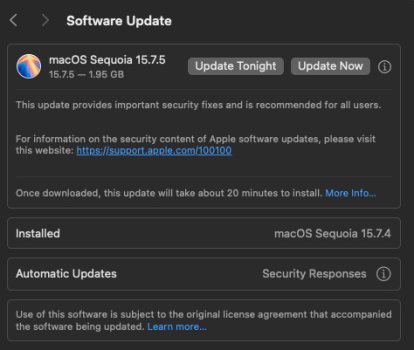
That's great. Where are you located? It is not showing up yet here... Just occurred to me, I previously installed the RC #5, build 24G624, so the release may be the same build as the last RC. Indeed, someone in the "Sequoia on Unsupported Macs" thread just posted that the release was build 24G624!15.7.5 has just been released, more than a month since this thread was started 🙂
View attachment 2616355
I was also curious about if it’s the same build; I didn’t realize with lockdown mode on my Mac, you get a warning that says “Changes to Beta Updates are blocked while your Mac is in Lockdown Mode”. I toggled “Beta Updates” to off, to see if there was a separate 15.7.5 (but now it won’t let me toggle the beta back on, so I probably have to toggle lockdown mode and reboot). Looks like the one I had installed last week was 24G624 as wellThat's great. Where are you located? It is not showing up yet here in Japan. Just occurred to me, as I previously installed the RC #5, build 24G624, is that the same build as the update you posted?
Unfortunately that's no longer working.I was using the defer Tahoe profile from @bogdanw, I don't know if it needs an update as well?

Unfortunately that's no longer working.

Unfortunately that's no longer working.
No, still working perfectly with 15.7.5, at least till this morningOh well, all good things must come to an end... unless?


Be aware, folks: I’ve just experienced “Black Screen hang plus cursor visible” phenomenon as a result of today’s 15.7.5 upgrade — on my two M4 equipped machines (Pro Mini and Max Studio, to be exact). Force shutdown was needed to restart them into normal state after that. Strange, innit?


Updates for CoreTypes.pkg & MobileDeviceOnDemand.pkg have been released, install them before connecting iOS devices.Any problems with macOS 15.7.5 working with iPhones & iPads on iOS 26?
Thank you!Updates for CoreTypes.pkg & MobileDeviceOnDemand.pkg have been released, install them before connecting iOS devices.
https://forums.macrumors.com/threads/itunes-software-updates.2416893/post-33894235
I forgot about this and checked the Apple security updates website with the release notes. Interestingly (unless I missed it) in 15.7.5 it doesn’t mention CVE-2026-20643 https://support.apple.com/en-us/126795, but the Safari update for Sonoma/Sequoia does https://support.apple.com/en-us/126800, which appears to match what was listed in the iOS/macOS 26 “background security improvementAt the moment, Apple has no release notes for Safari 26.3.1 https://developer.apple.com/documentation/safari-release-notes
Even if the WebKit vulnerability CVE-2026-20643 was fixed in Safari 26.3.1, macOS Sequoia still needs to be updated to fix it in /System/Library/Frameworks/WebKit.framework.
When it will be released, 15.7.5 will probably contain the fixes for CVE-2026-20643.
The fifth beta has been released 15.7.5 build 24G624 (Release Candidate 5)
https://betawiki.net/wiki/MacOS_Sequoia#15.7.5
The full installer is not available yet.

