Become a MacRumors Supporter for $50/year with no ads, ability to filter front page stories, and private forums.
The option to disable that showed for me, but for many other users it isn't for some reason. I've had people show me screenshots of their Spotlight "App" view, and they do not have the three dots in the top-right to enable/disable iPhone app view. A bug, once again.
Mine just has Grid or List
 
Seriously--It's crazy how little effort people put into checking to see if there are options/features available, like turning off the iPhone app view 😄
Actually it wasn't there when I first upgraded. It was only after I did the recent patch that added that functionality (otherwise I wouldn't have complained about it).
 
The option to disable that showed for me, but for many other users it isn't for some reason. I've had people show me screenshots of their Spotlight "App" view, and they do not have the three dots in the top-right to enable/disable iPhone app view. A bug, once again.
Exactly. Mine didn't show up until I did the recent update. I had to disable "iPhone mirroring" to turn it off. Glad to see there's an actual button now instead of having to disable other OS Features.
 
22 sept: as of 26.1 beta 1, when i swipe on the trackpad, am now getting a much wider & larger window, which (i think) should make a lot of unhappy people here happier. thoughts?
 
  • Like
Reactions: lotones
22 sept: as of 26.1 beta 1, when i swipe on the trackpad, am now getting a much wider & larger window, which (i think) should make a lot of unhappy people here happier. thoughts?
Can you please attach a screenshot for those not on the beta? Would be much appreciated!
 
Can you please attach a screenshot for those not on the beta? Would be much appreciated!
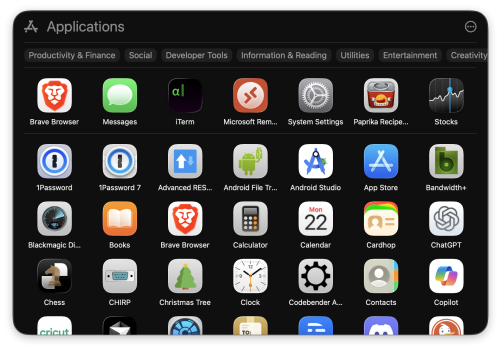
a portion in the center of my screen:

Screenshot 2025-09-22 at 5.16.30 PM.png
 
Last edited:
and since that's not going to happen, is the new window better for you?
I’ll be sticking with the existing tool that’s already in place, Spotlight. I’m still kind of lost as to why they’d remove one app to add another that’s just a stripped down version of the same search functionality as Spotlight. They’re the same thing! One just does way more than the other.
 
  • Like
Reactions: Makisupa Policeman
I’ll be sticking with the existing tool that’s already in place, Spotlight. I’m still kind of lost as to why they’d remove one app to add another that’s just a stripped down version of the same search functionality as Spotlight. They’re the same thing! One just does way more than the other.
spotlight does it.

being used to launchpad, i find myself, on instinct, opening apps with the trackpad swipe, but sometimes invoking spotlight. either way, i get to where i want to go. i like this 👍
 
  • Like
Reactions: gank41
I’ll be happier when they fire the person or persons responsible for getting rid of Launchpad.
I'm one who never really liked it, I found it superfluous and spotlight was a better option. With that said, after googling the loss has annoyed and angered quite a lot of people.
 
  • Like
Reactions: gregmac19
spotlight does it.
Spotlight only works when you can immediately recall the name of the app you want to open. And not all apps are intuitively named or used often enough to be foremost in your memory. 😉
Launchpad allowed users to move apps on screen to a place that was intuitive to them and / or build folders of apps named in a way that made sense to them - not Apple, as is the case with Apps.
 
Spotlight only works when you can immediately recall the name of the app you want to open. And not all apps are intuitively named or used often enough to be foremost in your memory. 😉
Launchpad allowed users to move apps on screen to a place that was intuitive to them and / or build folders of apps named in a way that made sense to them - not Apple, as is the case with Apps.
open 'apps' & scroll until you recognize the app you were looking for. or make a folder of apps that you don't remember the names of, put that in the dock. or try one of the 3rd-party apps, like QAL pro.

sure, these are all workarounds, but... find one that works for you 👍
 
open 'apps' & scroll until you recognize the app you were looking for. or make a folder of apps that you don't remember the names of, put that in the dock. or try one of the 3rd-party apps, like QAL pro.

sure, these are all workarounds, but... find one that works for you 👍

So, essentially, do the work that Apple used to do.

For the moment, I've built a desktop folder - basically duplicating Launchpad - with shortcuts to my mostly used apps, and with sub-folders with shortcuts of similarly-tasked apps in them. I tried it in Dock, but in typical Nanny mode for Apple, it opens a window with the shortcuts moved around - so on the Desktop it stays for the moment.

Watching QAL Pro and the project that pappkristof is doing above with interest, but shouldn't need to be reinventing the wheel just to make Apple happy.

(BTW - I don't use the iOS App Library for the exact same reason Apps in MacOS 26 is useless to me)


 
So, essentially, do the work that Apple used to do.

For the moment, I've built a desktop folder - basically duplicating Launchpad - with shortcuts to my mostly used apps, and with sub-folders with shortcuts of similarly-tasked apps in them. I tried it in Dock, but in typical Nanny mode for Apple, it opens a window with the shortcuts moved around - so on the Desktop it stays for the moment.

Watching QAL Pro and the project that pappkristof is doing above with interest, but shouldn't need to be reinventing the wheel just to make Apple happy.

(BTW - I don't use the iOS App Library for the exact same reason Apps in MacOS 26 is useless to me)

ok got it. but since launchpad is gone, what else is there to do, but find workarounds? seems great that there are developers offering possible replacements...
 
  • Like
Reactions: Bazza1
22 sept: as of 26.1 beta 1, when i swipe on the trackpad, am now getting a much wider & larger window, which (i think) should make a lot of unhappy people here happier. thoughts?
It's definitely a start. But can you organize the apps yourself?
 
  • Like
Reactions: pappkristof
22 sept: as of 26.1 beta 1, when i swipe on the trackpad, am now getting a much wider & larger window, which (i think) should make a lot of unhappy people here happier. thoughts?

I still find this Spotlight thingie beyond ridiculous (not that I intended to use it anyway).

First, it's nearly impossible to resize. That is, it's resizable - but the cursor doesn't always change to the "resize" symbol at the window edges. And if you miss that tiny mysterious area where the window can be dragged to resize, the window is dismissed.

Second, even if you manage to resize it, Spotlight doesn't remember the last window size anyway - and always reverts to its useless default size. Wow.

This is below an amateur newbie development project grade.
 
I still find this Spotlight thingie beyond ridiculous (not that I intended to use it anyway).

First, it's nearly impossible to resize. That is, it's resizable - but the cursor doesn't always change to the "resize" symbol at the window edges. And if you miss that tiny mysterious area where the window can be dragged to resize, the window is dismissed.

Second, even if you manage to resize it, Spotlight doesn't remember the last window size anyway - and always reverts to its useless default size. Wow.

This is below an amateur newbie development project grade.
don't use spotlight, use the 'apps' app; you could put that in your dock, and/or setup a key command for it (am using my mac trackpad). much better overall (as of 26.1 beta 1) than spotlight for this...
 
don't use spotlight, use the 'apps' app; you could put that in your dock, and/or setup a key command for it (am using my mac trackpad). much better overall (as of 26.1 beta 1) than spotlight for this...

well. the "Apps app" is not a thing. it's just a shortcut to open Spotlight, it only opens the apps search in Spotlight. it doesn't do anything else.
 
Register on MacRumors! This sidebar will go away, and you'll see fewer ads.