

Become a MacRumors Supporter for $50/year with no ads, ability to filter front page stories, and private forums.

MacRumors

macrumors bot
Original poster


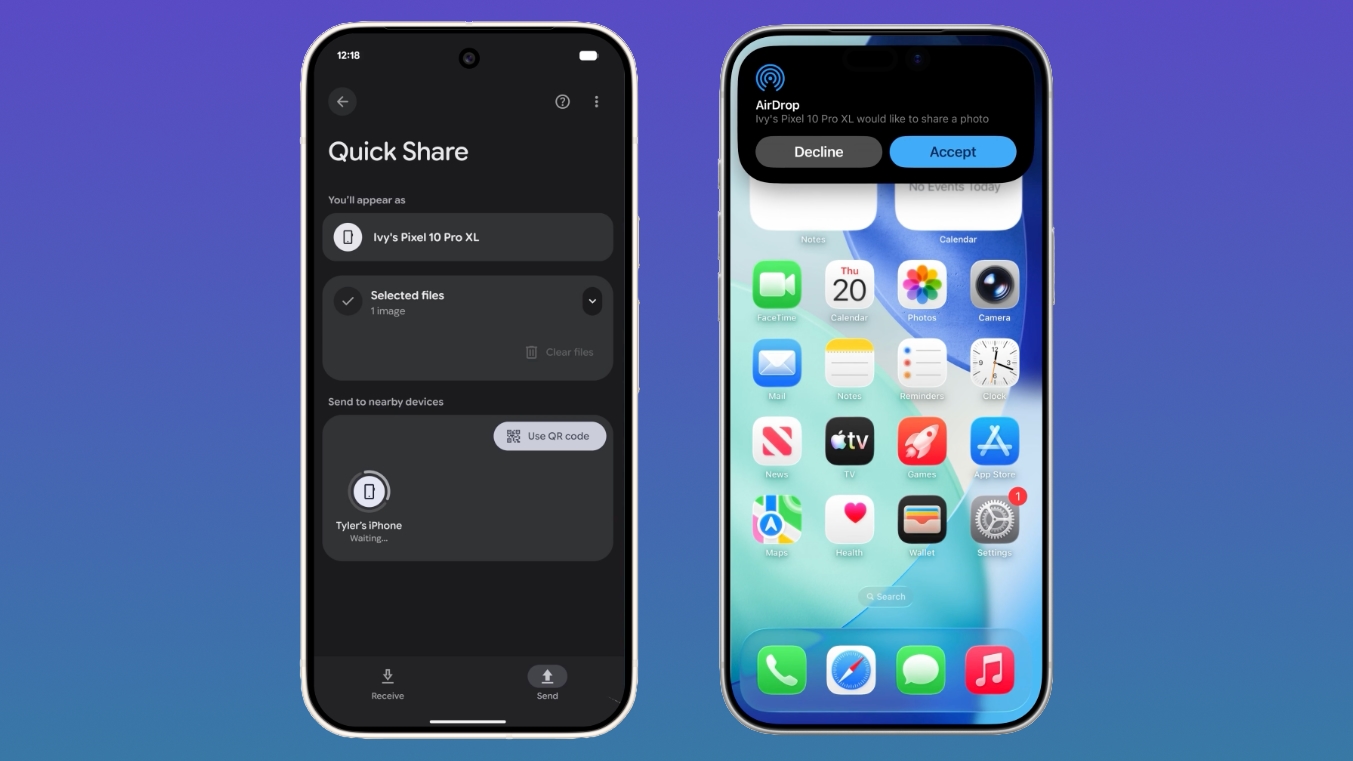
Google is expanding its cross-platform file sharing feature to additional Android devices, allowing them to transfer files to an iPhone using the AirDrop protocol. AirDrop support for Quick Share is coming to the Pixel 9, Pixel 9 Pro, Pixel 9 Pro XL, and Pixel 9 Pro Fold over the next few days.
android-iphone-airdrop-quickshare.jpg

Google announced Quick Share compatibility with AirDrop back in November, but the feature was initially limited to the newest Pixel 10 devices.

With AirDrop interoperability, Pixel 9 and Pixel 10 devices can transfer files to an iPhone, iPad, or Mac, and it works the same way as Apple device to Apple device AirDrop transfers. No internet connection is required.

To accept files from a Pixel smartphone, Apple device users need to change their AirDrop visibility to "Everyone for 10 Minutes." With the setting enabled, a file coming from an Android user looks identical to an AirDrop file from an iPhone, with the same notification and option to accept. Files are saved in the appropriate location, with a photo going to the Photos app or a document going to the Files app.

To receive files from an Apple user, the Pixel user will also need to turn on the Everyone for 10 minutes setting or enter into Receive mode on the Quick Share page. Files are saved in the Files app.

According to Google, Quick Share and AirDrop interoperability was designed with a multi-layered security approach to ensure a safe sharing experience regardless of platform. There's a secure sharing channel, built-in platform protections for Android and iOS, and a consent requirement before a file is received.

Connections between devices are direct and peer-to-peer, so data is not routed through a server. For file transfers in both directions, the Apple device or the Pixel device displays the other person's device name for verification purposes.

Article Link: Android-to-iPhone AirDrop Transfers Now Supported on Pixel 9
 
Here I was thinking “additional devices” would mean “additional devices not made by Google”. I’m wondering if sharing files in this specific way (remember, there are plenty of other ways to share files) will even be worth a bullet point on any other manufacturer’s device. Especially if it requires technology they’d have to start building into their devices (ie, not currently doing, so not free).

Definitely a positive for those few countries where iOS usage is close to Android usage AND allows Google to grow marketshare amongst those in those countries that care.
 
Hmm. Wonder if apple is going to cut this off at its knees?
Apple created the tech and gave it to the WiFi Alliance. Anyone wanting to support it just had to implement the same level of privacy controls Apple has. When looking up wireless technology, I was surprised at how much Apple has given to the WiFi Alliance that has improved wireless technology usage for everyone.
 
New attack vector for viruses?
Not really NEW, just the same huge attack vector which, these days, is the user. Turn on sharing because someone says, accept a document that someone asks you to accept, then open the document that’s been shared and if that document contains an unpatched exploit, could cause issues. At some level, there’s no connected technology that can’t be made less secure by the user. 🙂
 
They can't. It's been mandated by the EU that Apple shift from AWDL and go with open WiFi Aware in iOS 26 onward.


Why do people think intentionally crippling technology is a good thing?
Why do people think the regulating a companies IP is a good thing? It’s not. If apple wanted to give it up….oh well don’t want to be a broken record.
 
Part of their Gemini deal, in all likelihood. Same with the Vision Pro Youtube app. "Some strings() attached." (pardon the developer pun)
 
Why do people think the regulating a companies IP is a good thing? It’s not. If apple wanted to give it up….oh well don’t want to be a broken record.
Apple has to adopt the new Wi-Fi Standards that they gave to the Wi Fi Alliance. 😀

I give that story credit in that it does reference how Apple was behind USB-C AND Wi-Fi Direct. But, because they had to follow their “Apple was forced” line, they bring up USB-C as an example which was implemented on Apple’s decade timeline. 😋
 
Not really NEW, just the same huge attack vector which, these days, is the user. Turn on sharing because someone says, accept a document that someone asks you to accept, then open the document that’s been shared and if that document contains an unpatched exploit, could cause issues. At some level, there’s no connected technology that can’t be made less secure by the user. 🙂
Same user can send you the document by email, messages or the cloud. Iphone user can send you the document. If you need the document this is a convenience.
 
Not really NEW, just the same huge attack vector which, these days, is the user. Turn on sharing because someone says, accept a document that someone asks you to accept, then open the document that’s been shared and if that document contains an unpatched exploit, could cause issues. At some level, there’s no connected technology that can’t be made less secure by the user. 🙂
Unfortunately you are 100% correct.
 
Apple, Google and MS need to develop a predictable standard they all agree one that’s under singular branding such as “AirDrop” or similar using the same term across all companies. This standard for short range sharing should be a menu option and also pop-up automatically when devices are brought very close together with a sharing list of options for different types of media, prioritising at the top of the list the app that’s currently on-screen, say Comtacts to be able to share you personal content in a single tap, with the other user able to accept on the other side with a simple tap.

This way, if a person is looking at something on their phone like a video, a song, a website, a photo or anything else, the other user can ask them to share it and all it takes is bringing the devices close and one tap, with automatic authentication happening via face or fingerprint.

The second option in the list could be “Send cash” as a quick way to give another device user (any device) a few quid as easily as passing them physical cash.
 
Register on MacRumors! This sidebar will go away, and you'll see fewer ads.