

Become a MacRumors Supporter for $50/year with no ads, ability to filter front page stories, and private forums.

MacRumors

macrumors bot
Original poster


Anker this week launched a useful new accessory for your desk, debuting the 10-in-1 Nano Power Strip. Priced at $70, the Nano Power Strip has a unique clamp design that puts multiple ports on your desktop while eliminating cable clutter.
anker-nano-power-strip-1.jpg

I was able to test out the Nano Power Strip ahead of when it launched, and found it to be a useful alternative to standard under-desk power strips. The power strip comes in black or white and it's made of plastic, but the matte finish adds aesthetic appeal, as does a silver front plate for some of the ports.

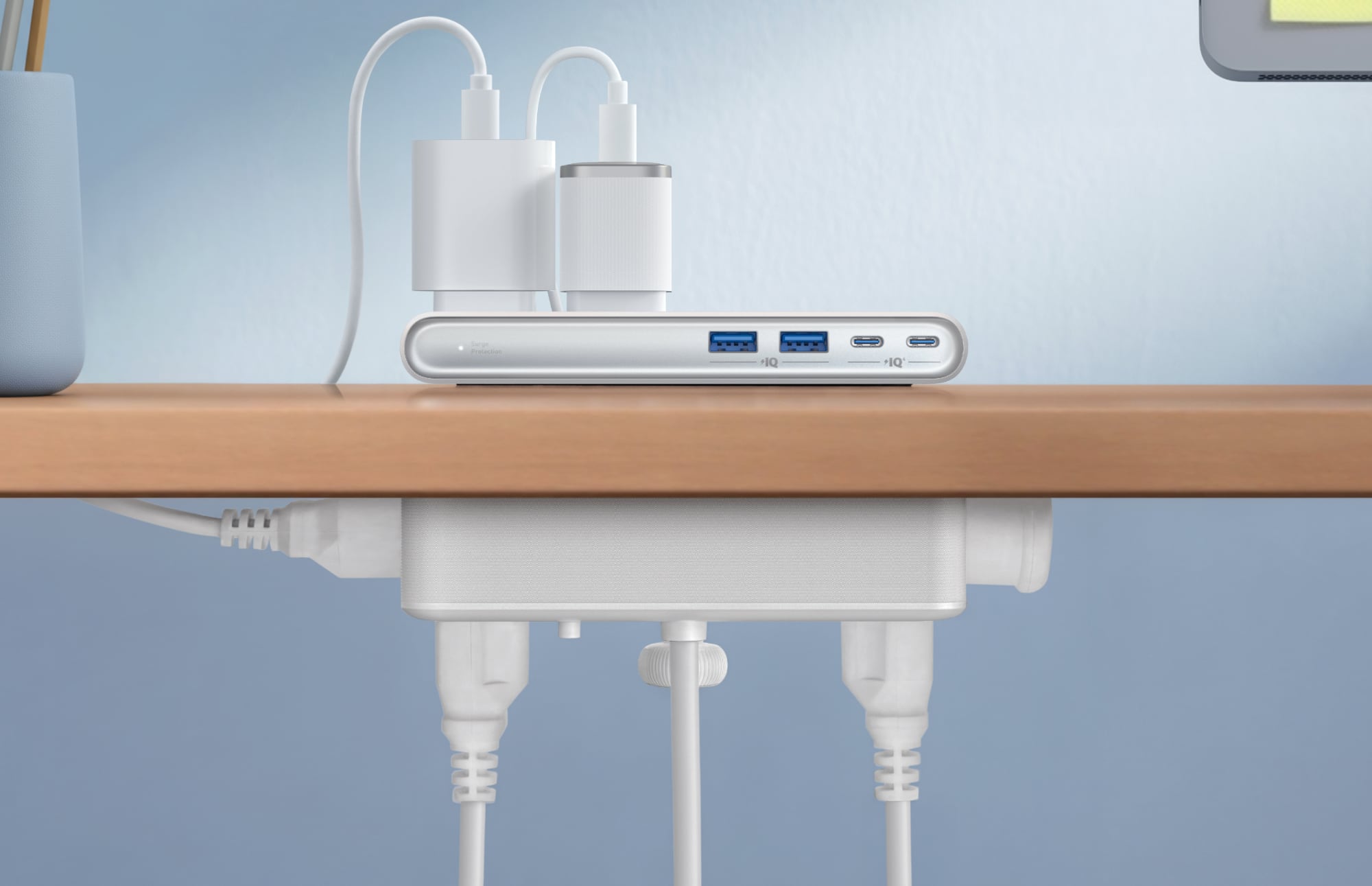
The clamp is adjustable with an included knob and it fits desktops from 0.6 inches to 1.8 inches. Unfortunately, I have a Parsons-style desk that's too thick to use the power strip as intended, so it's worth measuring. With my thicker desk, I can still attach it to a leg or the back of the desk, but it doesn't put all of the outlets in the ideal position. There are silicone pads at both sides of the clamp to keep furniture from being scratched.
anker-nano-power-strip-2.jpg

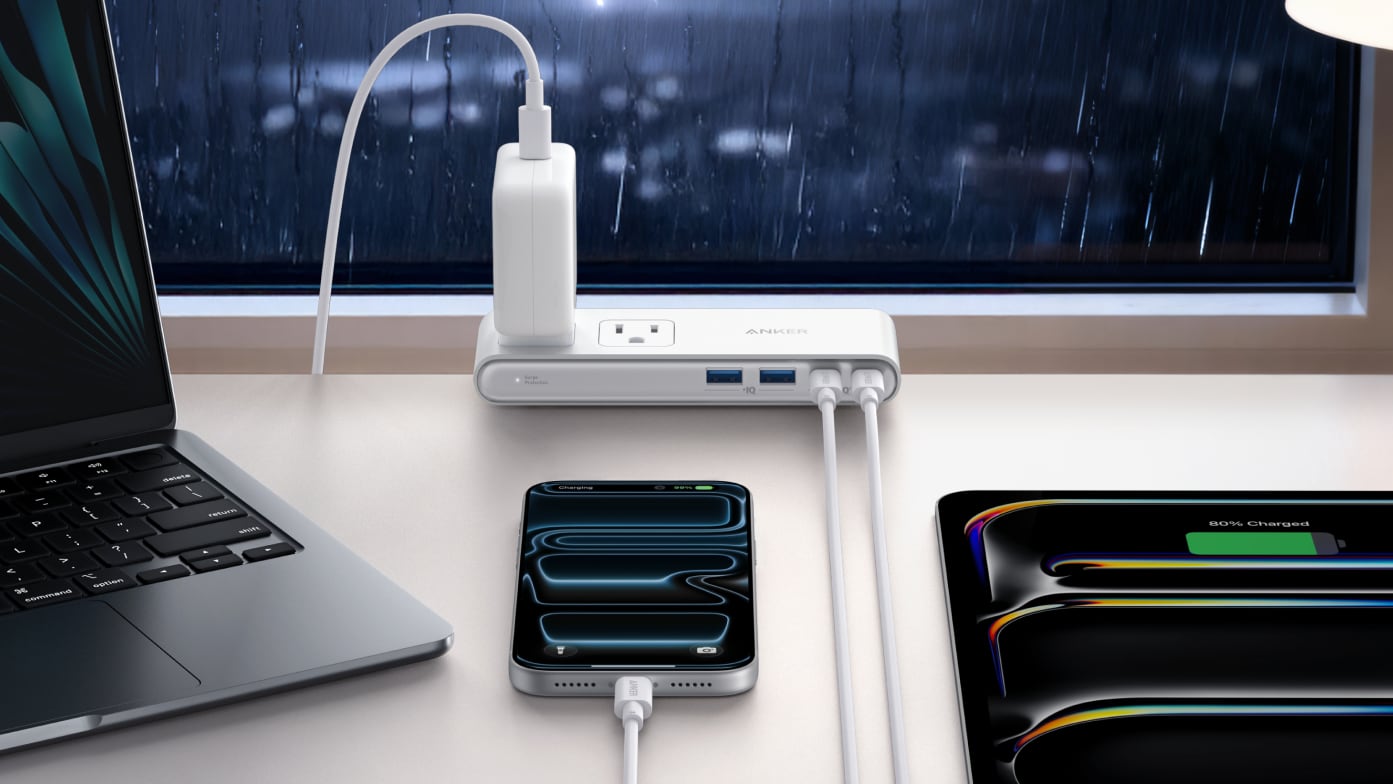
There are two outlets at the top, two outlets at the bottom, and two outlets at the sides, for a total of six outlets. There are two USB-C ports with 70W max charging (split between 45W and 25W when charging two devices), and two 12W USB-A ports. 70W isn't going to charge a MacBook Pro at its maximum speed, but it's enough for day-to-day use, and it'll fast charge most other Apple devices. I do wish there was more USB-C power and one less USB-A port, but it's easy enough to use one of the top outlets to plug in one of Anker's small multi-port power adapters.

With the power strip positioned at the edge of a desk, the two outlets on the top of the device are accessible from the desktop. The four other outlets are accessible from the bottom of the desk, so cables can be hidden away. The USB-A and USB-C ports are also meant to be used from the desktop, and the above-desk portion is slim, coming in at under an inch.

Because the Nano Power Strip attaches to a desk, it stays secure when plugging things in to the ports or the top outlets, which is convenient. I don't need to hold it down to unplug something, and it doesn't move around on a tabletop. If you've ever had a power strip with a bunch of heavy cables plugged in, you probably know what a hassle it can be trying to keep it upright.

The Nano Power Strip is a surge protector, and Anker says that it has overload, short-circuit, and temperature control.

Anker's Nano Power Strip can be purchased from the Anker website or from Amazon for $70.

Article Link: Anker's $70 Nano Power Strip Clamps to Your Desk for Easy Access to 10 Ports
 
As an Amazon Associate, MacRumors earns a commission from qualifying purchases made through links in this post.
  • Haha
Reactions: Z-4195
8_2_b8d07ab3-2718-44cb-8ff4-6204ac666c0d_3840x.png


Cool product and I would consider it but I have all my wires coming from under the desk without a need to plug in on my desk. But what is with this weird photo on their page? She is using an iMac without a keyboard or mouse.
 
I use an under desk cable management tray like this one. It allows me to customize the length of my power cords. It's not as elegant as this product but more functional.
 
As an Amazon Associate, MacRumors earns a commission from qualifying purchases made through links in this post.
I’m a big fan of Anker. I would probably buy this in a heartbeat if it had a display on that left side that told you what each port is pulling. I have one of their other products. The laptop
Charger with a big display and 4 ports. What is fascinating is you can plug certain cables in and you immediately see what they are pulling down in terms of WH… older cables regardless of the device pull less than newer thicker cables… plus you can verify what a device pulls to understand its capability. The screen is really helpful.
 
Interesting idea though not good for me. I have a well hidden power strip under my desk and I use my Caldigit dock on top for any extra USB charging needs. But I imagine there are some this will work well for.
 
8_2_b8d07ab3-2718-44cb-8ff4-6204ac666c0d_3840x.png


Cool product and I would consider it but I have all my wires coming from under the desk without a need to plug in on my desk. But what is with this weird photo on their page? She is using an iMac without a keyboard or mouse.
You don't see the keyboard that's attached to the monitor-the laptop? Or the mouse she is holding right near the laptop? I mean I do agree tho, very weird photo!
 
8_2_b8d07ab3-2718-44cb-8ff4-6204ac666c0d_3840x.png


Cool product and I would consider it but I have all my wires coming from under the desk without a need to plug in on my desk. But what is with this weird photo on their page? She is using an iMac without a keyboard or mouse.
I do this often. She might be using the Universal Control feature through her MacBook? My iMac's magic keyboard and magic trackpad were both dead the other day. Used my Neo to do work on my iMac. Worked great.
 
Give it a few weeks it will be on fire.
Yep, I don't use plastic power strips. If the surge protector activates it is not unknown for them to melt down and start a fire. Metal power strip can get pretty hot before it ignites the stuff around it. Plastic is cheap, until you have a house fire.
 
Note that it supports Anker's proprietary IQ charging, not the open USB PD standard.

If that was the case, this product would be half functional, and not spec compliant.

PowerIQ is the branding Anker uses to describe how their products manage power distribution between ports, and in the past, accommodation of proprietary standards like Apple 2.4 and QuickCharge.

PD is the only compliant protocol for power delivery over Type-C. Products that tried to implement QC3 over it were in violation of the spec. QC4 is just more branding, and employs PD in function.
 
  • Like
Reactions: artifex
I'd like a power strip that just has three or more USB-A ports and three or more USB-C ports. No AC ports. It can be low power.
 
This is not true. All these ports support USB PD.
If that was the case, this product would be half functional, and not spec compliant.

PowerIQ is the branding Anker uses to describe how their products manage power distribution between ports, and in the past, accommodation of proprietary standards like Apple 2.4 and QuickCharge.

PD is the only compliant protocol for power delivery over Type-C. Products that tried to implement QC3 over it were in violation of the spec. QC4 is just more branding, and employs PD in function.
Looks like I'm wrong, because they added support for PD starting with PIQ 3. But before that, they didn't support it.
Weird that it's not mentioned in the specs, however.
 
Sure, everyone should have a little Chinese under your desk. What can go wrong?
You get that 80 to 90% of Apple's total production capacity is still in China, right? If you're going to use a MBP, iPad, iPhone, and Apple TV from China, why balk at the power strip? 🤨
 
  • Like
Reactions: Ct applefan
Nice concept, but 70W seems low to me when they’re using laptop charging as a use case. Especially if you plug in two devices and are now stuck with 45/25w split which probably won’t even sustain a charge for many laptops.

Would love one with 4x USB-C ports (no type A), and around 140W (or higher) combined output including a good amount on at least one port when multiple devices are connected, so a Laptop is well catered for. Ideally I’d want enough there to power a higher end laptop, fast charge a phone/tablet and run two other less demanding device's, as a minimum. Better would be a laptop, fast charge phone and a tablet.
 
Register on MacRumors! This sidebar will go away, and you'll see fewer ads.