Become a MacRumors Supporter for $50/year with no ads, ability to filter front page stories, and private forums.

ferencav

macrumors member
Original poster
Mar 31, 2019
49
23
I would like to run Mojave (for some old 32-bit software) and Sequoia in dual boot on my iMac. I erased my drive and created two separate APFS containers and installed Mojave on the first one with no problems. Then I installed Sequoia on the second APFS container and it also works flawlessly. But then on Mojave I get the message "Incompatible Disk" after logging in. I know this is because Sequoia made changes to the APFS containers. However I thought by making two separate APFS containers, Sequoia would leave the partition of Mojave alone.

I do think I can actually ignore the message, but the OCD in me wants me to get rid of this message. So is there a way to completely prevent this warning? Or should I use an external HD for one of the two versions of MacOS?

Thanks in advance!
 
  • Like
Reactions: goldmac2006
I would like to run Mojave (for some old 32-bit software) and Sequoia in dual boot on my iMac. I erased my drive and created two separate APFS containers and installed Mojave on the first one with no problems. Then I installed Sequoia on the second APFS container and it also works flawlessly. But then on Mojave I get the message "Incompatible Disk" after logging in. I know this is because Sequoia made changes to the APFS containers. However I thought by making two separate APFS containers, Sequoia would leave the partition of Mojave alone.

I do think I can actually ignore the message, but the OCD in me wants me to get rid of this message. So is there a way to completely prevent this warning? Or should I use an external HD for one of the two versions of MacOS?

Thanks in advance!
External HD with the macOS Mojave installer instead of a partition on the internal drive would work better
 
  • Like
Reactions: ferencav
You could use /etc/fstab to prevent Mojave being mounted in Sequoia and Sequoia being mounted in Mojave.
That's a good one! I tried this by following the steps in this discussion:

I did manage to prevent the automatic mounting of the volume "Update" which was made by the Sequoia installer.

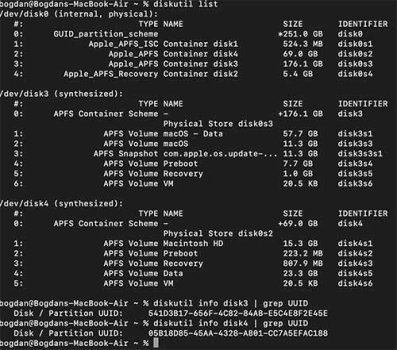
However I can't prevent the mounting of the Sequoia partition. This partition is encrypted and when I start Mojave it asks for a password to access the drive. It doesn't matter if I enter a password or not. Both ways it gives the "Incompatible Disk" warning.

According to the discussion you have to enter the password for the encrypted drive and save the password to your keychain. Then follow the steps, but unfortunately this doesn't work either.
 
  • Like
Reactions: goldmac2006
Don't run diskutil info /Volumes/volume, use diskutil info disk without entering the password
Command to return all UUIDs:
Code:
for d in $(diskutil list | awk '/disk[0-9]+s[0-9]+/{print $NF}'); do
  diskutil info "$d" | awk -F': *' '
    /Device Identifier|Volume Name|Volume UUID/ {printf "%s ", $2}
    END {print ""}
  '
done
 
Don't run diskutil info /Volumes/volume, use diskutil info disk without entering the password
Command to return all UUIDs:
Code:
for d in $(diskutil list | awk '/disk[0-9]+s[0-9]+/{print $NF}'); do
  diskutil info "$d" | awk -F': *' '
    /Device Identifier|Volume Name|Volume UUID/ {printf "%s ", $2}
    END {print ""}
  '
done
Yeah, I just right clicked -> Get Info on the volume in Disk Utility. From there you can copy the UUID also.
 
OP wrote:
"I would like to run Mojave (for some old 32-bit software) and Sequoia in dual boot on my iMac."

I do this (use both Mojave and Sequoia) on my 2018 Mac Mini (now semi-retired on the "back desk").

You're going to get that "incompatible" warning because old Mojave IS incompatible with the disk structure on the new Sequoia volume.

It is what it is.
So... get used to it.
A minor aggravation. Just "click through" it and get on with things.

In my case, Sequoia is on a separate, external drive.
I disconnect the drive when booting from Mojave.
No warnings that way...
 
Yeah you're right I have to get used to it I guess. Time to tame down the OCD. And otherwise I'm going to try the external disk option. Thanks!
 
Register on MacRumors! This sidebar will go away, and you'll see fewer ads.