
Got a tip for us?
Let us know
Become a MacRumors Supporter for $50/year with no ads, ability to filter front page stories, and private forums.
MP 7,1 Anyone tried new Studio Display (XDR) with 2019 Mac Pro?
- Thread starter realLucaR
- Start date
- Sort by reaction score
You are using an out of date browser. It may not display this or other websites correctly.
You should upgrade or use an alternative browser.
You should upgrade or use an alternative browser.

I've seen a screenshot of it working under windows with RTX5090 Nvidia at 120hz:
Someone will have to haul their 7,1 into an Apple store to test it. 😉

 appleinsider.com
It should probably work on our machines using the MPX modules, but not 120hz I would guess.
It might be good if the Macrumors article was updated to clarify: https://www.macrumors.com/2026/03/03/apple-studio-display-no-intel-mac-support/
Someone will have to haul their 7,1 into an Apple store to test it. 😉
Studio Display XDR works on select Intel Macs, with a catch
While the Apple Studio Display XDR is officially usable only with Apple Silicon Macs, the hardware seems to work with select Intel Macs as well.
It should probably work on our machines using the MPX modules, but not 120hz I would guess.
It might be good if the Macrumors article was updated to clarify: https://www.macrumors.com/2026/03/03/apple-studio-display-no-intel-mac-support/
Last edited:

That screenshot was posted on a Reddit post I made lmaoI've seen a screenshot of it working under windows with RTX5090 Nvidia at 120hz:
Someone will have to haul their 7,1 into an Apple store to test it. 😉
Studio Display XDR works on select Intel Macs, with a catch
While the Apple Studio Display XDR is officially usable only with Apple Silicon Macs, the hardware seems to work with select Intel Macs as well.
It should probably work on our machines using the MPX modules, but not 120hz I would guess.
I’m seriously considering going to the Apple Store with my heavy ass Mac Pro to check for myself 😂
Small world isn't it! 😀That screenshot was posted on a Reddit post I made lmao
You should, just for a laugh! From my experience at Apple Sydney a few days ago they probably wouldn't mind it. Usual reaction is "wow, you have one of those, what do you use it for, they are not very common".I’m seriously considering going to the Apple Store with my heavy ass Mac Pro to check for myself 😂
Main problem is hauling around what is it 20kg of that massive machine. 😀 I'd call them up first or see them if they are nearby and see if they are okay with it. Other folks have been connecting their laptops to check those.
Just make sure you don't get some over-zealous jobsmith.
Last edited:
Small world isn't it! 😀
You should, just for a laugh! From my experience at Apple Sydney a few days ago they probably wouldn't mind it. Usual reaction is "wow, you have one of those, what do you use it for, they are not very common".
Main problem is hauling around what is it 20kg of that massive machine. 😀 I'd call them up first or see them if they are nearby and see if they are okay with it. Other folks have been connecting their laptops to check those.
Just make sure you don't get some over-zealous jobsmith.
It really is 😅Small world isn't it! 😀
I think I might actually go along with it. Who knows, maybe it works and I can buy one on the spot. Although Apple never makes it that easy, do they 😅
Out of pure curiosity, what do you use your Mac Pro for?

keksikuningas
macrumors 6502
it never occurred to me to bring my macbook to test out a display before. I wish we had the 6k displays anywhere on display in my country so that I could see what it's like with my workflows (and then proceed to buy the Asus / Acer counterpart that is several times cheaper, sorry Tim)Other folks have been connecting their laptops to check those
you know what? I am going to believe 6900xt (using that special DP1.4 port+USB-A to USB-c port cable), or W6800x Duo (using TB3/4/5 cable) should be able to turn on the magic 5k 120Hz HDR on SD XDR, although it will definitely use DSC.Please test Windows support. It's a must have. Install the same drivers as for the old studio display and report.
If a Mac Pro 2013 with a proper eGPU was able to handle 5K@60Hz, then Mac Pro 2019 with proper MPX module should handle 5K@120Hz.
Keep in mind when M4 max or M5 max MBP driving two SD XDRs to 5K 120Hz HDR using a single TB5 cable, it also uses DSC.
keksikuningas
macrumors 6502
I saw someone run it at 120hz on a 2019 intel MBP i9 in another thread. But also DP could work. And aren't there AMD reference models of 6900xt with a USB-C output?It should work but at 60hz
I wonder if it will work at 5k@120hz if you have a card with DisplayPort and get the proper cable (USBC > DisplayPort)
So probably Navi cards (RX5000/6000 series) are capable of running these at 120 Hz which is super cool.
Our W6800/W6900 MPXs should probably be capable in that case too. At least we can be certain the display works, so 120hz if that also works is a bonus.
Thanks, that would be highly appreciated!Will be able to try on this weekend, will update here
It should -not- work, since the MP uses Thunderbolt 3, which only support 4k 120hz or 5k 60hz AFAIK, but 60hz should workIt should work but at 60hz
I wonder if it will work at 5k@120hz if you have a card with DisplayPort and get the proper cable (USBC > DisplayPort)

SDAVE
macrumors 601
I saw in another thread they tried it on an older Intel MacBook and it "falls" back to 60Hz 5k when its not TB5.Thanks, that would be highly appreciated!
It should -not- work, since the MP uses Thunderbolt 3, which only support 4k 120hz or 5k 60hz AFAIK, but 60hz should work
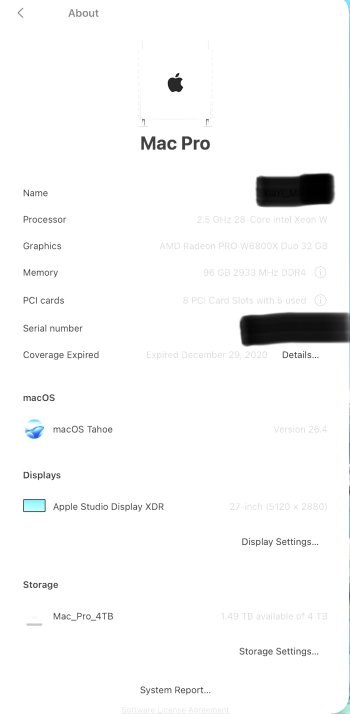
I am so happy to report we are able to get 5K 120HZ HDR HiDPI in Mac Pro 7.1 with certain GPU.
I first tried 6900xt (using that special type c to dp1.4&usb-a cable), it can reach 5K 60HZ HDR HiDPI
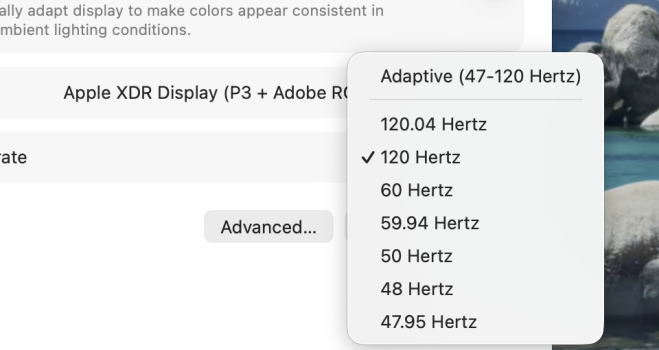
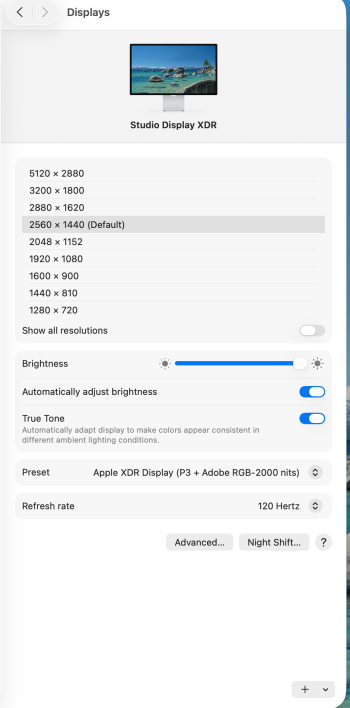
Then I tried the W6800x duo using a normal thunderbolt 3 cable(from Apple), it can get the glorious 5K 120HZ HDR HiDPI ! In fact it can support adaptive 47-120.04Hz as shown in image. I think DSC does the magic here!
For both GPU above, I can do brightness control using keyboard, use all the features of camera( center stage, studio light , desk view), microphone( different mode) and speakers.
Glory for Mac Pro!
I first tried 6900xt (using that special type c to dp1.4&usb-a cable), it can reach 5K 60HZ HDR HiDPI
Then I tried the W6800x duo using a normal thunderbolt 3 cable(from Apple), it can get the glorious 5K 120HZ HDR HiDPI ! In fact it can support adaptive 47-120.04Hz as shown in image. I think DSC does the magic here!
For both GPU above, I can do brightness control using keyboard, use all the features of camera( center stage, studio light , desk view), microphone( different mode) and speakers.
Glory for Mac Pro!
Attachments
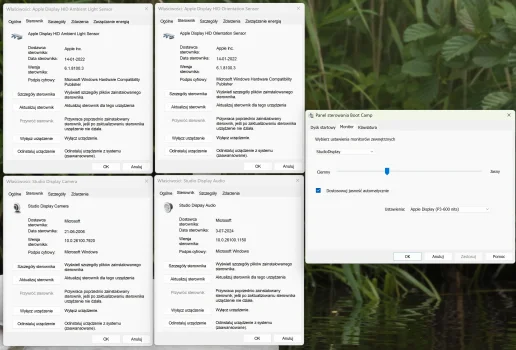
Wow! Can you please test Windows via BootCamp and see if brightness is still working and all drivers are the same?
Windows 10 or 11 - doesn't matter. They use the same drivers.
Make sure to use Apple keyboard to control brightness. Logitech ones doesn't work.
These are the ones that worked on 1st gen Apple Studio Display.
If you have driver issues test it using - BootCampDrivers.com driver. It's better for gaming.
Windows 10 or 11 - doesn't matter. They use the same drivers.
Make sure to use Apple keyboard to control brightness. Logitech ones doesn't work.
These are the ones that worked on 1st gen Apple Studio Display.
If you have driver issues test it using - BootCampDrivers.com driver. It's better for gaming.
Attachments
Last edited:
Wow, this is absolutely amazing news! Very glad to hear that, I almost thought that I’ll have to test for myself.I am so happy to report we are able to get 5K 120HZ HDR HiDPI in Mac Pro 7.1 with certain GPU.
I first tried 6900xt (using that special type c to dp1.4&usb-a cable), it can reach 5K 60HZ HDR HiDPI
Then I tried the W6800x duo using a normal thunderbolt 3 cable(from Apple), it can get the glorious 5K 120HZ HDR HiDPI ! In fact it can support adaptive 47-120.04Hz as shown in image. I think DSC does the magic here!
For both GPU above, I can do brightness control using keyboard, use all the features of camera( center stage, studio light , desk view), microphone( different mode) and speakers.
Glory for Mac Pro!
Wondering how it will run on my Vega II, maybe I’ll have to upgrade to the W6800X Duo.
But I am definitely going to get the Studio Display, maybe the XDR depending on my budget.
Thank you for testing it out, that is great news. Have you had any chance to check compatibility in Bootcamp?
Sorry,
I Have not setup windows on my Mac Pro yet, but I think I will find time to do it. Not sure when though.
Wow, this is absolutely amazing news! Very glad to hear that, I almost thought that I’ll have to test for myself.
Wondering how it will run on my Vega II, maybe I’ll have to upgrade to the W6800X Duo.
But I am definitely going to get the Studio Display, maybe the XDR depending on my budget.
Thank you for testing it out, that is great news. Have you had any chance to check compatibility in Bootcamp?
I Have not setup windows on my Mac Pro yet, but I think I will find time to do it. Not sure when though.

blackquartz
macrumors regular
This is gold, thanks for sharing.I am so happy to report we are able to get 5K 120HZ HDR HiDPI in Mac Pro 7.1 with certain GPU.
I first tried 6900xt (using that special type c to dp1.4&usb-a cable), it can reach 5K 60HZ HDR HiDPI
Then I tried the W6800x duo using a normal thunderbolt 3 cable(from Apple), it can get the glorious 5K 120HZ HDR HiDPI ! In fact it can support adaptive 47-120.04Hz as shown in image. I think DSC does the magic here!
For both GPU above, I can do brightness control using keyboard, use all the features of camera( center stage, studio light , desk view), microphone( different mode) and speakers.
Glory for Mac Pro!
No problem, macOS support is already enough reason to buy for me.Sorry,
I Have not setup windows on my Mac Pro yet, but I think I will find time to do it. Not sure when though.
Did you get the Studio Display XDR specifically for the Mac Pro?
not really, I bought it also for my other computers (MacBook Pro 16 M4 Max, Mac Studio M4 Max). I have a TB5 dock to switch between these 3 computersNo problem, macOS support is already enough reason to buy for me.
Did you get the Studio Display XDR specifically for the Mac Pro?
Bafflefish
macrumors 6502
I am so happy to report we are able to get 5K 120HZ HDR HiDPI in Mac Pro 7.1 with certain GPU.
I first tried 6900xt (using that special type c to dp1.4&usb-a cable), it can reach 5K 60HZ HDR HiDPI
Then I tried the W6800x duo using a normal thunderbolt 3 cable(from Apple), it can get the glorious 5K 120HZ HDR HiDPI ! In fact it can support adaptive 47-120.04Hz as shown in image. I think DSC does the magic here!
For both GPU above, I can do brightness control using keyboard, use all the features of camera( center stage, studio light , desk view), microphone( different mode) and speakers.
Glory for Mac Pro!
If you don’t mind, which brand/model of 6900 XT and which of the DisplayPort + USB to USB-C cables did you try with it?
AMD original version of 6900XT. DisplayPort + USB-A to USB-C cable link: https://www.amazon.com/dp/B0BNX7MS6N?ref_=ppx_hzod_title_dt_b_fed_asin_title_0_0&th=1If you don’t mind, which brand/model of 6900 XT and which of the DisplayPort + USB to USB-C cables did you try with it?
As an Amazon Associate, MacRumors earns a commission from qualifying purchases made through links in this post.