Become a MacRumors Supporter for $50/year with no ads, ability to filter front page stories, and private forums.

Undecided

macrumors 6502a
Original poster
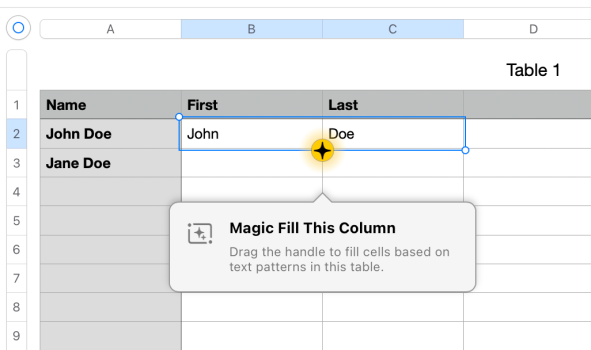
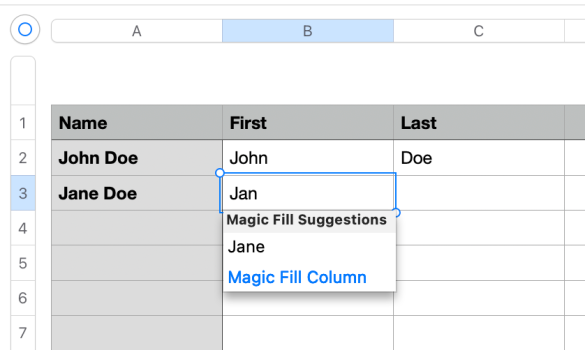
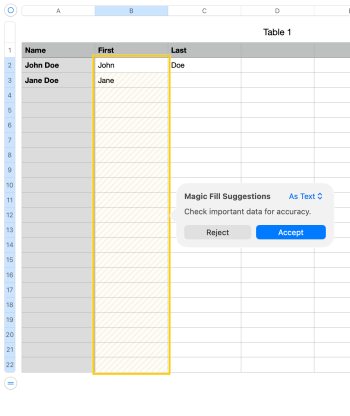
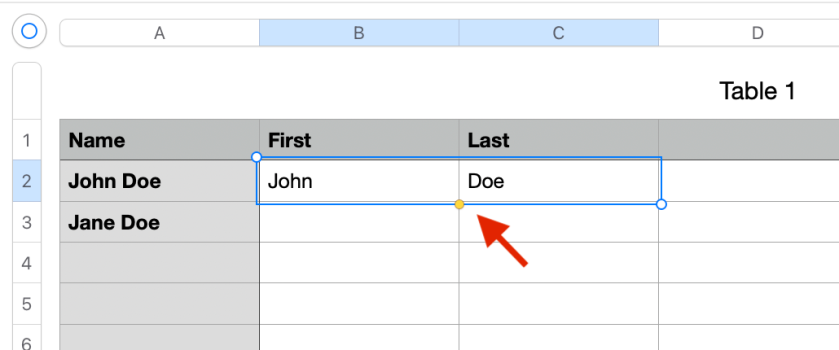
I don't subscribe to Apple Creator Studio, but I use Numbers, Pages, etc. a lot. In Numbers, I often select one or more cells, and then drag the surrounding selection box (from the yellow dot) to fill adjacent cells. Now, because of Magic Fill, when I select one or more cells to drag the box, a Magic Fill popup blocks it (obscures the yellow dot). I tried just hitting escape to make it go away (so I can drag the box) and that doesn't work. So I end up randomly clicking (since I don't know how to easily clear it) until it goes away and I'm able to drag to fill as before. What's weird is that once I make it go away, it doesn't pop up again for a while (I'm not sure what that's keyed to).

Is there a way that I can either block Magic Fill suggestions completely, or easily get out of the popup so I can use the app functions normally?
 
Last edited:
That is strange. As far as I understand, from the Help page, Magic Fill is a feature available only for subscribers.

It also says:
Important: If you don’t see Magic Fill options, you may need to turn on suggestions. Go to Numbers > Settings > General, then turn on “Show suggestions when editing table cells”.
Turning this option off may come with the cost of not having suggestions at all.
 
That is strange. As far as I understand, from the Help page, Magic Fill is a feature available only for subscribers.

It also says:

Turning this option off may come with the cost of not having suggestions at all.
Yes, you lose all autocomplete suggestions then.

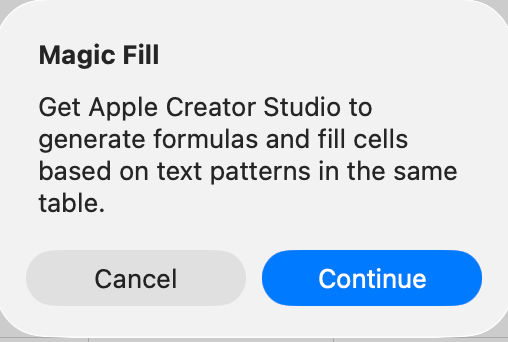
And, yeah, even though I'm not a subscriber, the Magic Fill popup shows up. And if I click on it, it says i need to subscribe to Creator Studio.
 
  • Like
Reactions: fireandmirth
yes, that popover will haunt you to upsell the subscription. I did get mine to go away... but now I can't remember what the 'trick' was.

make sure to read the whole popover if it opens again, I think there was a "not now", or "don't ask me again" check box, both??

I also stopped using 15 and when back to 14.5 due to 'Quick Filter' app crashes (bug iWork team is trying to figure out)
 
  • Like
Reactions: AlumaMac
yes, that popover will haunt you to upsell the subscription. I did get mine to go away... but now I can't remember what the 'trick' was.

make sure to read the whole popover if it opens again, I think there was a "not now", or "don't ask me again" check box, both??

I also stopped using 15 and when back to 14.5 due to 'Quick Filter' app crashes (bug iWork team is trying to figure out)
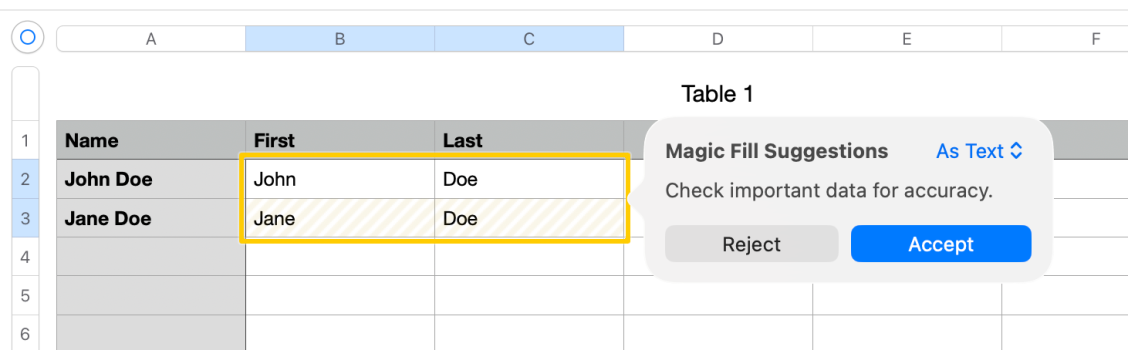
I don't see that option - take a look of these screenshots of the sequence. And, yeah, this is 15.1.

If I'm not a subscriber, stop making suggestions that require a subscription.
 

Attachments

  • Screenshot 2026-03-20 at 7.41.49 AM.png
    Screenshot 2026-03-20 at 7.41.49 AM.png
    96.2 KB · Views: 60
  • Screenshot 2026-03-20 at 7.42.16 AM.png
    Screenshot 2026-03-20 at 7.42.16 AM.png
    130.4 KB · Views: 55
  • Screenshot 2026-03-20 at 7.42.35 AM.png
    Screenshot 2026-03-20 at 7.42.35 AM.png
    31.8 KB · Views: 47
  • Screenshot 2026-03-20 at 7.49.11 AM.png
    Screenshot 2026-03-20 at 7.49.11 AM.png
    69.6 KB · Views: 59
  • Screenshot 2026-03-20 at 7.49.22 AM.png
    Screenshot 2026-03-20 at 7.49.22 AM.png
    504.9 KB · Views: 61
If you find Apple suite starting to ******ify , may I suggest migrating to OnlyOffice its FOSS and you shouldn't see this annoyance
 
I don't see that option - take a look of these screenshots of the sequence. And, yeah, this is 15.1.

If I'm not a subscriber, stop making suggestions that require a subscription.
agreed about the upsells.

sorry I think I confused the 'welcome' at opening of Numbers 15 (I got the sub notification), with the AI cell entry feature.

I do like that cell entry feature... but in decades past these would be the new features included in the update.
its a sorry a** money grab.

I too will probably move back to LibreOffice or the like, gonna have a look at OnlyOffice now- thnx
 
Lol, Apple sinking to new lows.

I will always be of the mind this is due to hiring based on leetcode vs actual skill. Why my industry thinks it's better to hire college kids as senior developers because they have time to study tricky irrelevant interview questions over seasoned developers who've been building scalable enterprise software for years is beyond me.
 
agreed about the upsells.

sorry I think I confused the 'welcome' at opening of Numbers 15 (I got the sub notification), with the AI cell entry feature.

I do like that cell entry feature... but in decades past these would be the new features included in the update.
its a sorry a** money grab.

I too will probably move back to LibreOffice or the like, gonna have a look at OnlyOffice now- thnx
I actually wouldn't be so irritated by this if it didn't get in the way of using the normal Autofill function. In this case. it's obscuring the small yellow dot. I can't grab the yellow dot until I get the Magic Fill popup to go away. Even if I hit ⌘-\, the Magic Fill suggestion comes right back.
 

Attachments

  • Screenshot 2026-03-21 at 3.49.25 PM.png
    Screenshot 2026-03-21 at 3.49.25 PM.png
    64.5 KB · Views: 45
I do like that cell entry feature... but in decades past these would be the new features included in the update.
its a sorry a** money grab.
Exactly! It's such an obvious money grab. No reason magic fill couldn't have been a new feature for all.

That said, the pay-for-play feature is actually worse than the old fill, making the update even more awful. Say for example I want to drag down a numbered list, and I have a 1 and a 2 already in row 1 and 2. Magic fill will fill the rest of the list with 2s, instead of a full numbered list (1,2,3…). Totally inane. Hard to think of a better example of ens*ification.

And yes, we could swap apps, but I've been using this software for decades, and don't want to relearn. Maybe I'm too old, but I know my way around Numbers and am happy. I expect many are similar. So without an easy way to turn it off, magic fill is just a slap in the face whenever the feature randomly shows up again. When it does show, we have to play the game where we pretend to magic fill, click yes on the nonsense generated, then the app shouts that it costs money monthly, decline, and the old fill is available again, for a limited time (hot potato style).
 
Exactly! It's such an obvious money grab. No reason magic fill couldn't have been a new feature for all.

That said, the pay-for-play feature is actually worse than the old fill, making the update even more awful. Say for example I want to drag down a numbered list, and I have a 1 and a 2 already in row 1 and 2. Magic fill will fill the rest of the list with 2s, instead of a full numbered list (1,2,3…). Totally inane. Hard to think of a better example of ens*ification.

And yes, we could swap apps, but I've been using this software for decades, and don't want to relearn. Maybe I'm too old, but I know my way around Numbers and am happy. I expect many are similar. So without an easy way to turn it off, magic fill is just a slap in the face whenever the feature randomly shows up again. When it does show, we have to play the game where we pretend to magic fill, click yes on the nonsense generated, then the app shouts that it costs money monthly, decline, and the old fill is available again, for a limited time (hot potato style).

thats when you go online and give it a 1 star review
 
Register on MacRumors! This sidebar will go away, and you'll see fewer ads.