Become a MacRumors Supporter for $50/year with no ads, ability to filter front page stories, and private forums.
Specific to my personal experience.

If I sleep early and longer.

While indoors spend some time on a 65", 32", 27", 16", 11", 6.7" and 46mm displays my eyes somewhat improve.

It helps further when I look outdoors & be outdoors and focus on far away objects.

I observe nominal improve over time.

Eating clean also helps with any blood chemistry or pressure concern impacting the eye system.
Thanks for the tips. You can't go wrong with healthy habits.
 
  • Like
Reactions: bigglow
That is one big reason why 34" ultrawide monitors are popular. Unfortunately, the best ones so far are only 163 ppi at 5120x2160. My holy grail would be something like 6208x2619 / 198 ppi, but I'd also take something like 6720x2835 / 215 ppi.

BTW, the top of the viewing area of my 31.5" 6144x3456 monitor with the new aftermarket stand is at about 19.7". The top of the bezel is at 20.1".

The top of the viewing area of my 27" iMac is at about 19.3", so only about 1 cm below the top of the viewing area on my 31.5" 6K monitor. The iMac's bezel is significantly larger though so the top of the iMac is at about 20.3", which actually makes it taller than my 31.5" 6K monitor.

There are other stands that will go even lower, but they generally don't look as nice. This is my aftermarket all aluminum stand. At its lowest setting, as mentioned it pairs really well with the M4 Mac mini. However, at that lowest setting it would be a little too low for comfort for the Mac Studio, since the Mac Studio is significantly taller. I suspect that is one reason why the 32" Apple Pro Display XDR is somewhat taller at 21" - to provide more clearance at the lowest setting for the Mac Studio.

View attachment 2587993


Are you talking about presbyopia? If so, you can get computer glasses for that, but they do provide a small range of viewing distances. You usually don't need to have an exact distance because even with presbyopia your eyes can still partially focus.

Huh? No HomePod speakers with your Pro Display XDR? Sacrilege!
Just kidding. They're OK but not ideal as Mac speakers.
Hopefully Apple will include speakers and camera in its XDR 2, if it ever comes out.

Presbyopia: indeed, coupled with near-sightedness. If I don't wear glasses, I can only see neatly if the object, book, screen, etc. is at exactly a certain distance. Without the laser operation, I would need to get a second pair of glasses (for presbyopia) on top of my near-sightedness ones. I know a couple of guys who've had the laser operation (which cures these two conditions and two other ones) and the only thing they regret is not having done it before.
 
It isn't the Pro Display XDR! It is the LG Ultrafine 6k with the Kuycon Stand.
Yes, pretty much although technically it’s not a Kuycon stand. Kuycon doesn’t actually manufacture the chassis, and it’s not the stand that usually comes with the Kuycon. It’s the one that Clickclack sells as a universal stand which is a little different design.

There seem to be a couple different companies that sell monitors with that same chassis, but many different companies that sell that stand. I bought mine from a different company.
 
But if they switch to a 32-inch 6K monitor (218 dpi), they're likely to place the monitor a bit farther away than they would have with the 27-inch 5K, even though they're the same dpi.

Why would you assume this?

I have consistently had my all my screens more less at the same distance as my 9” screen in 1992.

A larger screen provides no benefit if you move it further away at the same time.
 
Last edited:
Yes, should work without issues. I would imagine others could as well considering Asus lists older macs as compatible with their future 5k 180hz monitor.
 
Why would you assume this?

I have consistently had my all my screens more less at the same distance as my 9” screen in 1992.

A larger screen provides no benefit if you move it further away at the same time.
24-inch was the perfect size for me given my desk height, own size, and personal preferences. But I ended up switching to 27-inch because I was tired of waiting for 120 Hz and other modern standards that, for some reason, are never coming to 24-inch. So yes, my 27-inch experience has been great, but I had to move the screen a bit farther away compared to my 24-inch. Not absolutely necessary, I admit, but it just felt unusually big at first when you're not used to that size.
You mention your 9-inch screen from 1992. That's about an iPad Mini size. Most people would not look at their iPad Mini screen the same distance as their Studio Display, I'm pretty sure about this.
 
24-inch was the perfect size for me given my desk height, own size, and personal preferences. But I ended up switching to 27-inch because I was tired of waiting for 120 Hz and other modern standards that, for some reason, are never coming to 24-inch. So yes, my 27-inch experience has been great, but I had to move the screen a bit farther away compared to my 24-inch. Not absolutely necessary, I admit, but it just felt unusually big at first when you're not used to that size.
You mention your 9-inch screen from 1992. That's about an iPad Mini size. Most people would not look at their iPad Mini screen the same distance as their Studio Display, I'm pretty sure about this.
According to your logic, many users must be pretty stupid if they buy a new, larger monitor and don't move it further away from themselves (from their eyes) in line with its new larger diagonal size in order to... well, to achieve what exactly? Roughly the same visible dimensions as the old monitor, only now it's 20-40 cm further away? What kind of nonsense is that?

The other users have already told you: as a rule, the new, larger monitor remains at roughly the same distance as the old one SO THAT you simply have more space with the same pixel density and resolution.

Of course, above a certain diagonal size (e.g., 50“ in 21:9 screen format), there are situations where you think, ”Hmm, now I have to constantly turn my head from left to right to see the entire screen... I'd better move the 50“ monitor back a little.”... But we're talking about 32“ displays here, and many of us previously had a 27” monitor that simply became a little too small over the years. And, of course, the 32“ monitor is now exactly the same distance from my seat as the 27” monitor... for me, it's pretty much exactly 58 cm. This is the optimal distance for me, so that at 224 PPI the image looks like it's printed and I only have to move my head minimally to see from the upper left to the lower right corner.

If, according to your logic, I were to move my 32" 6K monitor further back (which I could do because I have a 1m x 2m desk), then I could have saved myself the expense of buying such a premium monitor with premium resolution, because I could have bought a low-resolution 4K monitor with 42" and placed it 1m away. But then I wouldn't enjoy working. I don't just want to use the monitor to read something, I want to enjoy its outstanding resolution and quality. So think again about what you said and maybe you'll realize that other users have completely different requirements for high-resolution displays.
 
  • Like
Reactions: Arctic Moose
According to your logic, many users must be pretty stupid if they buy a new, larger monitor and don't move it further away from themselves (from their eyes) in line with its new larger diagonal size in order to... well, to achieve what exactly? Roughly the same visible dimensions as the old monitor, only now it's 20-40 cm further away? What kind of nonsense is that?

The other users have already told you: as a rule, the new, larger monitor remains at roughly the same distance as the old one SO THAT you simply have more space with the same pixel density and resolution.

Of course, above a certain diagonal size (e.g., 50“ in 21:9 screen format), there are situations where you think, ”Hmm, now I have to constantly turn my head from left to right to see the entire screen... I'd better move the 50“ monitor back a little.”... But we're talking about 32“ displays here, and many of us previously had a 27” monitor that simply became a little too small over the years. And, of course, the 32“ monitor is now exactly the same distance from my seat as the 27” monitor... for me, it's pretty much exactly 58 cm. This is the optimal distance for me, so that at 224 PPI the image looks like it's printed and I only have to move my head minimally to see from the upper left to the lower right corner.

If, according to your logic, I were to move my 32" 6K monitor further back (which I could do because I have a 1m x 2m desk), then I could have saved myself the expense of buying such a premium monitor with premium resolution, because I could have bought a low-resolution 4K monitor with 42" and placed it 1m away. But then I wouldn't enjoy working. I don't just want to use the monitor to read something, I want to enjoy its outstanding resolution and quality. So think again about what you said and maybe you'll realize that other users have completely different requirements for high-resolution displays.
No need to get angry. This is a forum, we're each entitled to our own opinions. And no, I never said or thought people who think different than I are stupid. Some people buy a larger monitor and leave it at the same distance, and that's very fine and understandable. Others like me feel the need to push it a little farther - not 20/40 cm, come on, maybe 5/10 cm or so - and that's OK too. In my case, on top of specs that were unavailable on 24-inch monitors, 27-inch also allowed me to have the screen a little less near, something that's not ideal for one's eyes as others have already told us. And in my family, two people refuse to switch from 24 to 27 because their desk is against the wall, their screen is already as "far" back as physically possible, and they feel 27 at that same distance would be a little too big.
 
You mention your 9-inch screen from 1992. That's about an iPad Mini size. Most people would not look at their iPad Mini screen the same distance as their Studio Display, I'm pretty sure about this.

The iPad form factor and screen resolution makes it suitable (and even necessary) to use it closer to your face.

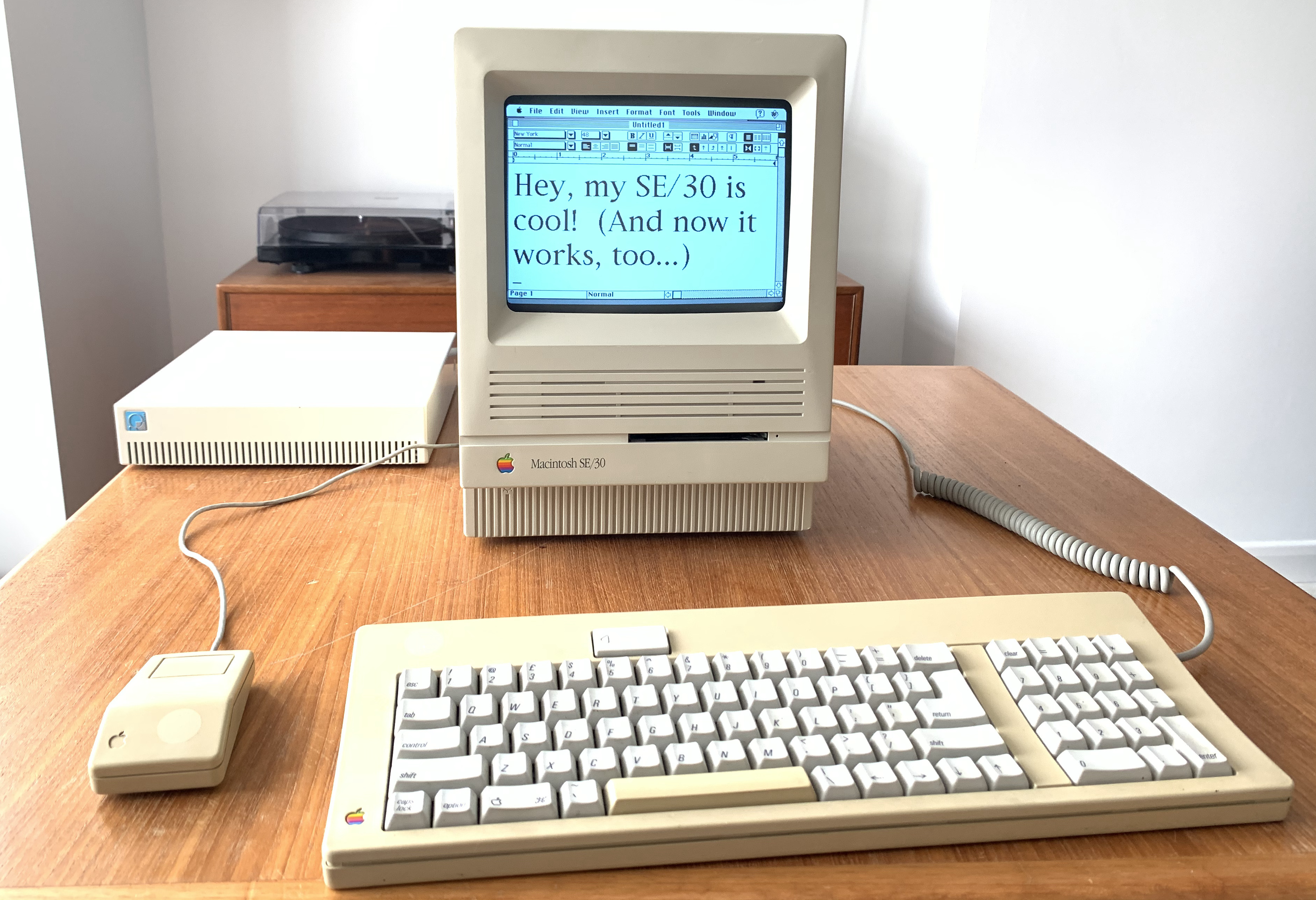
Have a look at the images on this page and consider why you would not use an SE/30 in the same way you use an iPad:
working_mac.jpg


(I am guessing that menu bar on the SE/30 is pretty close to the same height as it is on my Studio Display.)
 
Last edited:
  • Like
  • Wow
Reactions: Lioness~ and EugW
Register on MacRumors! This sidebar will go away, and you'll see fewer ads.