Become a MacRumors Supporter for $50/year with no ads, ability to filter front page stories, and private forums.
As you now understand, I've been trying to determine how the MDM designation survives a wipe. I'm afriad you've given two different answers that are logically inconsistent.

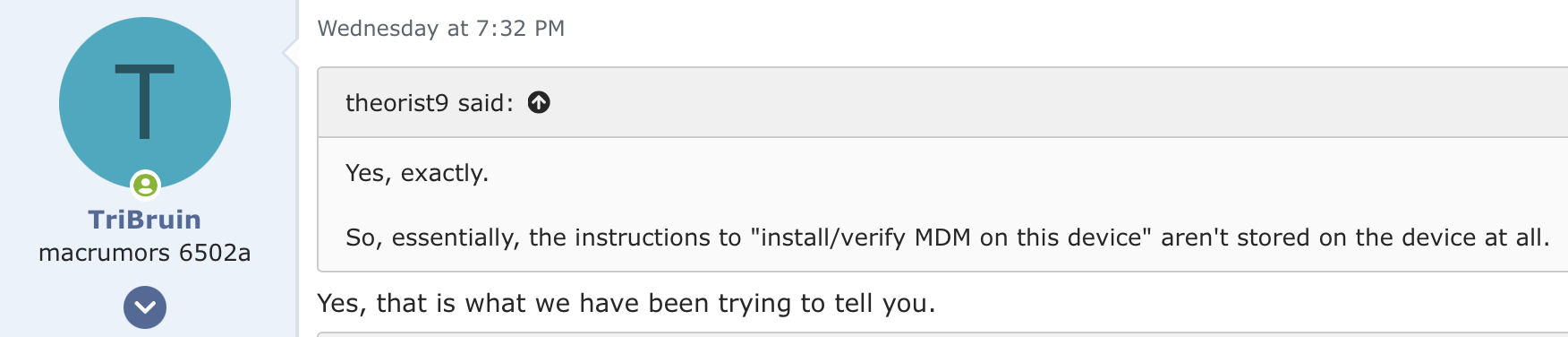
This one says the MDM designation is not stored on the computer at all:

1774814462434.png


And this one says it is, at least on all devices with current or recent OS's:
Second, a few O/S versions ago, Apple added a security feature. Once a computer has been enrolled in to an MDM the first time, a special setting is saved in the a non-volitale portion of the system board that survives between o/s wipes.
 
As you now understand, I've been trying to determine how the MDM designation survives a wipe. I'm afriad you've given two different answers that are logically inconsistent.

This one says the MDM designation is not stored on the computer at all:

View attachment 2617981

And this one says it is, at least on all devices with current or recent OS's:

Nothing I have said contradicts.

Let me make it simple.

1) MDM software DOES not survive a wipe. PERIOD - END OF DICUSSION.

2) When a Mac first connects to the internet, during setup, it immediately checks in with Apple server to determine if belongs to and organization and if it is assigned to an MDM. If it does, the Apple servers send back the URL of the MDM that the computer should contact to enroll. This is when the MDM software installed.

3) IF the computer was ever enrolled in an MDM (using Automated Device Enrollment), a small setting is set on the system board that, if the computer is wipe, the user can NOT setup the computer without connecting to the internet. That does not mean the computer will be enrolled in an MDM during setup, if the organization has released the computer from Apple Business Manager, the computer will continue through setup without enrollment. (The setting is NOT MDM, it is just a bit that tells the O/S that it must connect to the internet first).
 
Nothing I have said contradicts.

Let me make it simple.

1) MDM software DOES not survive a wipe. PERIOD - END OF DICUSSION.

2) When a Mac first connects to the internet, during setup, it immediately checks in with Apple server to determine if belongs to and organization and if it is assigned to an MDM. If it does, the Apple servers send back the URL of the MDM that the computer should contact to enroll. This is when the MDM software installed.

3) IF the computer was ever enrolled in an MDM (using Automated Device Enrollment), a small setting is set on the system board that, if the computer is wipe, the user can NOT setup the computer without connecting to the internet. That does not mean the computer will be enrolled in an MDM during setup, if the organization has released the computer from Apple Business Manager, the computer will continue through setup without enrollment. (The setting is NOT MDM, it is just a bit that tells the O/S that it must connect to the internet first).
And let me make it simple in turn:

1) The essence of my question is why people can't bypass an active MDM by wiping the computer. I.e., why the MDM designation survives a wipe. For the purposes of my question, it doesn't matter if the software is wiped if the MDM designation persists. Your statement in #1 emphasizing the software indicates you still don't understand my question.

And the fact that you put it in ALL-CAPS is tantamout to blaming this on me, which I find inaccurate and unfair.

This poster does understand my question:
I think you are trying to understand how the MDM configs get pushed to a device after a full wipe.

2) You've taken BOTH of these positions:
a) The info identifying the device as under an active MDM is not stored on the device at all. It's instead stored on Apple's servers.
b) "Once a computer has been enrolled in to an MDM the first time, a special setting is saved in the a non-volitale portion of the system board that survives between o/s wipes."

Position (a) says the info identifying the device as under an active MDM survives a wipe because it's stored outside the computer, not on it. Position (b) says the info identifying the device as under an active MDM survives a wipe because it's stored on a special place on the computer.

Those two positions are logically contradictory, regardless of whether you recognize this or not.

The info identifying the device as under an active MDM can't be both be not stored on the device at all, and stored on the device. Both cannot be true.

It could be the case that this info is both on stored on the device in a place that survives wipes, and is also on Apple's servers. But the former is different from the first postion you took, which is that this info isn't stored on the device at all.

 
Last edited:
Very cool idea! Are you listening, Apple?
I am also running the IT-department at our household, while only at around 20 devices, the need for something like this is real.
Your feedback gave me the push to email Tim Cook. Never done that before. Doubt to hear back but even if he could forward it to the proper people, that would be awesome.

Also told him that people who are Apple One Premier members should not receive ads in Apple Maps. Why treat your loyal services subscribers like that?
 
  • Love
Reactions: flottenheimer
And let me make it simple in turn:

1) The essence of my question is why people can't bypass an active MDM by wiping the computer. I.e., why the MDM designation survives a wipe. For the purposes of my question, it doesn't matter if the software is wiped if the MDM designation persists. Your statement in #1 emphasizing the software indicates you still don't understand my question.

And the fact that you put it in ALL-CAPS is tantamout to blaming this on me, which I find inaccurate and unfair.

This poster does understand my question:


2) You've taken BOTH of these positions:
a) The info identifying the device as under an active MDM is not stored on the device at all. It's instead stored on Apple's servers.
b) "Once a computer has been enrolled in to an MDM the first time, a special setting is saved in the a non-volitale portion of the system board that survives between o/s wipes."

Position (a) says the info identifying the device as under an active MDM survives a wipe because it's stored outside the computer, not on it. Position (b) says the info identifying the device as under an active MDM survives a wipe because it's stored on a special place on the computer.

Those two positions are logically contradictory, regardless of whether you recognize this or not.

The info identifying the device as under an active MDM can't be both be not stored on the device at all, and stored on the device. Both cannot be true.

It could be the case that this info is both on stored on the device in a place that survives wipes, and is also on Apple's servers. But the former is different from the first postion you took, which is that this info isn't stored on the device at all.
Apple has something called DEP - Device enrollment program. When a device is enrolled in DEP, it's kind of like FindMy. When the device gets wiped and the OS reinstalled, it has to be re-activated with Apple. When it reactivates, the device is then given the MDM server information and is required to use the one provided.

MDM on its own without DEP can be removed from a device that isn't in DEP. MDM is just profiles installed on the device. If it's not enrolled in DEP, the MDM profiles need to be installed manually.
 
Apple has something called DEP - Device enrollment program. When a device is enrolled in DEP, it's kind of like FindMy. When the device gets wiped and the OS reinstalled, it has to be re-activated with Apple. When it reactivates, the device is then given the MDM server information and is required to use the one provided.

MDM on its own without DEP can be removed from a device that isn't in DEP. MDM is just profiles installed on the device. If it's not enrolled in DEP, the MDM profiles need to be installed manually.

When I wrote "under an active MDM", that's what I meant—that the device was registered with Apple as being under a current MDM. I just didn't know that the registration program's name is "Device Enrollment Program".
 
Last edited:
Register on MacRumors! This sidebar will go away, and you'll see fewer ads.