My test results
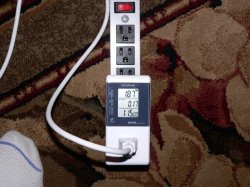
Ok, I was able to reproduce the temperature increase. And quantify what's happening with HW monitor, an IR thermometer on the intake/exhaust/HSF, and with an AC energy meter to measure the AC draw of the Mac Pro.
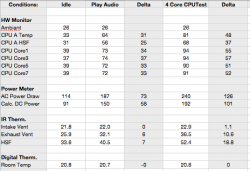
Results: in the table below.
Table Clarifications:
Idle: is powering up the Mac Pro with no USB attachments (including my USB audio interface or the 24" LED ACD USB connector) and reaching steady state after 30 min of unattended operation.
Play Audio: As above but with iTunes playing music for 30+ min.
Delta: The difference between idle and play audio.
4 Core CPUTest: Stress test using
CPUTest with Huge test type, 10 repetitions, and 4 instances (to load 4 physical cores).
Delta: The difference between idle and the CPUTest stress test
HW Monitor: The temps reported by Hardware Monitor.
Power Meter: The AC power draw of the Mac Pro as shown by my power meter. Calculated DC draw assuming 80% efficiency is also noted.
IR Thermometer: Black and Decker IR Thermometer which is accurate to +/- 3 deg F. Targets were the intake front cheese grate, rear exhaust vent, and the side of the HSF. Pics illustrate how these measurements were made.
Digital Thermometer: A digital thermometer placed near the Mac Pro throughout the testing to ensure room temps were stable.
Observations:
- Just plugging in my USB audio I/F causes the temp increase. Since this is always on, I was suffering from this temp increase all the time. Disconnecting it allowed my to reproduce the effects others were seeing.
- The temp increase when using my audio I/F or playing music in iTunes resulted in an average core temp increase of about 33 deg. C.
- The temp increase when running a full 4 core stress test was about 55 deg. C.
- The delta increase in temps for the audio test is about 60% of the stress test. The delta increase in AC power draw is 58%.
- The temp increase is real as the IR thermometer indicates a clear increase in exhaust and HSF temperatures.
- Under the stress test, my core temperatures reached a maximum of around 95-deg C before the fans ramped up, and even then, BOOSTA increased 150 RPM from 850 to 1000 and both Intake and Exhaust fan speeds increased 100 RPM from 600 to 700. Core temps then stabilized at around 94-deg. C.!
😱😡 While I have no idea how accurate these temps are, I'm shocked the cooling system is so slow to ramp up.
Conclusions:
While I know I've been slow in coming to this conclusion and questioning the validity of the reported temps (which I still think was a good first step), I can definitely throw my support behind the fact that there is some bizarre load being put on the CPU that goes undetected by activity monitor but is equivalent to about 60% of a fully loaded quad core stress test... indicating that audio decoding, or in my case, just connecting my USB audio interface, is equivalent to fully loading approx. two cores.
😱
I thank everyone for their patience with my previous posts as I know it must have been difficult... thinking "Who does this noob think he is!?"
😉
I think there are three significant problems here:
1. Audio playback or even connecting a USB I/F causes this extraordinary load on the CPU
2. This load is somehow not being reported by activity monitor
3. The CPU cooling is very slow to ramp up
I'm not sure where to go next. The fact that simply connecting my USB audio interface causes this kind of load on the processor indicates there must be something seriously wrong with the CoreAudio subsystem on the Nehalem Xeon's.
I'll definitely log a call with Apple.
The following photos were captured during the audio playback test.