Become a MacRumors Supporter for $50/year with no ads, ability to filter front page stories, and private forums.
I don't know..... I can not see how a hardware issue can change a software code (the code written to display the switch).
If it were a hardware issue then it would not make any difference selecting the switch to 'ON'.
To me this is a software issue.
 
Are O2 sending you a new sealed phone? If not I wouldn't let them give you a reconditioned unit.

A couple of times Apple tried to give me a reconditioned phone and I wouldn't agree. Now I just go through my insurance that I get free with my bank, I don't have to pay anything and it is a new sealed phone within 24 hours.

I'm on my 4th iP7 which thankfully is absolutely spot on.
 
I did ask and he said it would be new. That's all that I can say until the day arrives.

EDIT: As he said there would be a 3 week delay due to shortages, I am hoping it will be a new one.
 
Last edited:
Not sure where is the best place to post this, but here goes,

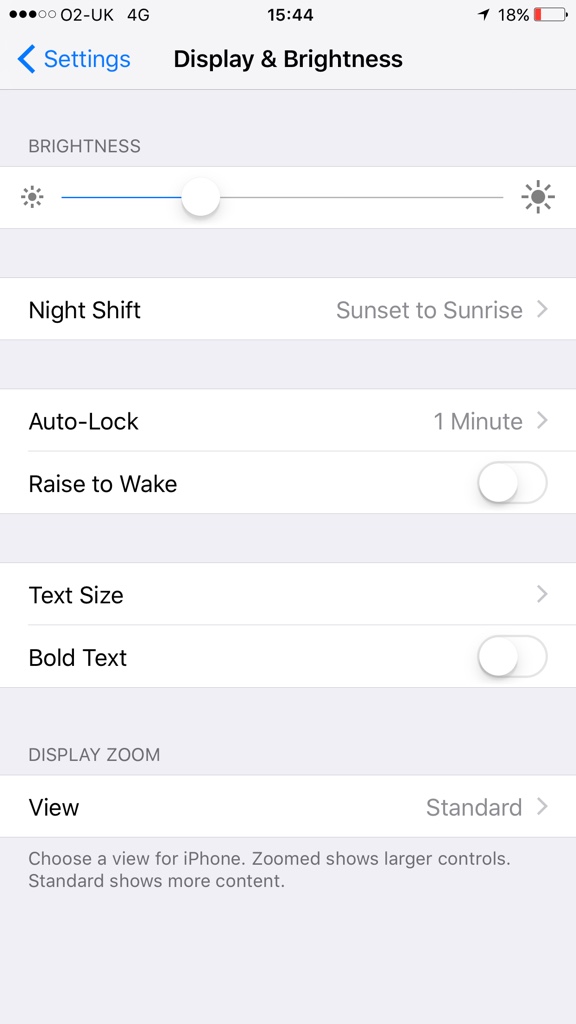
I have a new iPhone 7 Plus - great phone and am well pleased with it, but I noticed that the Auto Brightness toggle option is missing in Settings> Display & Brightness.

I can manually adjust the brightness setting, but it does not appear to auto adjust. I am running iOS 10.1.1 (build 14B150)

I have tried a hard reset, but it's still missing.

Any ideas why it's not there and how I can get it back please?

Thanks
Go to settings/General/Accessibility/Display Accommodations/then toggle off or on Auto Brightness.
[doublepost=1535904710][/doublepost]
Not sure where is the best place to post this, but here goes,

I have a new iPhone 7 Plus - great phone and am well pleased with it, but I noticed that the Auto Brightness toggle option is missing in Settings> Display & Brightness.

I can manually adjust the brightness setting, but it does not appear to auto adjust. I am running iOS 10.1.1 (build 14B150)

I have tried a hard reset, but it's still missing.

Any ideas why it's not there and how I can get it back please?

Thanks
[doublepost=1535904766][/doublepost]
To be quite honest, I don't know whether it has ever been there. I have only had the 7 Plus for a week.

I have tried Reset-All-Setting, but that made no difference.

I can manually adjust the screen brightness. Attached is a screen shot of the settings page.

fc959c1403b76dfce0491d8027a4fc1e.png


Everything else is working fine.
[doublepost=1535904803][/doublepost]Go to settings/General/Accessibility/Display Accommodations/then toggle off or on Auto Brightness.
[doublepost=1535904899][/doublepost]
To be quite honest, I don't know whether it has ever been there. I have only had the 7 Plus for a week.

I have tried Reset-All-Setting, but that made no difference.

I can manually adjust the screen brightness. Attached is a screen shot of the settings page.

fc959c1403b76dfce0491d8027a4fc1e.png


Everything else is working fine.
 
Not sure where is the best place to post this, but here goes,

I have a new iPhone 7 Plus - great phone and am well pleased with it, but I noticed that the Auto Brightness toggle option is missing in Settings> Display & Brightness.

I can manually adjust the brightness setting, but it does not appear to auto adjust. I am running iOS 10.1.1 (build 14B150)

I have tried a hard reset, but it's still missing.

Any ideas why it's not there and how I can get it back please?

Thanks
Settings > General > Accessibility > Display Accommodations > Auto-Brightness
It took forever to find it on my X.
 
Go to settings/General/Accessibility/Display Accommodations/then toggle off or on Auto Brightness.
[doublepost=1535904710][/doublepost]
[doublepost=1535904766][/doublepost]
[doublepost=1535904803][/doublepost]Go to settings/General/Accessibility/Display Accommodations/then toggle off or on Auto Brightness.
[doublepost=1535904899][/doublepost]

go too General accessibiliy and the display accommodation then you see auto brightness

Settings > General > Accessibility > Display Accommodations > Auto-Brightness
It took forever to find it on my X.

As per post #24, this was resolved almost 2 YEARS AGO now.
 
Register on MacRumors! This sidebar will go away, and you'll see fewer ads.